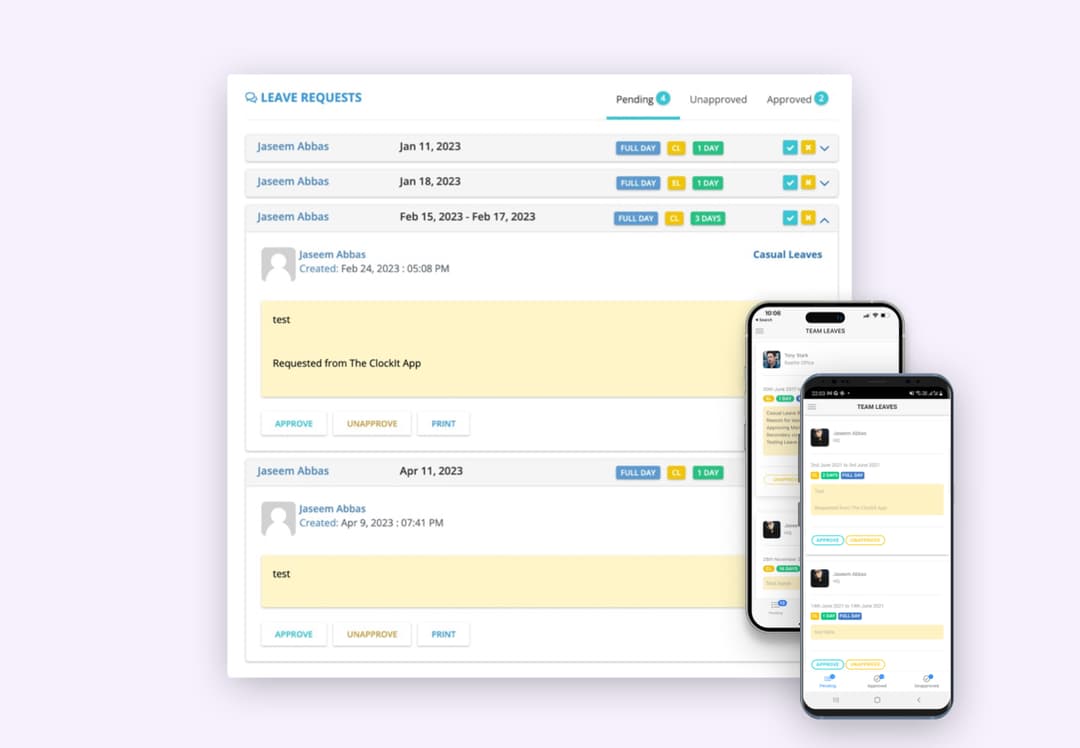

Easy Vacation TrackingEffortlessVacation & PTO Tracking

Request, approve, and track time off without spreadsheets. Real-time balances, automated accruals, and clear calendars keep everyone in sync.

  • Automated PTO Accruals
  • One-Click Approvals
  • Notifications & Calendar
  • • Setup within 5 minutes
  • • No credit card required
  • • 14-day full trial

23,000+customers since 2015

Happy customerHappy customerHappy customerHappy customerHappy customer
4.7/ 5

822 people signed up this week

Why Businesses Love ClockIt Time Off Tracking

Say Goodbye to Time Off Tracking Headaches

HR teams waste hours manually tracking PTO and resolving conflicts. ClockIt automates the entire process, giving employees and managers a seamless self-service experience.

Automated PTO Accruals

Employees see their real-time leave balances, no need for manual updates.

Approval Workflows

Managers can approve or reject leave requests instantly, keeping schedules organized.

Custom Leave Policies

Configure rules for sick leave, unpaid leave, holidays, and more to fit your company’s policies.

Notificaitons and Calendar

ClockIt sends real-time notifications to employees and managers on time off requests.

Flexible Leave Management

Multiple PTO Types & Accrual Rules

Create unlimited PTO categories like vacation, sick leave, personal days, or parental leave. Each category can have its own accrual rules, approval workflows, and reporting. Set different accrual rates based on tenure, seniority, or department. ClockIt automatically calculates balances, so employees and managers always know exactly how much time off is available.

PTO Type Management
Multiple Leave Types
Configure unlimited PTO types with different rules, colors, and requirements. Track vacation, sick days, personal leave, and custom categories separately.
Custom Accrual Rules
Set different accrual rates, caps, and carryover rules for each PTO type. Implement complex policies like tenure-based accruals or annual resets automatically.
Group-Based Policies
Assign different PTO policies to teams, departments, or employment types. New employees automatically inherit the right policies based on their role and location.

Flexible PTO Accruals

Choose how time off accrues for your team

ClockIt adapts to your company's accrual policies with multiple options. Set up automatic accruals based on hours worked, or choose regular intervals like weekly, bi-weekly, monthly, or annual. For simpler needs, you can skip automation and manually manage balances. The system automatically calculates and updates PTO balances according to your rules.

Manual Balance Management
Enter time off balances manually for complete control. Perfect for companies with simple policies or unique accrual needs.
Hours-Based Accruals
Automatically accrue PTO based on hours worked. Set different rates for regular, overtime, or specific job codes.
Time-Based Accruals
Configure accruals on a weekly, bi-weekly, monthly, or annual basis. Perfect for salaried employees with regular accrual schedules.

Tenure-Based PTO Management

Reward Loyalty With Automatic Tenure-Based Accruals

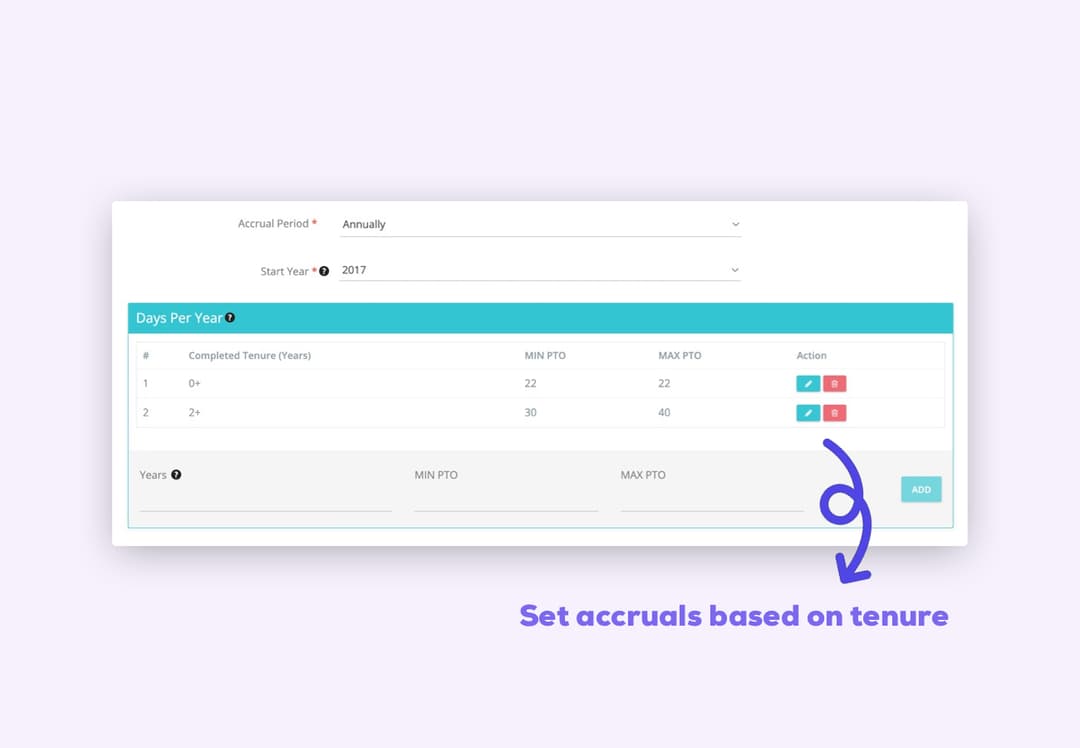
Automatically increase PTO benefits as employees grow with your company. ClockIt's smart tenure tracking automatically adjusts accrual rates based on years of service without manual intervention. Configure tiered PTO systems where employees gain additional days off after 1, 3, 5, or any number of years. The system handles anniversary dates and rate adjustments automatically, ensuring loyal employees receive their earned benefits precisely when they qualify.

Tenure-Based PTO Accruals
Milestone Recognition
Set up automatic accrual increases at key tenure milestones. Employees automatically receive increased benefits when they reach 1, 2, 5, or any custom year thresholds you define.
Anniversary Tracking
ClockIt monitors hire dates and automatically adjusts accrual rates on work anniversaries. No manual updates needed when an employee qualifies for the next tier of benefits.
Customizable Tiers
Create unlimited tenure tiers with custom accrual rates, caps, and rules for each milestone. Different departments or roles can have their own tenure-based accrual schedules.

Flexible Vacation Tracking Rollover Policies

Customize Year-End Time Off Carryover Options

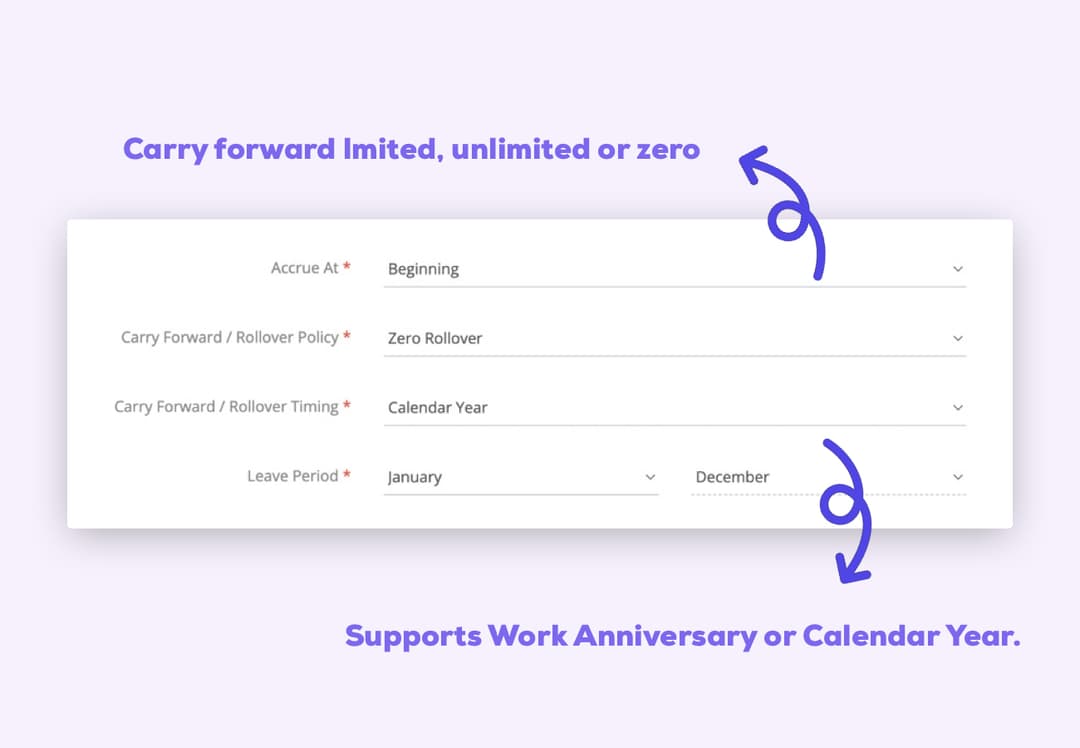
Set the perfect vacation tracking rollover policy with ClockIt's flexible options. Choose between unlimited carryover, capped rollover limits, or "use it or lose it" policies that encourage employees to take their time off. ClockIt automatically handles year-end processing, calculating vacation carryover balances and resetting time off accruals according to your specific requirements. Define different rollover rules for each time off category to create a vacation tracking system that perfectly matches your company culture.

Vacation Tracking Rollover Settings
Capped Time Off Rollover
Allow employees to carry forward a limited amount of vacation time into the next year. Set caps as days, hours, or percentages of annual allowance. Perfect for balancing flexibility with encouraging regular time off usage in your vacation tracking system.
Unlimited Vacation Carryover
Enable employees to roll over all unused time off with no limits. Ideal for organizations with seasonal workloads or projects that might require vacation tracking flexibility across calendar years.
Use It Or Lose It
Implement a zero-rollover policy where unused vacation time expires at year-end. Encourages work-life balance by motivating employees to use their time off within each calendar year through transparent vacation tracking.

Shared Vacation Calendar

Full Visibility of Team Availability

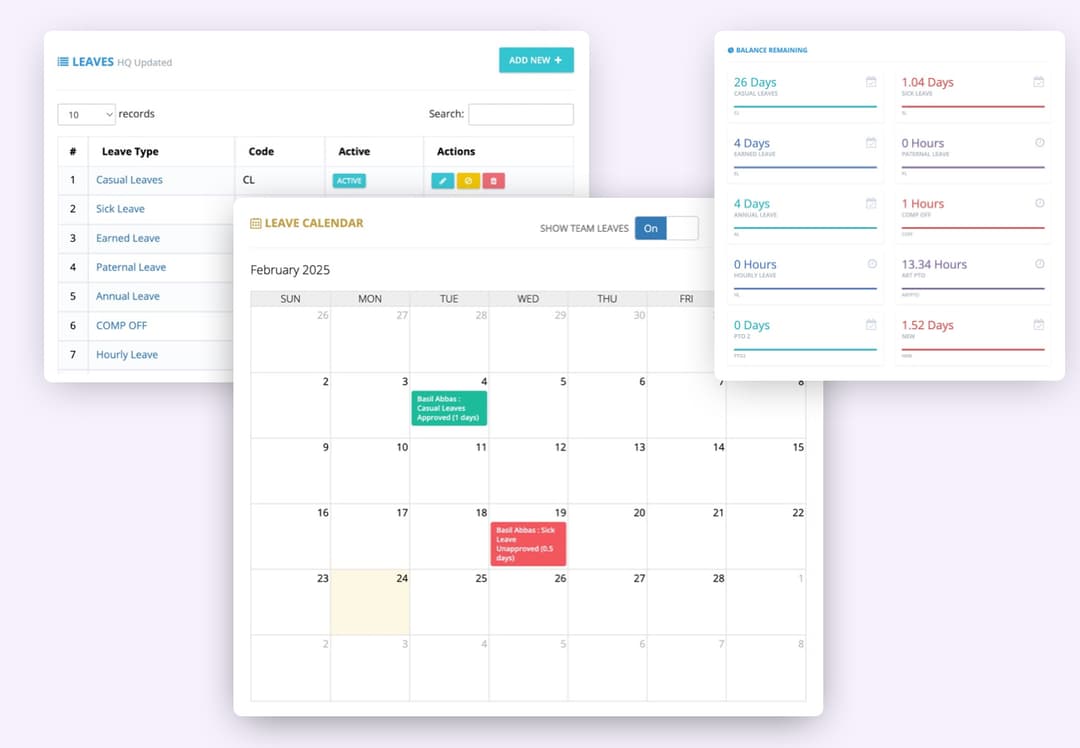
ClockIt's integrated vacation calendar gives teams complete visibility into who's away and when. Managers can see upcoming absences at both team and company-wide levels, making it easy to plan projects, coordinate coverage, and avoid scheduling conflicts before they happen.

Team Vacation Overview
See at a glance who's out of office on any given day with color-coded calendars that display different leave types like vacation, sick time, or personal days.
Company-Wide Calendar
Access organization-wide visibility with filters by department, location, or team. Perfect for management planning and ensuring critical roles always have coverage.
Calendar Integrations
Automatically sync approved time off with Outlook, Google Calendar, or iCal so team members can see vacation schedules in the tools they already use daily.

Custom PTO Application Forms

Standardize Your Time Off Request Process

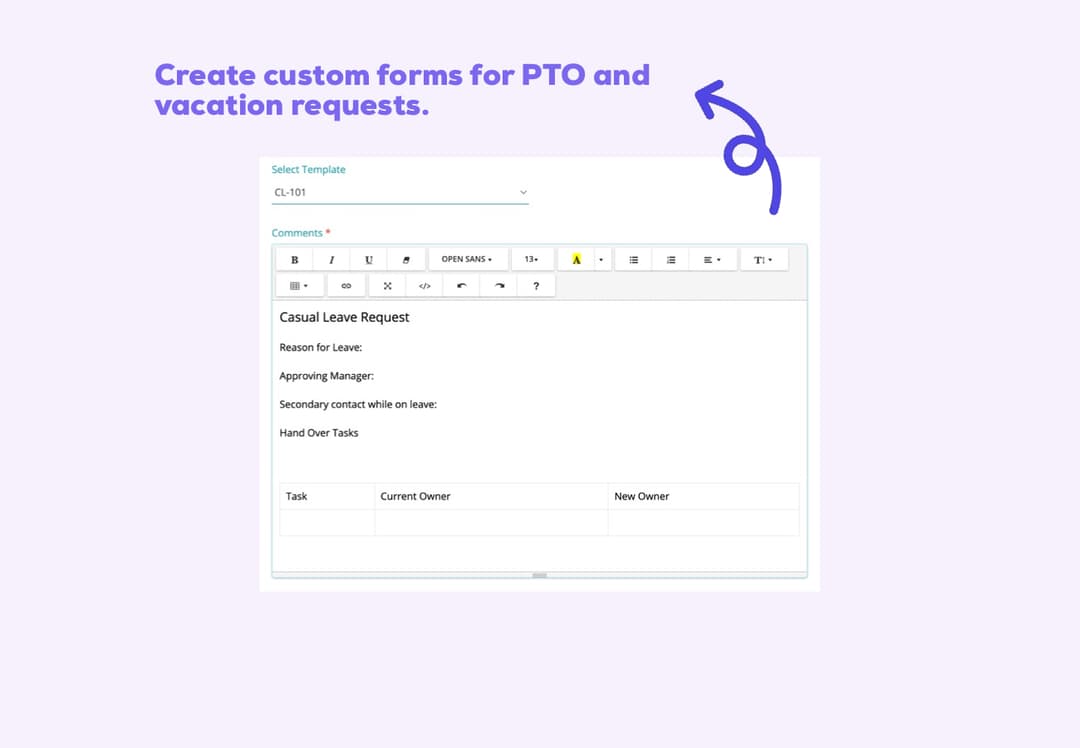
ClockIt's vacation tracking lets administrators create custom forms that employees complete when requesting time off. Build standardized templates with required fields like reason for absence, contact while away, or handover notes. Collect consistent information across all PTO requests, making approval decisions faster and ensuring nothing important is overlooked. Custom forms eliminate back-and-forth communications and provide managers with all the details they need in one place.

Custom PTO Request Forms
Customizable Form Fields
Design PTO request forms with exactly the fields you need - from standard details like dates and type to custom fields like project handover notes, backup contact information, or location during leave.
Consistent Information Collection
Ensure every employee provides the same essential information when requesting time off. No more incomplete requests or missing details that delay approvals or cause scheduling conflicts.
Different Forms By Leave Type
Create unique request forms for different leave types. Vacation requests might require travel details, while sick leave forms could include return-to-work information - all automatically presented based on the selected time off category.

Seamless PTO Request Experience

Request & Approve Time Off Anywhere

ClockIt makes time off requests effortless for your entire team. Employees can submit PTO requests in seconds through our mobile app or web portal. The system instantly notifies managers of new requests, showing available balances and team coverage. When requests are approved or denied, automatic notifications keep everyone informed. With ClockIt, your team spends less time on paperwork and more time planning their well-deserved breaks.

Mobile Time Off Requests
Mobile & Web Access
Request and approve time off from anywhere using ClockIt's mobile apps or web portal. Employees can check balances, select dates, and submit requests with just a few taps while on the go.
Real-Time Notifications
Receive instant notifications when time off is requested, approved, denied, or canceled. Custom alerts keep managers and employees informed at every step, eliminating confusion about request status.
One-Click Email Approvals
Managers can approve or deny requests directly from notification emails without logging in. Just click "Approve" or "Deny" buttons within the email to process requests instantly with minimal disruption.

As a small business owner, I was skeptical about implementing a new time tracking system. But this mobile app has exceeded all my expectations. It's user-friendly, reliable, and the reporting features have given me invaluable insights into our productivity.

Frequently asked questions

Have a different question and can't find the answer you're looking for? Reach out to our support team by sending us an email and we'll get back to you as soon as we can.

  • ClockIt supports multiple accrual methods: by hours worked, at fixed intervals (weekly, bi‑weekly, monthly, yearly), or manual balance management. You can set accrual rates, caps, carryover rules, and anniversary‑based tiers per PTO type.

  • Yes. Create groups (e.g., departments, locations, full‑time/part‑time) and assign unique policies to each. New users automatically inherit the correct policy based on their group.

  • Absolutely. Define unlimited leave categories with their own colors, approval workflows, accrual rules, and reporting. Track balances independently for each leave type.

  • Configure carryover per leave type: no carryover, capped carryover (by hours/days), or unlimited. ClockIt automatically processes year‑end resets and carryover based on your settings.

  • Yes. Employees can request full days or partial days in hours/minutes. You can enforce minimum increments (e.g., 30 minutes) and rounding rules per leave type.

  • Requests notify assigned approvers instantly. Approvers see balances, conflicts, and team coverage before approving or denying. One‑click approvals via email and in‑app notifications are supported.

  • Yes. Approved PTO can be published to external calendars so teams see who’s out. Employees can subscribe to their own feed, and managers can view team/company calendars.

  • They do. Balances update automatically with accruals, requests, approvals, cancellations, and policy changes. Visibility can be controlled via role‑based permissions.

  • Yes. Build custom request forms with required fields and file uploads for specific leave types. Approvers receive all details and attachments in one place.

  • Yes. Configure milestones (e.g., 1, 3, 5 years) that automatically adjust accrual rates on the employee’s work anniversary—no manual updates needed.

  • Admins can optionally allow negative balances (advance PTO) with configurable limits per policy. All changes are tracked with an audit log for compliance.

  • Run detailed reports by person, team, location, or leave type. Export to CSV/Excel or connect with your payroll process so approved time off flows cleanly into payroll calculations.

  • Yes, managers can define blackout dates (e.g., during busy seasons) where time off requests are automatically restricted or require special approval.