Employee Time Tracking to Payroll in just 5 minutes!
Stop wasting hours on payroll every week. ClockIt automates employee scheduling, time tracking, and PTO management—turning hours of work into just 5 minutes with AI-powered automation.
- Smart Timesheets
- Shift Scheduling
- Time Off & PTO
- Location Tracking
- Real-time Payroll
- • Your team clocking in within 15 minutes
- • No credit card required
- • Free forever for unlimited users, or try Pro free for 14 days


Up and running in 5 minutes
No credit card required. No IT team needed.
Create Your Account
Sign up free and add your team in minutes. Import from CSV or invite by email.
Clock In & Clock Out
Employees clock in via mobile app, web, kiosk, Slack, Teams, or biometric device. All synced automatically.
Run Payroll Reports
Generate timesheet and payroll reports in one click. Export to CSV, Excel, or your payroll provider.
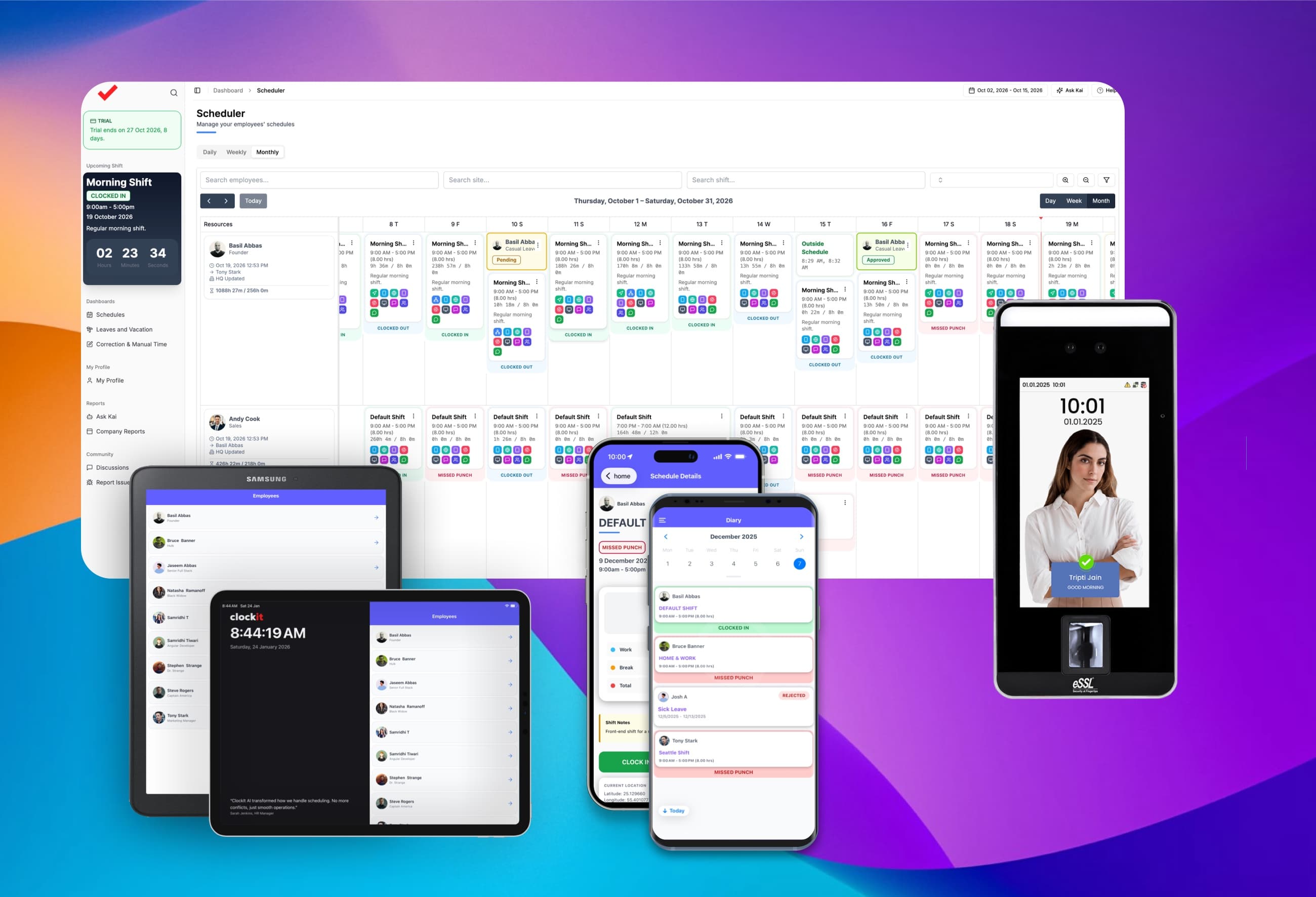
Drag-and-drop employee scheduling with live clock-in status
Build the week by dragging shifts into place, then watch each one update in real time as employees clock in and out. Approved and pending time off sits on the same calendar, so you schedule around who is actually available.
Drag-and-drop shifts
Move and reassign shifts by dragging them across the calendar.
Live clock-in status
Every shift shows In, Out or Missed Punch as it happens.
PTO on the same schedule
Approved and pending leave appear right alongside shifts.
Month, week, day & list
Plan the whole team at a glance or zoom into a single day.
Clock in and out six ways, all synced to one timesheet
Give every team the clock-in that fits how they work: a browser, their own phone, a shared tablet, a desktop app, a chat command or a biometric terminal. Every punch lands on the same timesheet in real time, ready for payroll.
Web
Clock in from any browser: Chrome, Safari, Firefox or Edge.
Mobile for iOS & Android
Employees clock in from their own phone, wherever they work.
Kiosk for iOS & Android
Turn an iPad or Android tablet into a shared time clock.
Desktop apps
Native apps for Windows, Mac and Linux.
Chat apps
Clock in with a quick command in Slack, Microsoft Teams or Google Chat.
Biometric terminals
Face, fingerprint, RFID card or PIN on ZKTeco, eSSL and NGTeco devices.
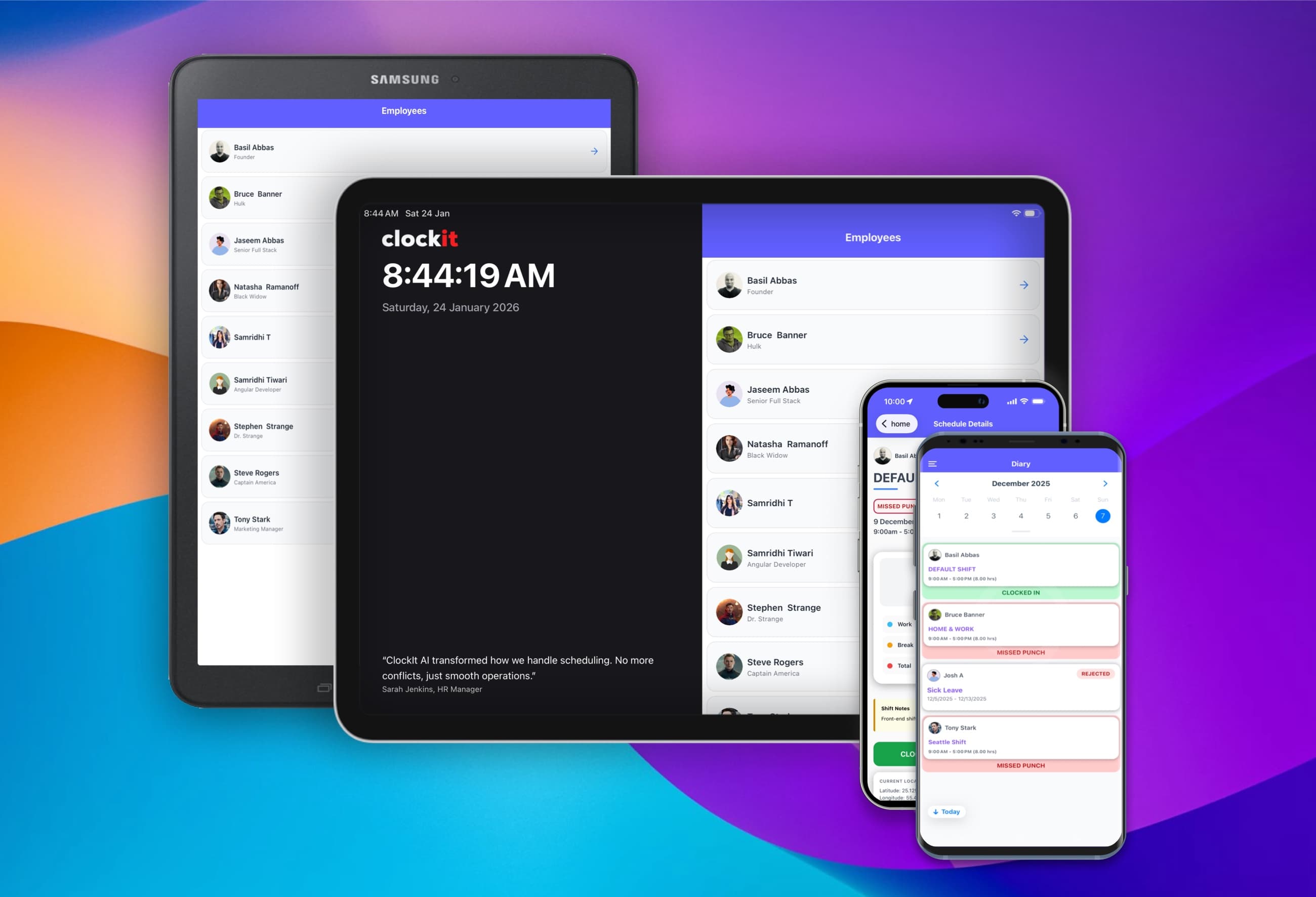
A time clock app for every phone and shared tablet
iOS and Android apps for employees on the move, and a kiosk app that turns any iPad or Android tablet into a shared time clock. Clock in, switch projects and request time off from the same app.
Time tracking & breaks
Clock in, out and on break from a phone or shared tablet.
Location capture & geofencing
Record the GPS location of every punch and limit clock-ins to your job sites.
PTO requests
Request time off in the app; managers approve on the go.
Project tracking
Choose the project or job being worked on at clock-in.
Kiosk PIN, QR & selfie
Shared-tablet clock-ins with PIN, QR code or selfie verification.
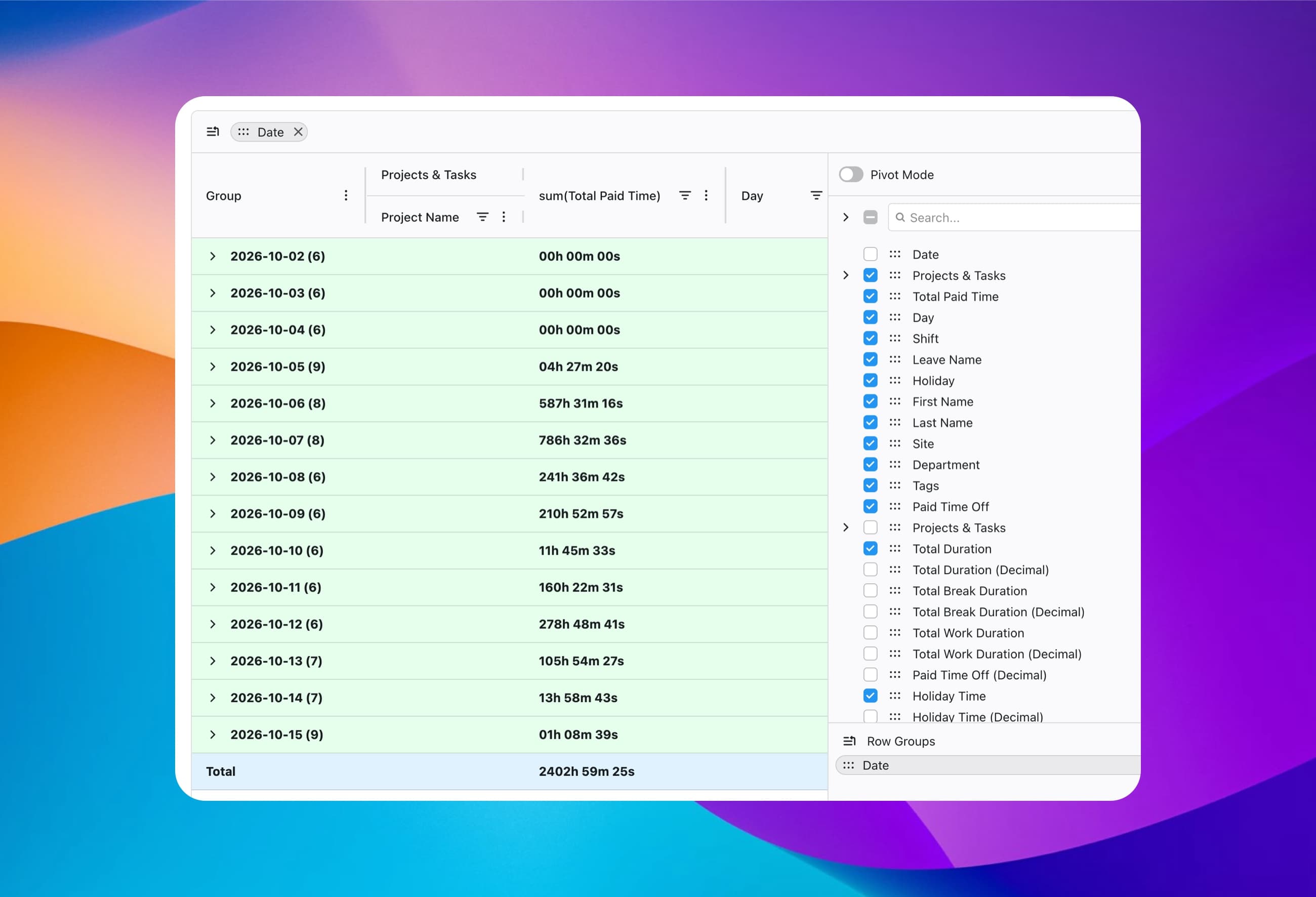
All-in-one reports, exported to CSV, Excel or PDF
Hours, overtime, breaks, PTO, holidays and project time in a single report — no stitching spreadsheets together. Group, filter and pivot it your way, then export a payroll-ready file in one click.
One report for everything
Worked hours, PTO, holidays and projects side by side.
CSV, Excel & PDF
Payroll-ready files to import into any payroll provider.
Pay periods built in
Weekly, biweekly, semi-monthly or monthly pay schedules.
Saved, shared views
Save a report layout once and share it with other admins.
Employee time tracking with projects and job codes
Every clock-in can carry the project, task or job code it belongs to — from the app, the browser, or right at the biometric terminal. Hours land against the right job, ready for costing, billing and payroll.
Clock in to a project
Employees pick the project and task as they clock in on web, mobile or kiosk.
Job codes at the terminal
Key a job code on ZKTeco, eSSL or NGTeco devices as part of the punch.
Cost and billable rates
Set rates per team member and see billable vs non-billable hours add up.
Project budgets
Track the hours spent on each project against its budget.

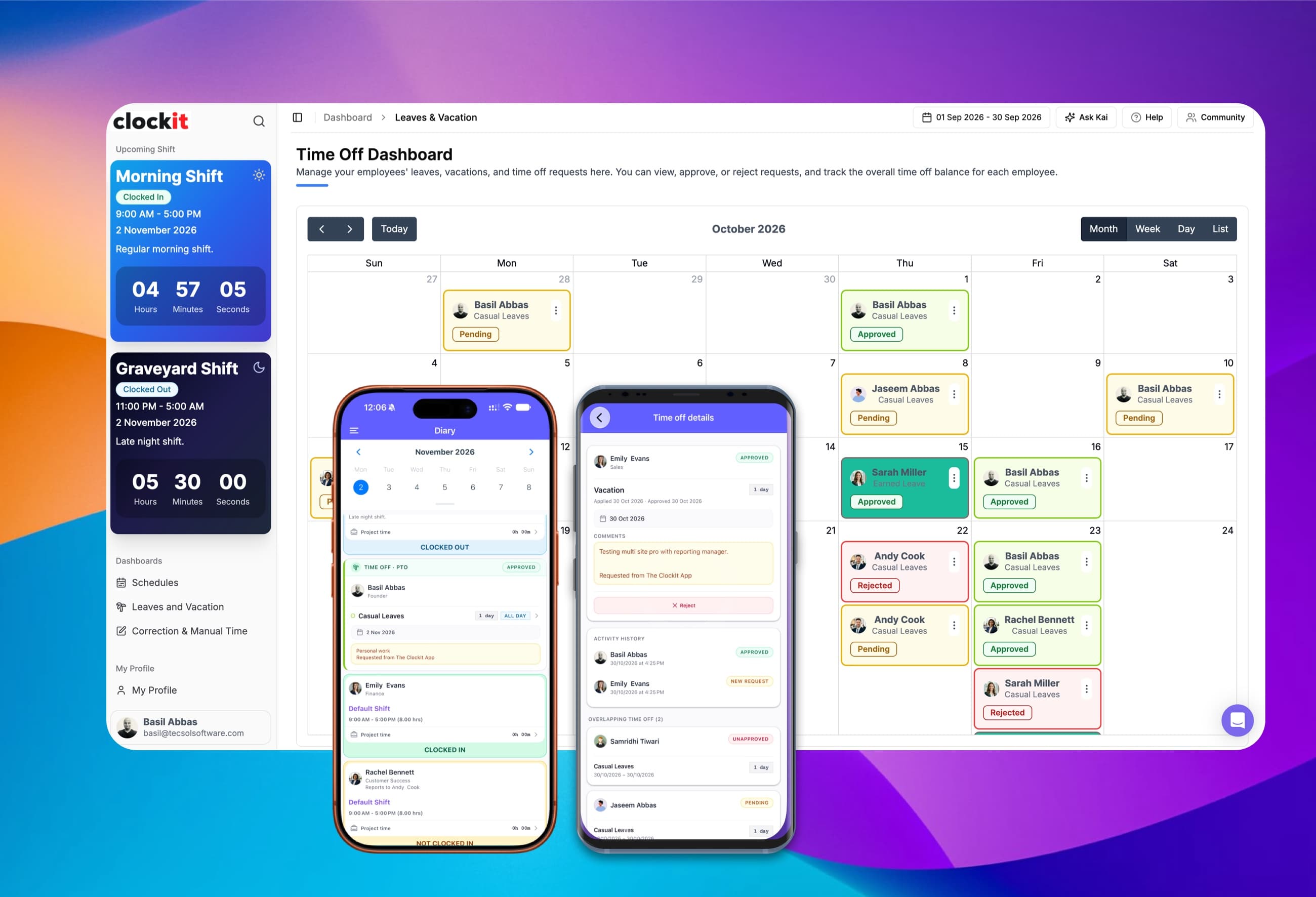
PTO and vacation tracking that keeps everyone in the loop
Requests, approvals and balances in one place, with no spreadsheet to maintain. Everyone is notified automatically at each step, and balances build up on the accrual schedule you choose for each leave type.
Notified when someone applies
Managers are alerted automatically when a new request comes in.
Notified on approve or reject
Employees hear the decision as soon as it's made.
Hourly or daily accruals
Accrue each leave type in hours or in days.
Weekly to annual schedules
Accrue weekly, every 2 weeks, monthly, quarterly or annually.
Based on hours worked
Balances grow with the hours each employee actually works.
Tenure-based accruals
Employees earn more time off the longer they stay.
Email and push notifications that catch problems early
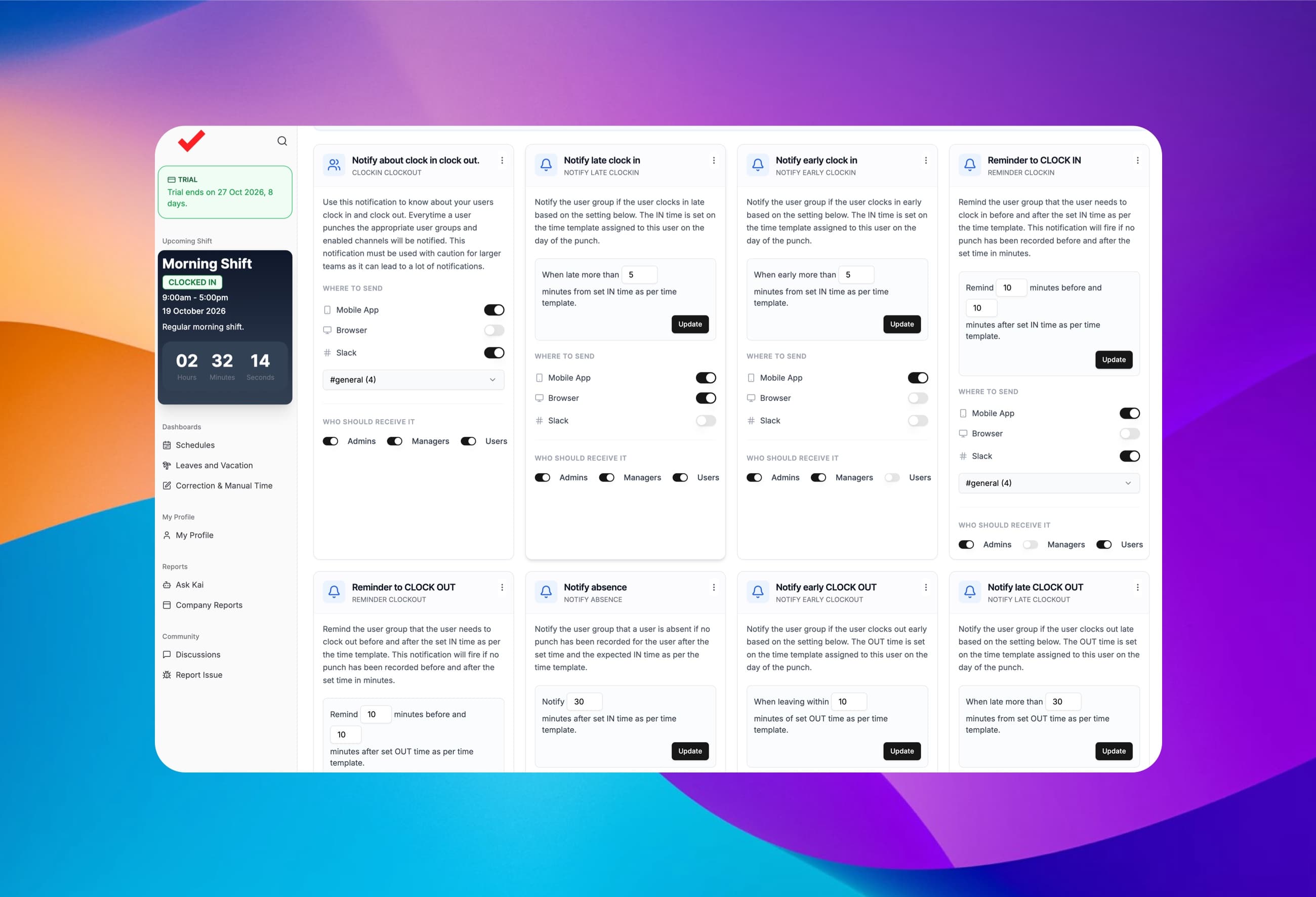
35+ notification types for missed punches, late arrivals, overtime and approvals — sent by email, mobile push, browser, Slack or Microsoft Teams to exactly the people who need them.
Missed punch alerts
Know when a shift has started and nobody has clocked in.
Overtime warnings
Set thresholds and get warned before hours tip into overtime.
Approve from the email
Approve or reject time off requests straight from the inbox.
Role-based delivery
Choose who hears about what — admins, managers or employees.
Meet Kai, your helpful AI HR assistant
Ask Kai anything about your team in plain English: who's working, who's off, who's about to hit overtime. You get the answer, or a ready-to-download report, in seconds. Kai does the digging so you don't have to.
Instant answers
Schedules, missed punches, PTO balances and project hours, in plain English.
Reports on request
Ask for payroll, overtime or PTO reports and download a CSV or PDF.
Catches problems early
Flags missed breaks, duplicate punches and approaching overtime.
Free on every plan
Ask Kai from any page of the ClockIt portal, even on the free plan.
Why ClockIt
Why teams pick ClockIt
Hardware and software, one system
Biometric terminals — face, fingerprint, RFID — and the cloud platform, from one vendor. No bolt-ons, no middleware. Nobody else in the category does both.
Payroll-ready in 5 minutes
Punches become payroll-ready timesheets automatically — overtime, breaks, and rounding rules included.
Pricing without the suite tax
A free plan for unlimited users that stays free, and simple per-seat pricing for the advanced features at a fraction of what payroll suites charge.
Trusted by Businesses Worldwide
Bank-Level Security
256-bit SSL and SOC 2 Type II compliance
GDPR Compliant
GDPR, CCPA, and international data protection
99.9% Uptime SLA
Reliable infrastructure with global CDN
24/7 Support
Chat, email, and phone on premium plans
Awards & Recognition
Award‑Winning Software
Recognized by industry leaders for value, ease of use, and performance.

Best Value
Capterra
2026
Most Recommended
Software Advice
2026
Best Customer Support
Software Advice
2026
Best Ease of Use
Capterra
2026
Front Runner
Software Advice
2026
The Numbers Speak for Themselves
Real results from real businesses. See why teams choose ClockIt.
Average Payroll Time
< 5 min
Save 90% of your time on payroll. From clock-in to payroll-ready exports without spreadsheets.
Platform Uptime
99.9%
Rock-solid reliability with global CDN. Your team can always clock in, anywhere, anytime.
Active Users
23,000+
Join thousands of teams who trust ClockIt for scheduling, time tracking, and payroll.
Shifts Scheduled
1M+
Over a million shifts managed. From restaurants to healthcare, teams plan coverage with confidence.
Time Saved Monthly
40hrs
Average team saves a full work week every month on admin tasks with automation.
Payroll Cost Reduction
15%
Teams reduce labor costs by 15% on average by eliminating buddy punching and time theft.
Join the thousands of teams already saving time and money
Free forever plan
Free for your whole team. No user limit.
Add every employee to ClockIt's free plan, with no per-user cap and no credit card. Upgrade only when you want the advanced features.
Free, for unlimited users
- Mobile, web, kiosk and desktop time clocks
- Shift scheduling
- Real-time attendance tracking
- Basic reports
- Clock in from Slack, Teams and Google Chat
Upgrade to Pro when you need it
- PTO tracking and accruals
- Project and job code tracking
- GPS and geofencing
- Break rules and time rounding
- IP restrictions
“The mobile app time clock has revolutionized how we manage our remote team. It's intuitive, accurate, and has saved us countless hours in payroll processing. The GPS feature ensures accountability without being intrusive. It's a game-changer for businesses with a mobile workforce.”
“As a small business owner, I was skeptical about implementing a new time tracking system. But this mobile app has exceeded all my expectations. It's user-friendly, reliable, and the reporting features have given me invaluable insights into our productivity.”
“The integration capabilities of this mobile time clock app are outstanding. It seamlessly connects with our existing HR and payroll systems, creating a streamlined workflow that has significantly reduced errors and improved our overall efficiency.”
“What we love most is the real-time data and reports, which provide clear insights into employee attendance and payroll expenses. Plus, the ease of use means less administrative burden, allowing our HR team to focus on more strategic initiatives. If you’re looking for a reliable payroll solution that enhances efficiency and accuracy, clockit.io is the perfect choice! Highly recommended!”
“ClockIt.io cut our timesheet corrections by more than half. Exports line up perfectly with payroll and the GPS clock-ins keep our field crews honest without creating friction.”
“Geofencing and kiosk mode at each site solved our late punches. Managers love the late alerts and I love closing payroll on Friday in minutes.”
“ClockIt’s overtime rules and approvals gave us immediate savings. Clear audit trails and clean timesheets mean finance isn’t chasing people anymore.”
“We schedule across multiple locations and roles. ClockIt.io handles PTO, availability, and publishes updates to everyone’s phones instantly—no more group chats.”
“Our trainers swap shifts right in the app and confirm attendance. Attendance and payroll line up perfectly—ClockIt just works.”
“Setup was fast and the support team was outstanding. We rolled out ClockIt to 120 staff in a week and adoption was near 100% on day one.”
“The reports in ClockIt.io make our monthly reviews painless. We finally have visibility into attendance trends and actual hours by department.”
“Time‑off requests, approvals, and balances are all in one place. Doctors see who’s off at a glance and we avoid coverage gaps.”
“For crews on the move, ClockIt’s GPS punch-ins and site-based rules keep things accurate. It’s the reliability we were missing before.”
“We tried three tools before ClockIt.io. This is the first one our team actually likes using—and it saves my admin two hours every payroll run.”
“Implementing ClockIt's biometric kiosks eliminated buddy punching overnight. The facial recognition is instant and works perfectly even in our warehouse environment. It's the most secure time tracking decision we've made.”
Ready to Transform Your Payroll Process?
Join thousands of businesses running payroll in under 5 minutes. Start free today—no credit card required.
No credit card required • Cancel anytime • 24/7 support included
Frequently asked questions
Have a different question or can't find the answer you're looking for? Reach out to us on the chat support on the bottom right.
ClockIt is an all-in-one employee scheduling and time tracking platform. It combines drag-and-drop shift scheduling, six ways to clock in and out (web, mobile, kiosk, desktop, chat apps and biometric terminals), project and job code tracking, PTO tracking, payroll-ready reports, 35+ notifications and Kai, an AI HR assistant. It runs on the web, iOS, Android, Windows, Mac and Linux, and connects to ZKTeco, eSSL and NGTeco biometric time clocks.
Yes. ClockIt has a free forever plan with no user limit and no credit card required. It includes time tracking on the mobile, web, kiosk and desktop apps, clock-ins from Slack, Microsoft Teams and Google Chat, shift scheduling, real-time attendance tracking, basic reports and the Kai AI assistant. You upgrade to the Pro plan only when you need its advanced features.
ClockIt Pro costs $2.99 per user per month, or $29.99 per user per year billed annually, with local pricing in some regions. Pro adds PTO tracking and accruals, project and job code tracking, GPS location capture and geofencing, break rules, time rounding and IP restrictions. Every new account can try Pro free for 14 days with no credit card.
ClockIt offers six ways to clock in and out: a web time clock in any browser, mobile apps for iOS and Android, a kiosk app that turns an iPad or Android tablet into a shared time clock, desktop apps for Windows, Mac and Linux, chat commands in Slack, Microsoft Teams and Google Chat, and biometric terminals using face, fingerprint, RFID card or PIN. Every punch syncs to the same timesheet in real time.
Yes. ClockIt connects to ZKTeco, eSSL and NGTeco biometric terminals over the ADMS push protocol, so face, fingerprint, RFID and PIN punches sync to the cloud in real time with no local PC. Employees can also enter a job or project code on the terminal as part of the punch. ClockIt sells compatible terminals as well, so hardware and software come from one vendor.
Managers build schedules by dragging and dropping shifts onto a calendar with month, week, day and list views. Each shift shows the employee's live clock-in status (In, Out or Missed Punch) as it happens, and approved and pending time off appears on the same calendar, so you can schedule around who is actually available. Shift scheduling is included on the free plan.
Yes, on the Pro plan. Employees choose a project or task when they clock in on the web, mobile or kiosk apps, or key a job code on a ZKTeco, eSSL or NGTeco terminal. ClockIt tracks hours against project budgets, applies cost and billable rates per team member, and reports billable versus non-billable time for job costing and client billing.
Yes, on the Pro plan. ClockIt records the GPS location of each punch made in the mobile app, and geofencing restricts clock-ins to your job sites or office locations, on both phones and shared kiosk tablets.
Yes, on the Pro plan. Employees request time off in the app, managers approve or reject it (including straight from the notification email), and ClockIt tracks accruals and balances for vacation, sick leave and other leave types. Approved and pending leave shows on the scheduler next to shifts.
Yes. ClockIt's all-in-one report combines worked hours, overtime, breaks, PTO, holidays and project time per employee and pay period, with weekly, biweekly, semi-monthly or monthly pay schedules. You can group, filter and pivot it, save and share report layouts, and export to CSV, Excel or PDF to import into payroll providers such as ADP, Gusto, QuickBooks or Paychex. ClockIt prepares payroll data; your payroll provider runs payroll.
ClockIt has 35+ notification types, including late and early clock-ins, clock-in and clock-out reminders, absences, missed punches, overtime warnings, and time off and correction approvals. Each notification can be sent by email, mobile push, browser, Slack or Microsoft Teams, and you choose whether admins, managers or employees receive it.
Kai is ClockIt's AI HR assistant. You ask it questions in plain English, such as who missed a punch today, who is on vacation next week or who is close to overtime, and it answers from your schedules, attendance, PTO, holidays and project data. Kai can generate CSV and PDF reports on request and flag issues like missed breaks and duplicate punches. Kai is read-only and is included on every plan, including the free plan.
Most teams are set up in about 5 minutes. Sign up free, add employees by importing a CSV or inviting them by email, and they can start clocking in from the mobile app, web, kiosk or chat right away. No IT team or credit card is required.
Yes. ClockIt encrypts data in transit and at rest, and role-based access controls what admins, managers and employees can see. Pro adds IP restrictions to limit where employees can clock in from, and biometric terminals and geofencing prevent buddy punching. Customer data is not used to train public AI models.