New in ClockIt Pro • Payroll in 5 MinutesPayroll Run & Pay Policy EngineFrom Punch to Gross Pay
Set employee pay rates and company payroll policies once. ClockIt calculates daily and weekly overtime, shift differentials, PTO, holiday and rest-day pay, salaried LOP and bonuses — then exports pre-mapped files for ADP, Rippling, Deel, Gusto or QuickBooks.
- Daily & Weekly Overtime Tiers
- Shift, PTO, Holiday & Rest-Day Rates
- ADP, Rippling, Deel & Gusto Exports
- • Included in ClockIt Pro ($2.99/user/mo)
- • No credit card required
- • Free 15-minute policy setup call


Time-to-Gross-Pay Engine
Every pay rule calculated before it touches your payroll provider
Time clocks usually hand you raw hours and leave you to calculate night differentials, split-rate promotions, holiday premiums and anti-pyramiding overtime in a spreadsheet. ClockIt prices every punch, break and leave record into audited gross pay lines, ready for your payroll system to handle taxes and direct deposit.
Pay policies applied automatically
- Daily and weekly overtime tiers, shift differentials, paid breaks, PTO, holidays and rest-day premiums calculate straight from your live shifts and punches.
Higher rate wins — zero pyramiding
- When daily overtime, weekly overtime, shift differentials or holiday-worked premiums meet on the same shift, ClockIt applies the highest hourly rate instead of compounding multipliers.
Ready for ADP, Rippling, Deel & Gusto
- Finalize and lock an immutable pay-period snapshot, then download pre-mapped CSV files built for your payroll provider or accounting ledger.
Calculate gross pay across your entire team in seconds
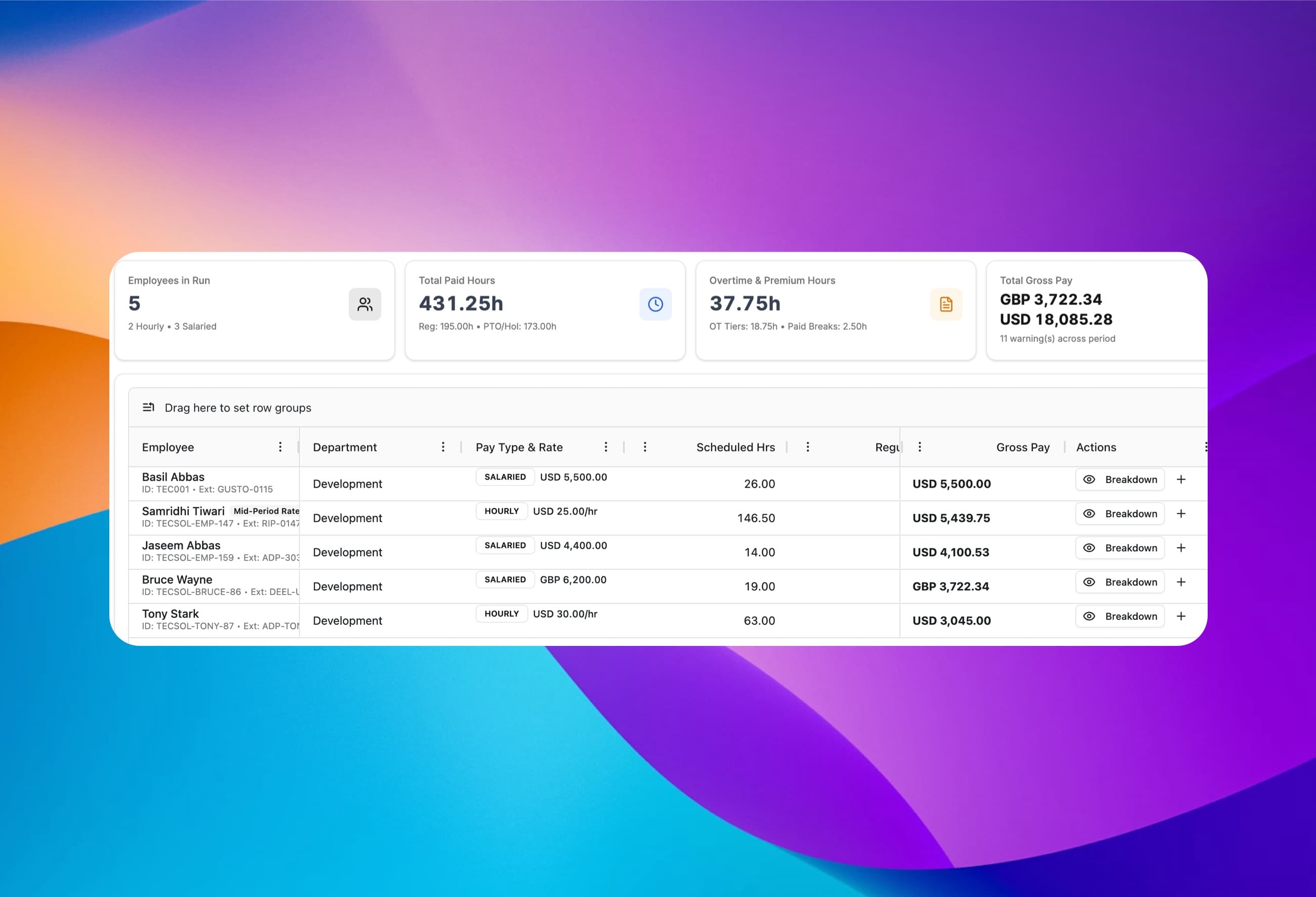
Pick a site and a pay period, and ClockIt calculates regular hours, multi-tier overtime, holiday worked, PTO worked, rest-day worked, paid breaks and total gross pay per employee — grouped cleanly by currency.
Hourly & salaried together
Run hourly staff and salaried staff side by side in one pay period.
Multi-currency totals
Gross pay totals stay separated by currency across global teams.
Context-day lookback
Semi-monthly runs automatically look back to the start of a split workweek for accurate 40-hour overtime.
14 pre-flight checks
Flags missing rates, missed punch-outs, pending PTO and unapproved days before you finalize.
Hourly wages and salaries in 160+ currencies
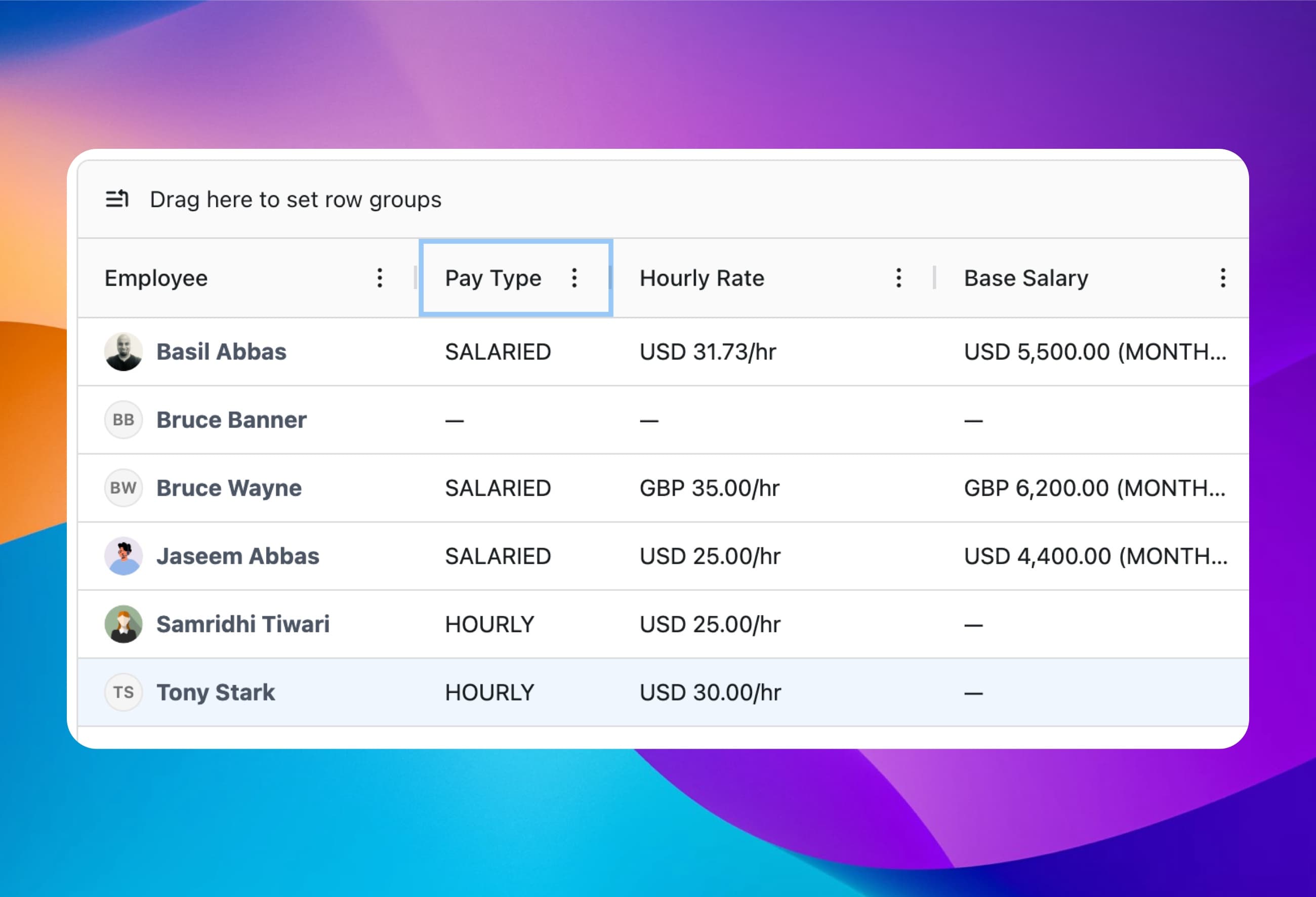
Set hourly unit rates or weekly, biweekly, four-weekly, semi-monthly, monthly and annual salaries per employee. Assign up to 2,000 rates in bulk and map each person's External Payroll ID once for ADP, Gusto, Rippling or Deel.
160+ ISO currencies
Price each employee in USD, GBP, EUR, CAD, AUD, AED, INR and more.
Standard daily hours
Define each employee's standard day (such as 8h or 7.5h) to value PTO and holidays accurately.
Automatic salary proration
Mid-period hires and departures prorate automatically across employed days.
External Payroll ID
Store each employee's ADP File #, Gusto ID or Deel contract ID on their profile.
Mid-period raises and hourly-to-salary switches without manual splits
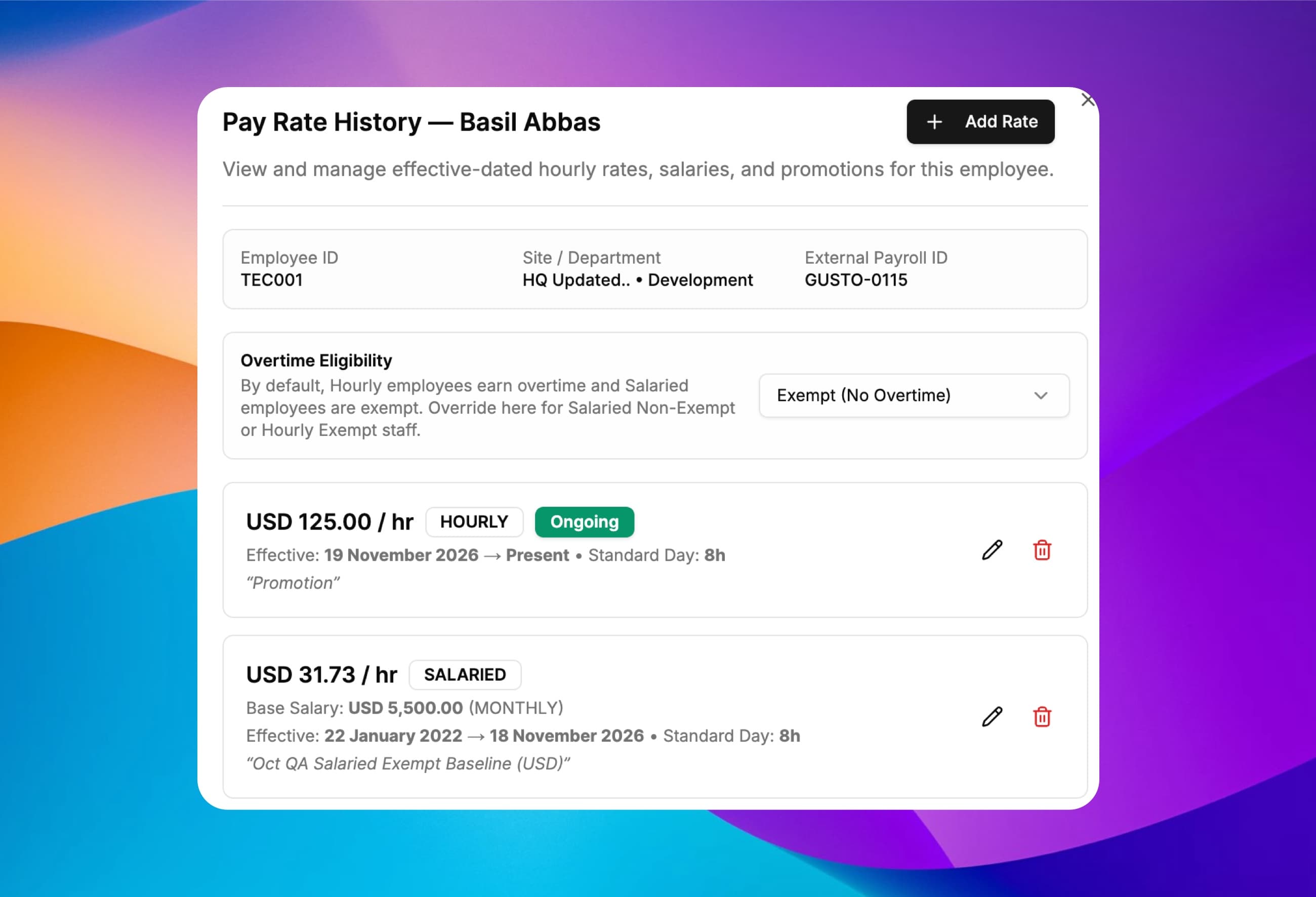
Every pay rate is effective-dated. Promote an employee on a Thursday or switch someone from hourly to salaried mid-month, and ClockIt prices Monday through Wednesday at the old rate and Thursday onward at the new rate automatically.
Effective-dated history
Add future or mid-period rates with a reason such as Promotion or Annual Review.
Auto-close prior rate
Adding a new rate closes the previous open rate the day before.
Hourly ↔ salaried switches
Transition staff between hourly and salaried pay cleanly inside a single pay run.
Overtime eligibility override
Mark salaried non-exempt staff eligible for overtime, or exempt specific hourly roles.
Multi-tier daily, weekly and monthly overtime with anti-pyramiding
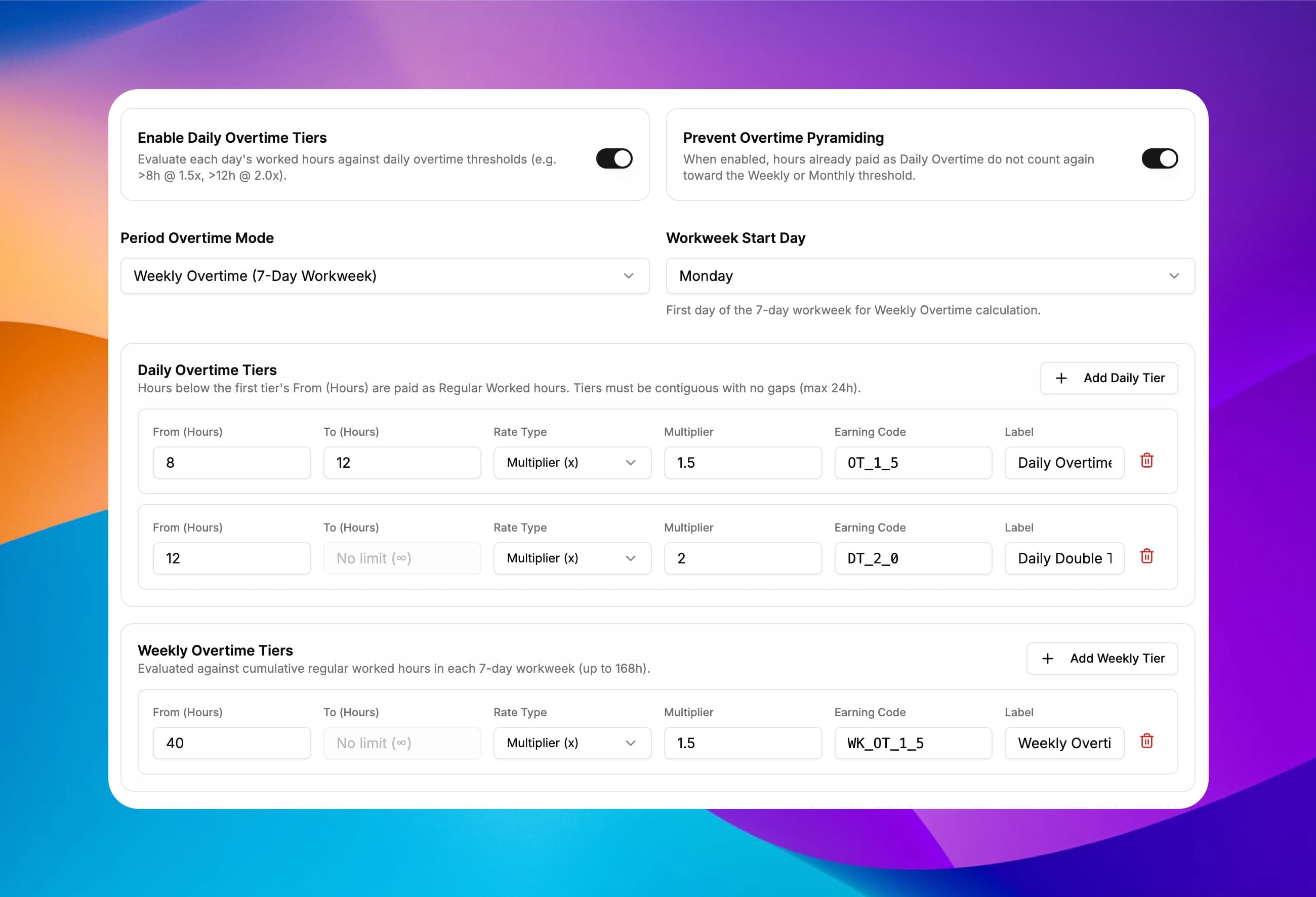
Configure up to 20 contiguous overtime tiers per site — including Federal FLSA 40-hour weeks, California 8-hour daily 1.5x and 12-hour 2.0x double time, or UK/EU tiered 1.25x and 1.5x bands. Turn on Prevent Overtime Pyramiding so daily overtime hours never count twice toward the 40-hour weekly threshold.
Daily, weekly or monthly
Combine daily thresholds with a 7-day workweek or calendar-month threshold.
Multiplier, +$/hr or custom rate
Price any tier at 1.5x, 2.0x, a flat hourly add-on or a fixed rate.
Prevent overtime pyramiding
One toggle stops daily overtime hours from double-counting toward weekly overtime.
Custom earning codes
Label each tier with your own code (such as OT_1_5, DT_2_0, WK_OT_1_5) for payroll imports.
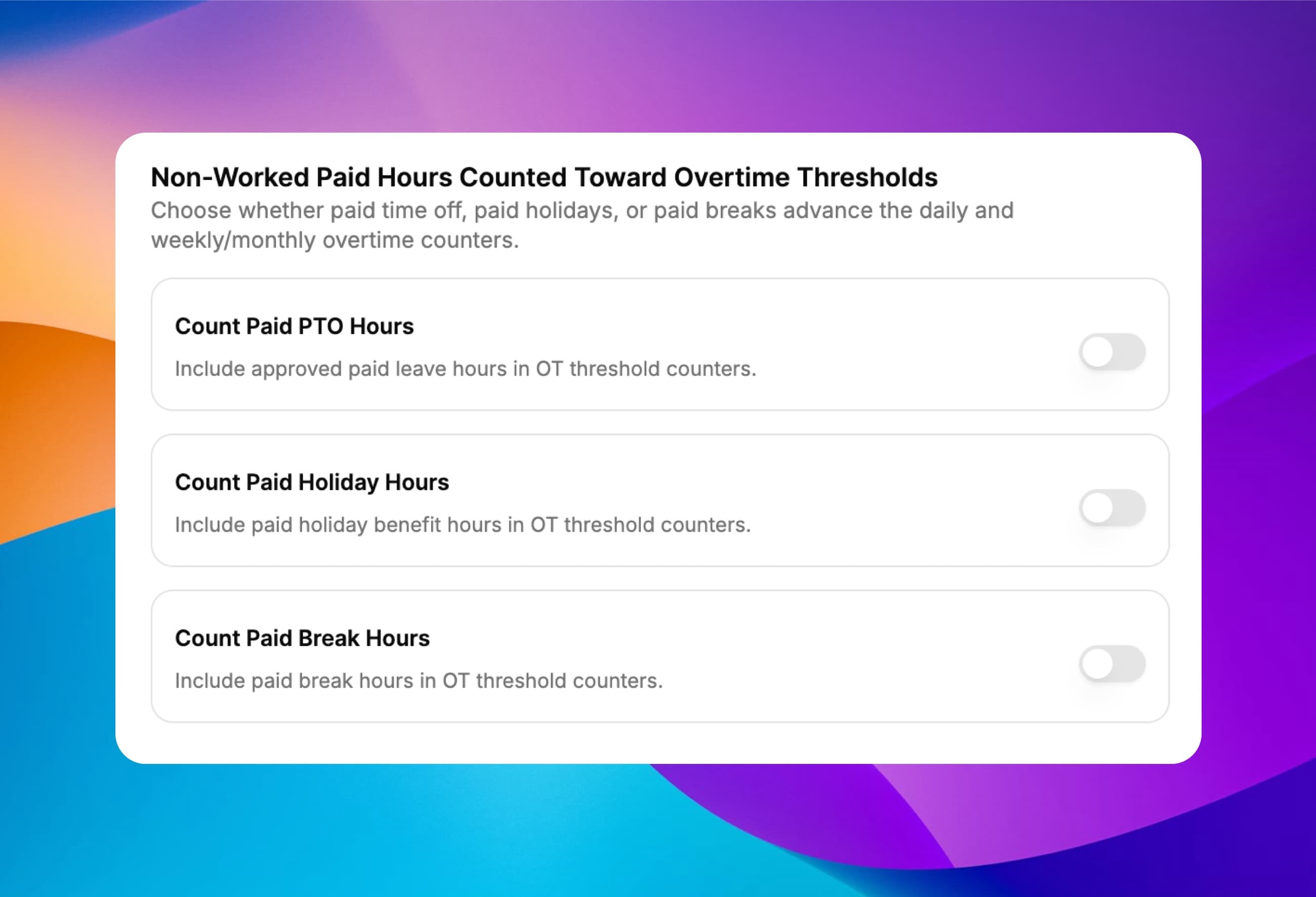
Decide whether paid PTO, holidays or breaks advance overtime
Under US federal rules, paid vacation does not push an employee over 40 worked hours — unless your union agreement or company policy says it should. Control each non-worked bucket with a simple per-site toggle.
Count Paid PTO Hours
Choose whether approved paid leave advances daily and weekly overtime counters.
Count Paid Holiday Hours
Include or exclude unworked public holiday benefit hours from overtime thresholds.
Count Paid Break Hours
Decide whether paid rest breaks count toward overtime limits.
Never overpays unworked time
Counted benefit hours advance the threshold cursor while remaining paid at their own benefit rate.
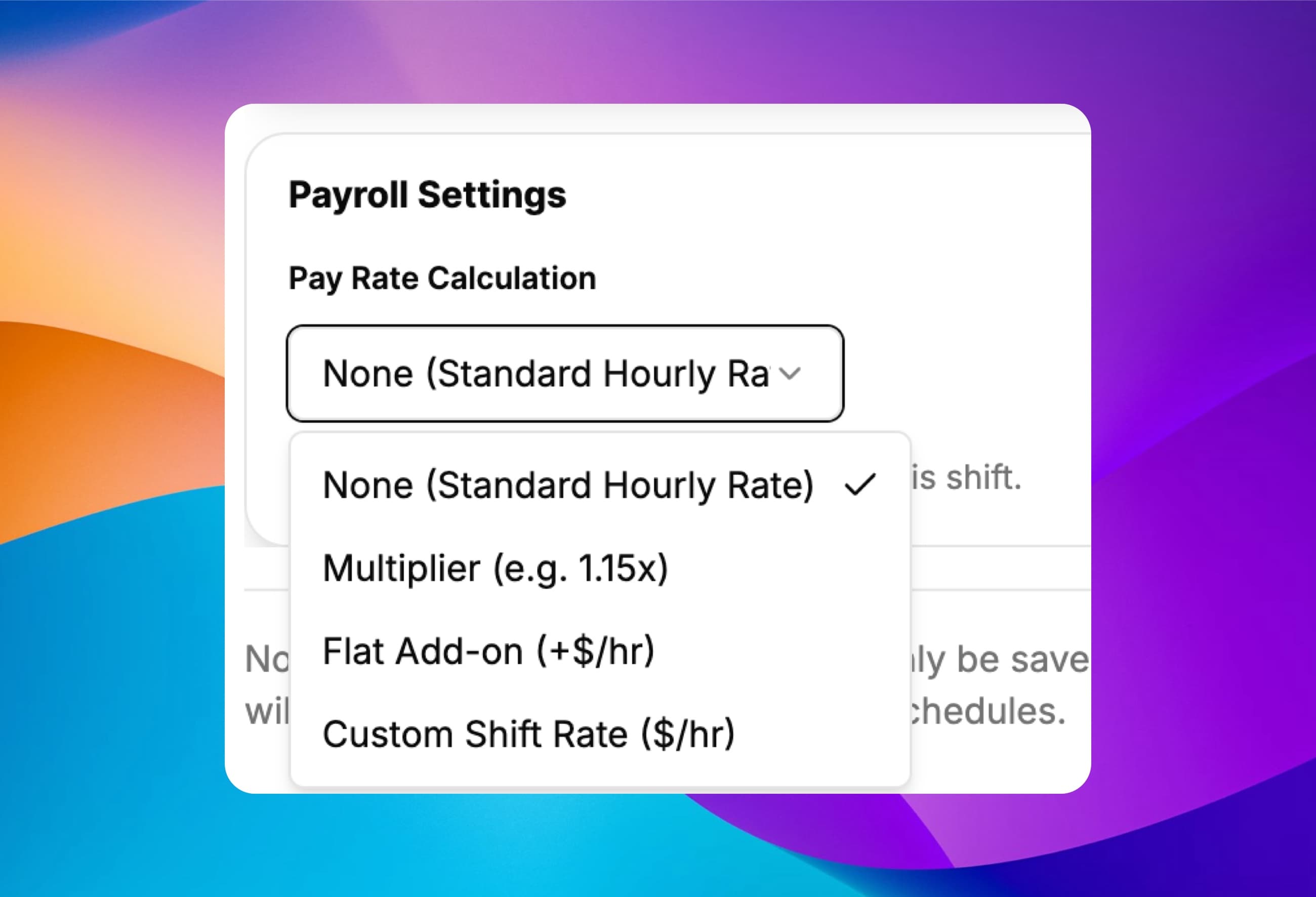
Night, weekend and role shift differentials built into the schedule
Attach a shift differential directly to any shift template or individual assignment — as a percentage multiplier (1.15x), a flat hourly add-on (+$2.00/hr) or a custom role rate ($32/hr). If an employee works two different shifts in one day and crosses into overtime on the evening shift, overtime calculates on that shift's rate.
Multiplier, +$/hr or custom rate
Support night premiums, hazard add-ons and higher-paid acting manager shifts.
Template or per-shift override
Set once on the shift template or override for a single scheduled shift.
Overnight shifts stay whole
A 10:00 PM to 6:00 AM shift stays anchored to its start date without splitting at midnight.
Paid & auto-carved breaks
Deduct unpaid breaks automatically after 6 hours or pay rest breaks at standard or custom rates.
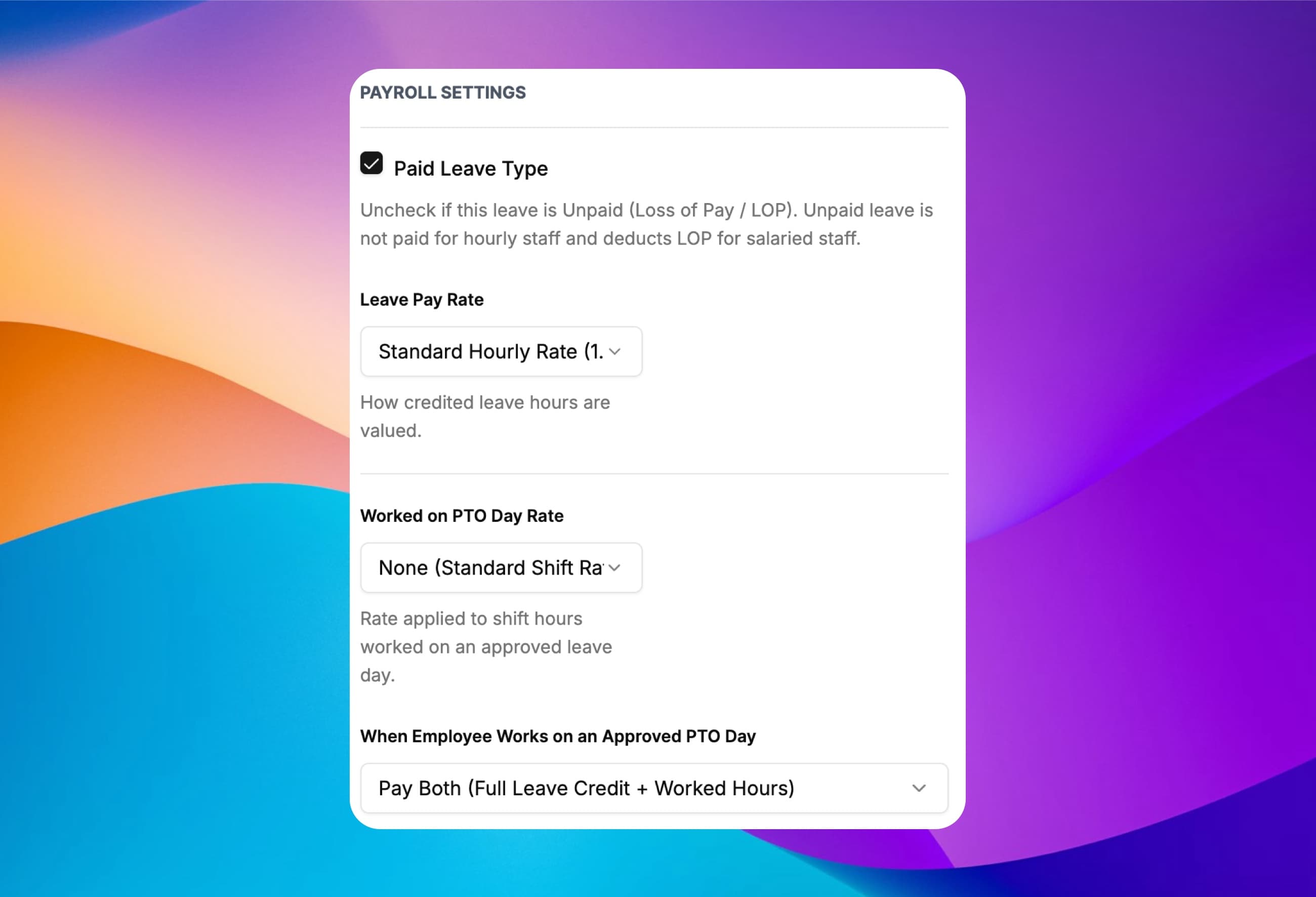
Paid leave multipliers, half-pay sick tiers and worked-on-PTO rules
Every leave type carries its own payroll rules. Pay vacation at 1.0x, statutory sick leave tiers at 0.5x or a custom rate, and mark unpaid leave as Loss of Pay (LOP). When someone clocks in on an approved PTO day, choose whether to pay both or let worked hours replace the leave benefit.
Per-leave-type pay rate
Standard 1.0x, custom multiplier (such as 0.5x half-pay sick leave) or fixed hourly rate.
Worked on PTO rate
Apply standard shift pay or a premium multiplier under code PTO_WRK.
Pay Both vs Worked Replaces Benefit
Prevent accidental double-paying when an employee works a half-day during approved leave.
Paid vs Unpaid (LOP)
Unpaid leave records $0 for hourly staff and deducts LOP for salaried staff.
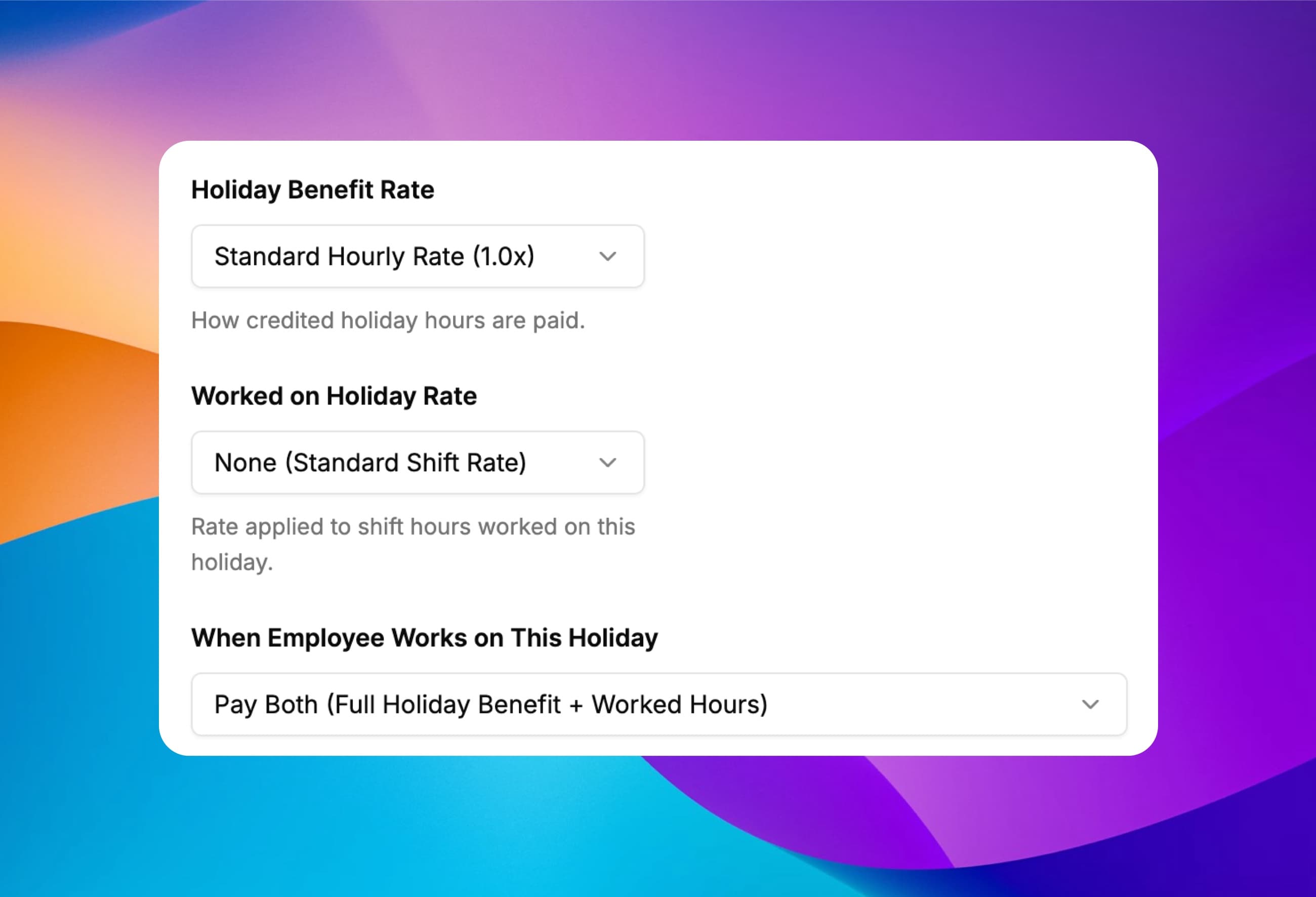
Public holiday benefits and holiday-worked premiums
Credit full-day, half-day or custom holiday hours on scheduled workdays, scoped to the whole site or a selected group of employees for regional and religious holidays. Set a separate premium rate (such as 1.5x or 2.0x) when staff work on the holiday.
Holiday benefit rate (HOL)
Credit unworked holiday hours at 1.0x, a multiplier, a custom rate or unpaid.
Holiday worked rate (HOL_WRK)
Pay hours worked on a public holiday at 1.5x, 2.0x, +$/hr or a custom rate.
Pay Both or Replace Benefit
Pay full holiday benefit plus worked hours, or top up only the unworked portion of the day.
Site-wide or selected staff
Assign restricted or floating holidays to specific employees without crediting everyone else.
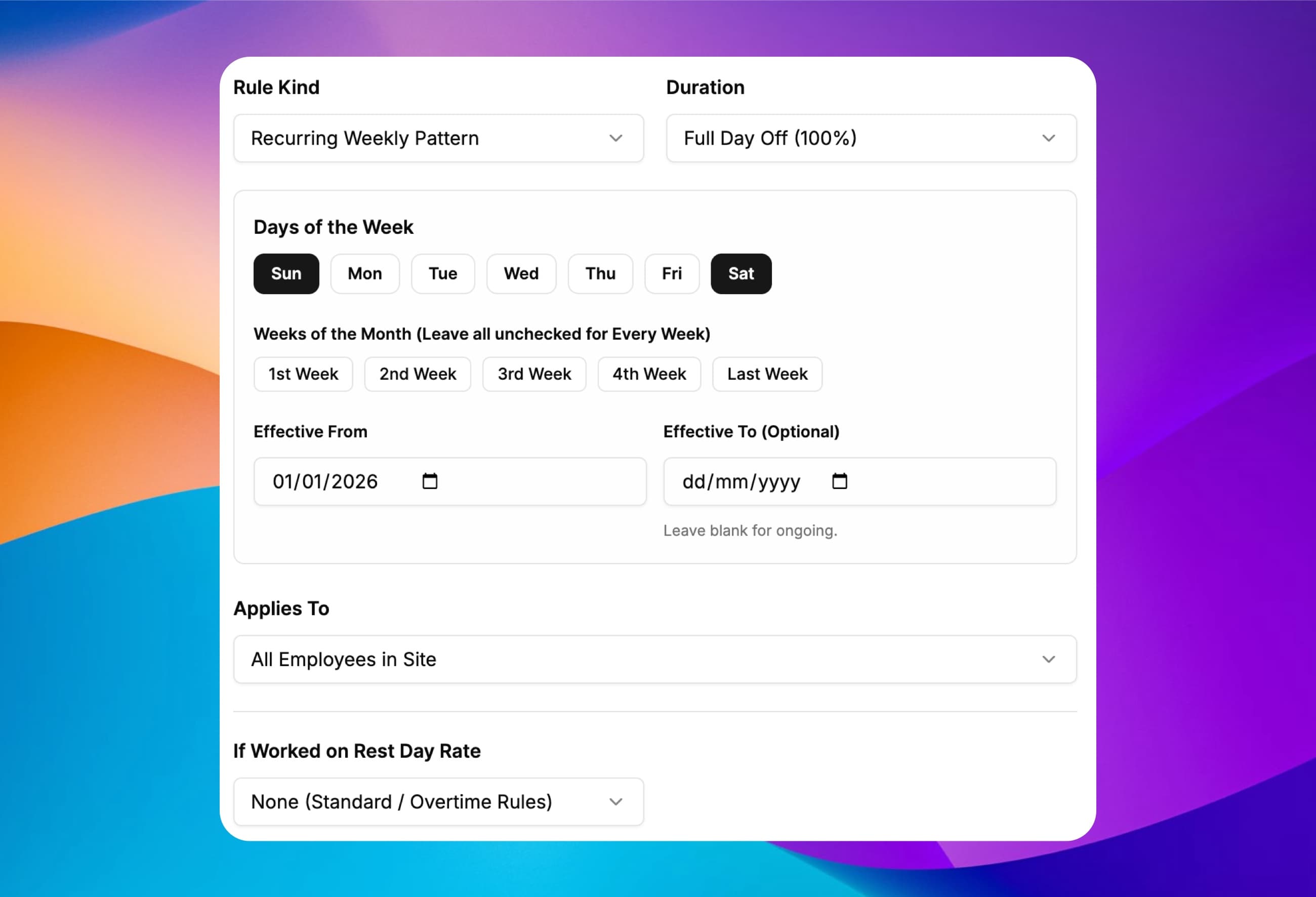
Weekly rest-day schedules, half-day Saturdays and rest-day premiums
Define full or half-day weekly rest days — including alternating 2nd and 4th Saturdays or one-off rest days — for the whole site or selected staff. When an employee is called in on their rest day, ClockIt prices those hours under REST_WRK at your rest-day multiplier.
Full, half-day or custom hours
Model Sunday rest days, half-day Saturdays or custom weekly rest schedules.
Specific weeks of the month
Support alternating week-offs such as 2nd and 4th Saturdays off.
Rest-day worked rate (REST_WRK)
Pay rest-day call-ins at 1.5x, 1.75x, 2.0x, +$/hr or a custom rate.
Smart holiday & LOP awareness
Unworked rest days never inflate holiday benefits or salaried workday divisors.
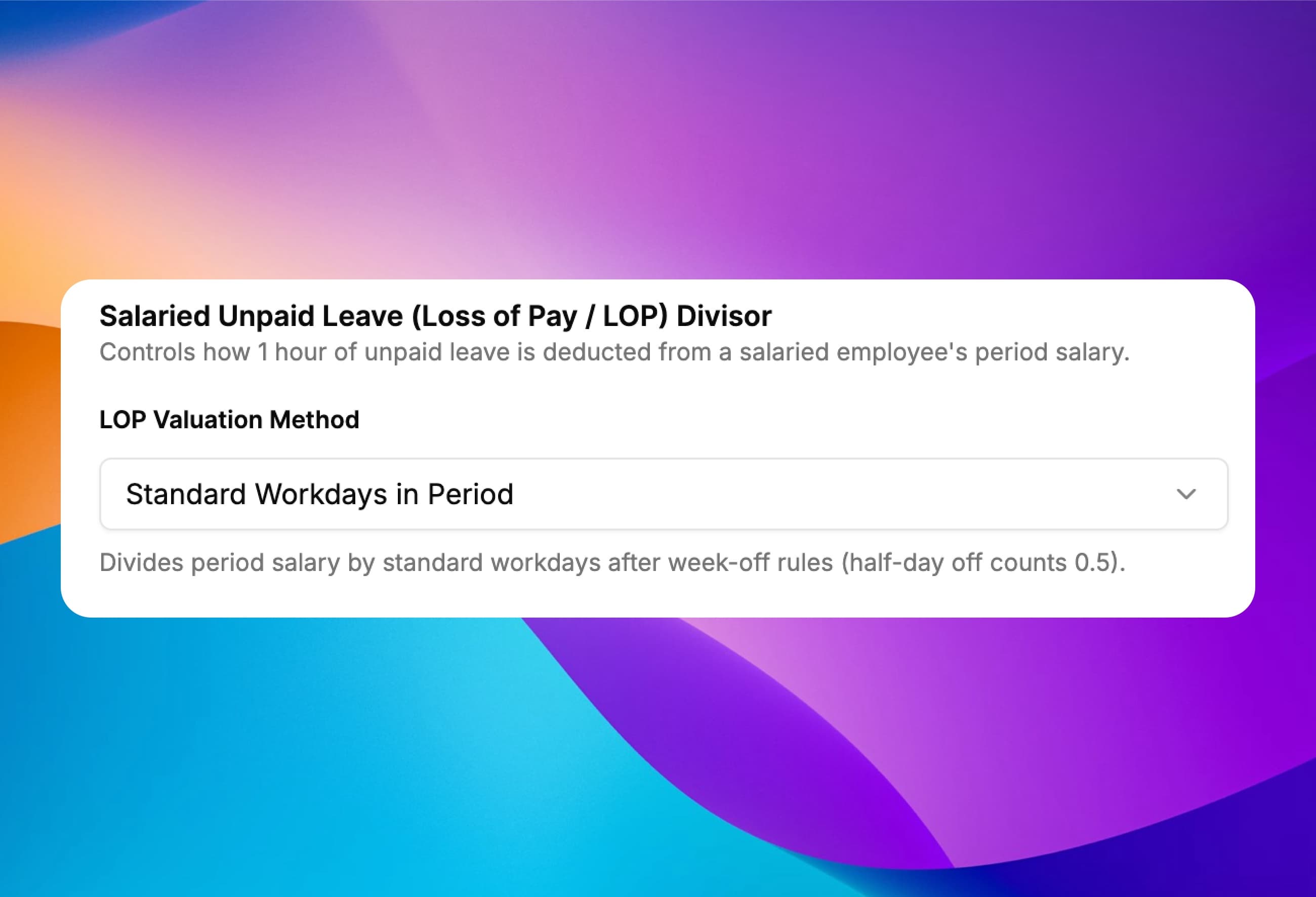
Automatic unpaid leave deductions for salaried staff
When a salaried employee takes unpaid leave, ClockIt calculates the exact Loss of Pay (LOP) deduction line using the valuation method your finance team follows — accounting for half-day week-offs automatically.
Standard workdays in period
Divides period salary by actual workdays after full and half-day week-offs.
Calendar days in period
Divides period salary across all 28–31 calendar days in the pay period.
Fixed days divisor
Use a fixed company convention such as 26 or 30 days per month.
Hourly unit rate
Deduct unpaid hours directly at the salaried employee's configured hourly unit rate.
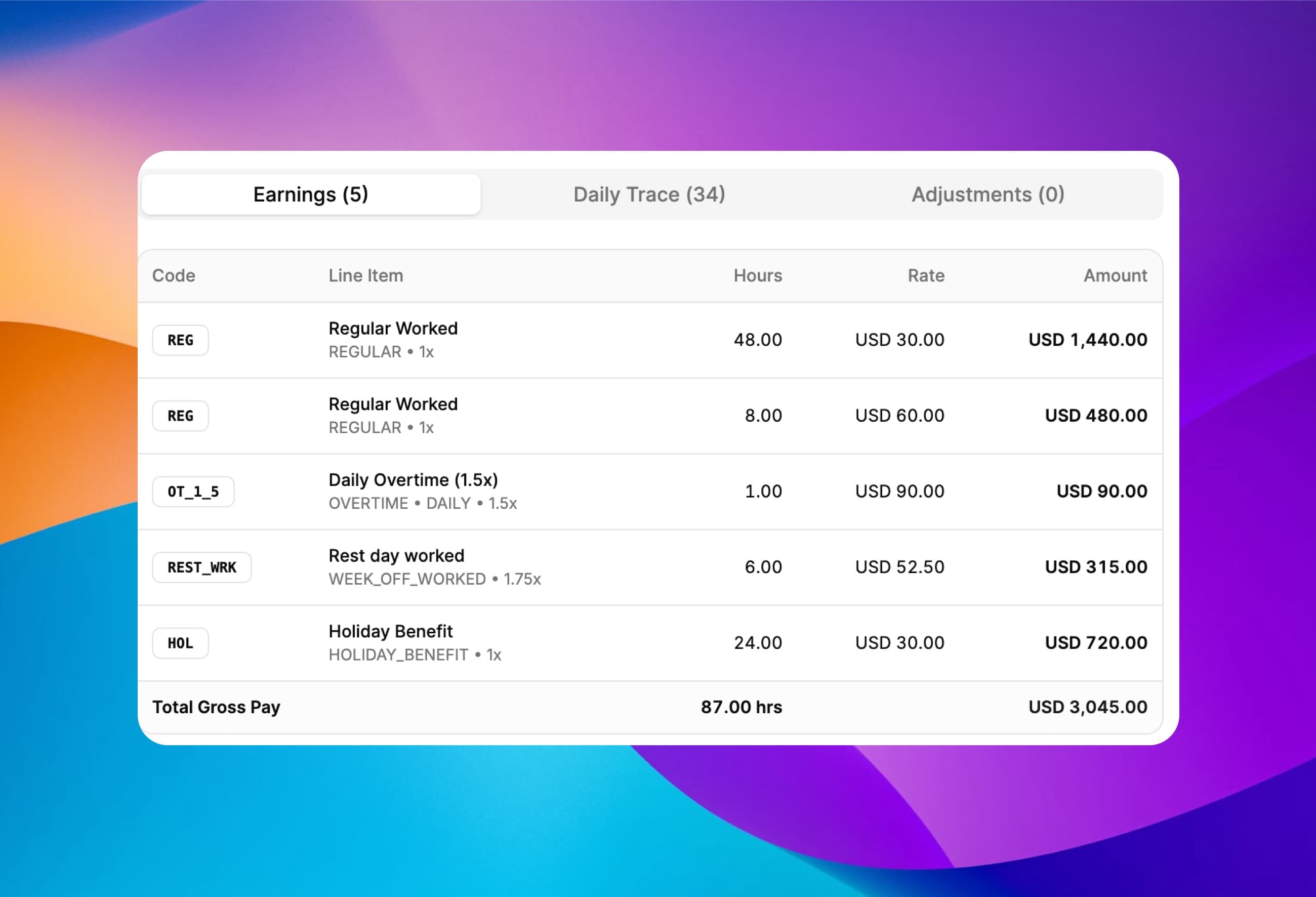
Grouped earning codes plus one-off bonuses, allowances and deductions
Every employee's pay is broken into clean, standardized earning codes — REG, OT_1_5, DT_2_0, HOL_WRK, PTO_WRK, REST_WRK, BRK, PTO, HOL, SALARY and LOP. Add one-off bonuses, shift allowances, expense reimbursements or deductions right inside the draft run.
Standard & custom earning codes
Hours at the same code and rate group into a single ledger line rounded to the cent.
Bonuses & allowances
Add one-off BONUS or ALLOWANCE lines with custom labels and earning codes.
Reimbursements & deductions
Record non-wage reimbursements or one-off deductions on the same pay run.
Exact rational math
4-decimal hour & rate precision prevents penny-rounding drift across shifts.
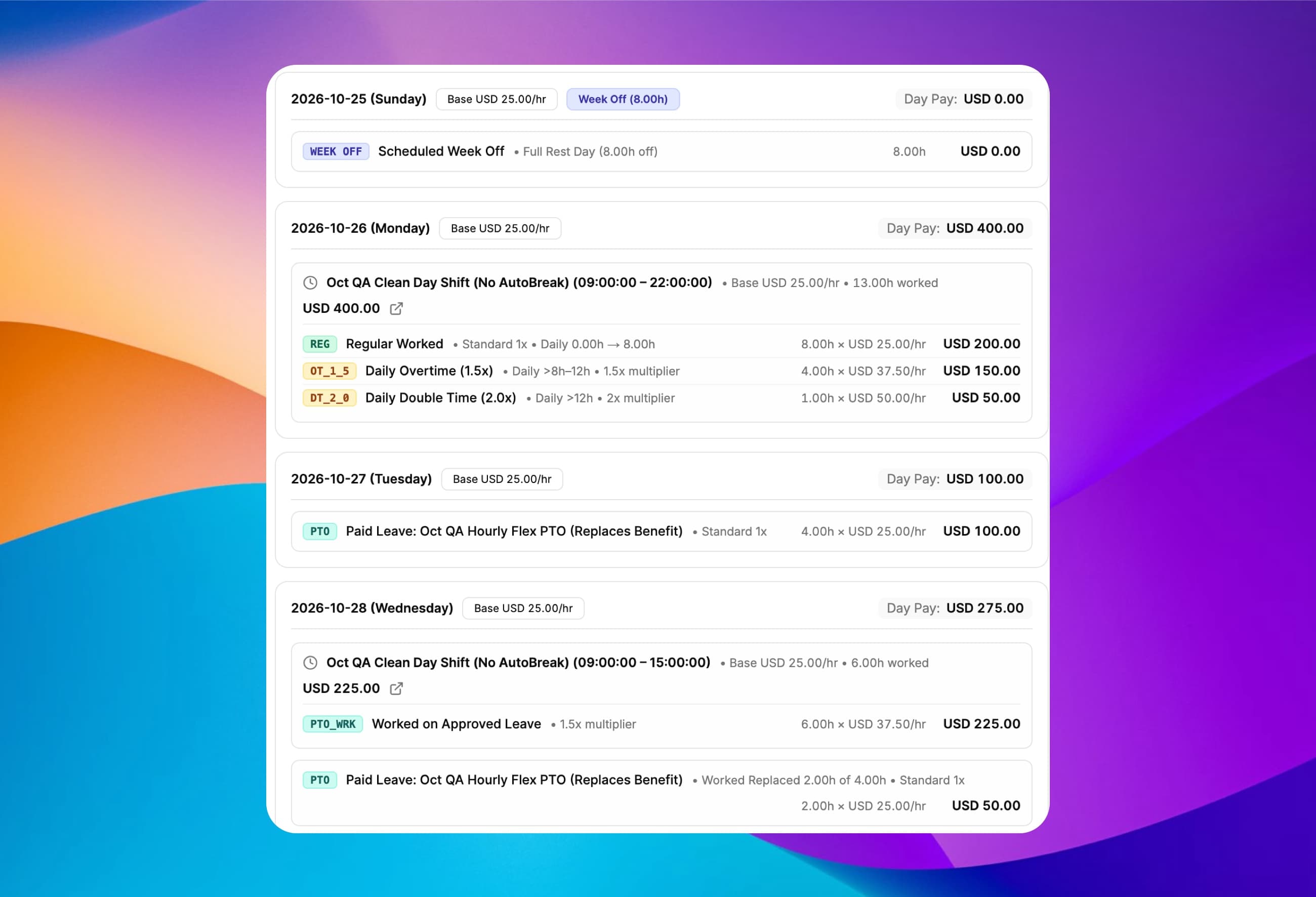
Add period adjustments and trace every dollar back to the exact punch
Click Breakdown on any employee to inspect a day-by-day audit sheet showing every scheduled shift, carved break, shift differential, daily and weekly overtime cursor movement, and warning — plus add or remove one-off period adjustments in seconds.
Day-by-day trace sheet
See raw minutes, carved breaks, active shift rates and exact overtime cursor slices per day.
One-off run adjustments
Attach bonuses, allowances, reimbursements or deductions to any employee in the draft run.
Higher-rate-wins proof
Verify whenever a holiday or rest-day premium beat an overtime tier (or vice versa).
Immutable finalized history
Finalizing locks a permanent snapshot of policies, rates and daily traces for audits.
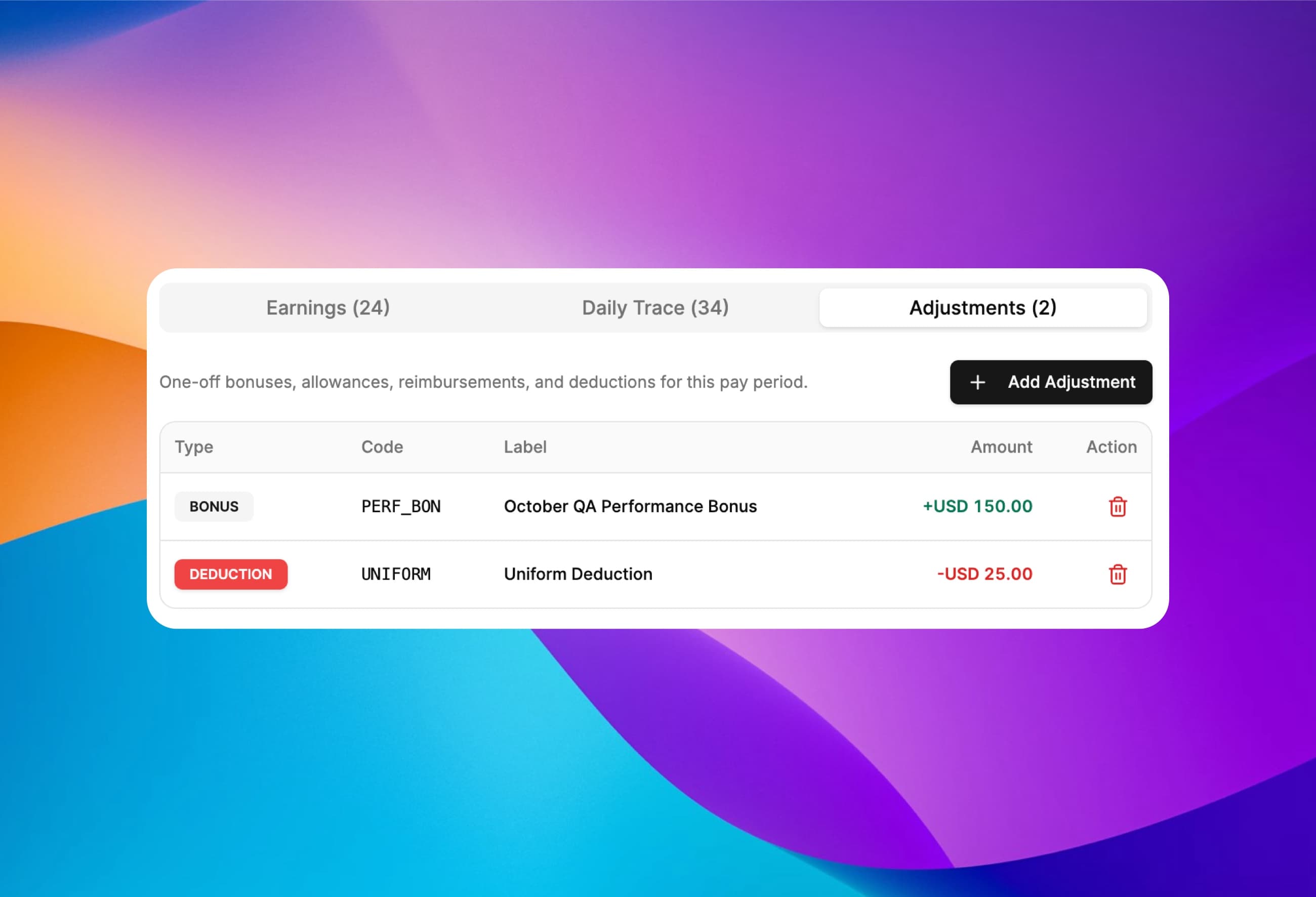
Include bonuses, allowances, reimbursements and deductions in the run
Before locking the pay period, add one-off adjustments for individual employees — holiday bonuses, travel allowances, tool reimbursements or uniform deductions — tagged with the exact earning code your payroll system expects.
Four adjustment types
Bonus, Allowance, Reimbursement and Deduction (automatically signed negative).
Custom earning codes
Map adjustments to codes like BONUS, COMM, REIMB or ADV_DEDUCT.
Currency-validated
Ensures every adjustment matches the employee's active pay currency.
Revision-safe
Every change increments the draft run revision so two admins never overwrite each other.
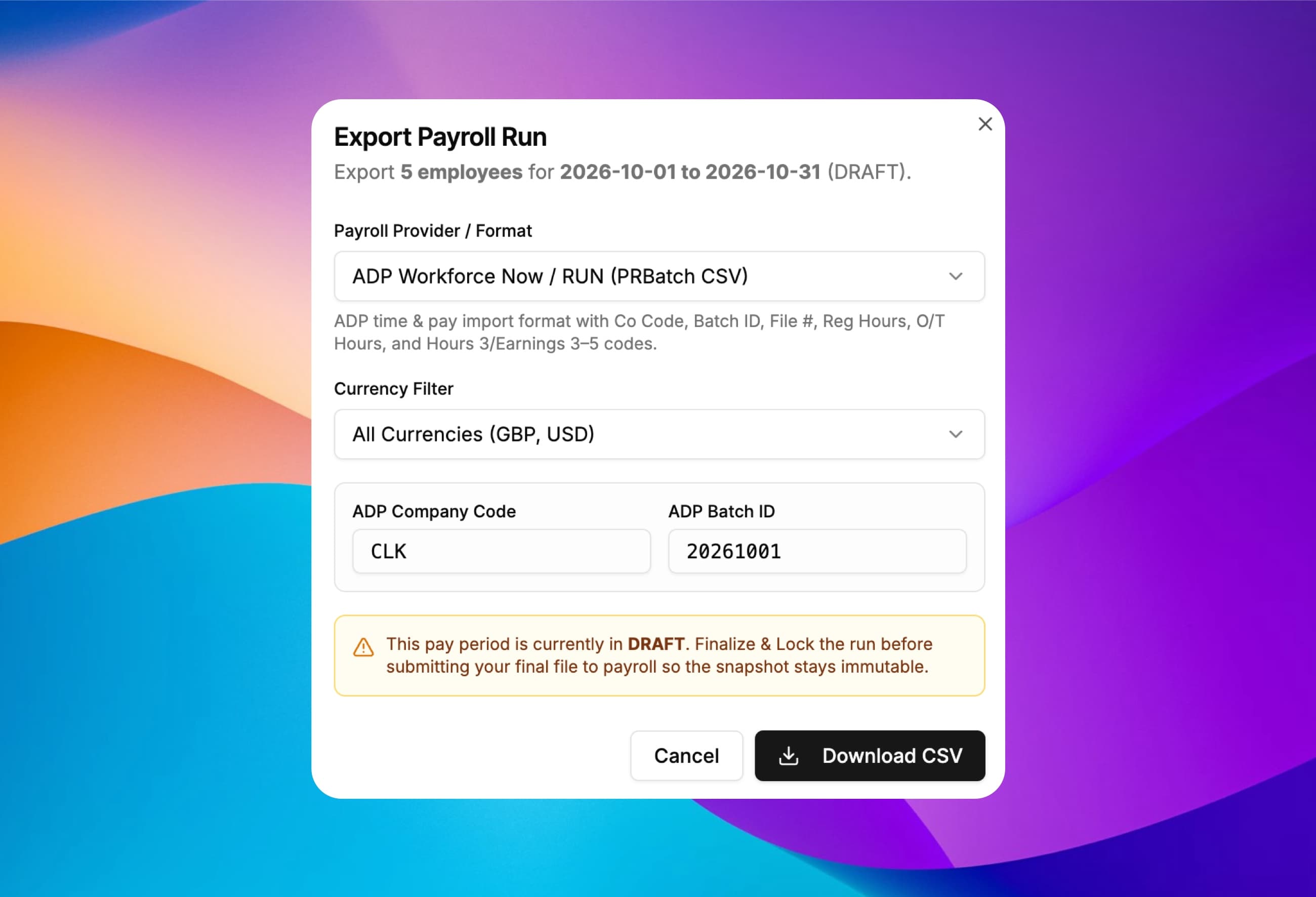
Export pre-mapped files for ADP, Rippling, Deel, Gusto or any ERP
Once warnings are cleared, click Finalize & Lock Run to freeze an immutable snapshot so past pay periods never shift if a policy changes later. Download provider-ready CSV files or a universal detailed earnings ledger in one click.
ADP Workforce Now & RUN
PRBatch CSV with Company Code, Batch ID, File #, Reg/OT Hours and Earnings 3–5 codes.
Gusto, Rippling & Deel
Dedicated CSV schemas mapping Regular, OT, Double Time, PTO, Holidays and Adjustments.
Universal & Detailed Ledgers
One-row-per-employee summary CSV or one-row-per-earning-code ERP ledger.
Lock & reopen control
Locked runs block duplicate payouts across overlapping runs, with audited reopen history.
How Payroll Run Works
Close the pay period in three steps
Once your site policy and employee pay rates are saved, every pay cycle follows the same repeatable workflow.
- 1. Set pay rates & site policy once
Assign hourly rates or salaries, set your daily/weekly overtime tiers, and configure shift, PTO, holiday and week-off multipliers.
- 2. Review live calculations & warnings
Open Payroll Run for the pay period, review pre-flight flags (missed punches, pending PTO, unapproved days), and add any one-off bonuses.
- 3. Finalize, lock & export CSV
Freeze an immutable audit snapshot of the run and download your ADP, Gusto, Rippling, Deel or universal CSV import file.
Built for Multi-Site & Global Operations
One payroll engine for US, UK, EU, Middle East and APAC rules
Each site in ClockIt carries its own payroll policy, workweek start day, overtime tiers and week-off calendar, so distributed teams run local labor rules from one account.
US Federal (FLSA) & California
- 8-hour daily overtime (1.5x), 12-hour daily double time (2.0x), 40-hour weekly overtime, anti-pyramiding, and mid-week promotion rate splits.
UK, Ireland & European Union
- Tiered daily overtime bands (1.25x then 1.5x), automatic 30-minute unpaid break deductions after 6 hours, and Bank Holiday Worked Replaces Benefit top-ups.
UAE, Saudi Arabia & Middle East
- Overnight shifts anchored to their start date across pay-period cutoffs, night shift differentials, and 50% partial-pay sick leave tiers.
India, APAC, Australia & Global Teams
- Monthly salaried payroll with automated Loss of Pay (LOP) divisors, non-exempt salaried overtime, alternating Saturday week-offs, and multi-currency runs.
Related: custom payroll reports · employee shift scheduling · PTO & leave management · biometric time clocks · free overtime calculator · global labor law compliance hub
What we love most is the real-time data and reports, which provide clear insights into employee attendance and payroll expenses. Plus, the ease of use means less administrative burden, allowing our HR team to focus on more strategic initiatives. If you’re looking for a reliable payroll solution that enhances efficiency and accuracy, clockit.io is the perfect choice! Highly recommended!
Frequently asked questions
Have a different question or can't find the answer you're looking for? Reach out to us on the chat support on the bottom right.
ClockIt Payroll Run calculates gross pay per employee for a pay period directly from live clock-ins, schedules, breaks, holidays and leave. It prices regular worked hours, up to 20 daily, weekly or monthly overtime tiers, shift differentials, paid and auto-carved breaks, PTO pay multipliers, public and restricted holiday benefits, holiday-worked and rest-day-worked premiums, salaried Loss of Pay (LOP) deductions, and one-off bonuses, allowances, reimbursements or deductions.
No. ClockIt calculates audited gross pay and earning-code lines from your time and attendance policies, then exports pre-mapped CSV files for payroll providers such as ADP Workforce Now, ADP RUN, Gusto, Rippling, Deel or QuickBooks, which handle tax withholding and direct deposit.
When Prevent Overtime Pyramiding is enabled on your site payroll policy, hours already paid as Daily Overtime (such as hours beyond 8 in California) do not count a second time toward the 40-hour Weekly Overtime threshold. In addition, when an overtime tier and a holiday, PTO or rest-day worked premium apply to the same hours, ClockIt applies whichever hourly rate is higher rather than multiplying one premium on top of another.
Each shift template or individual scheduled shift can carry a percentage multiplier (such as 1.15x), a flat hourly add-on (such as +$2.00/hr) or a custom role rate. If an employee works multiple shifts in one day and crosses into daily or weekly overtime during a higher-paid shift, ClockIt calculates the overtime tier on that shift's differential rate.
Every pay rate in ClockIt is effective-dated. When you add a new hourly rate or switch an employee between hourly and salaried mid-period, ClockIt automatically closes the previous rate the day before and prices each day of the pay run at the exact rate active on that date, prorating salaried days automatically.
You set separate benefit rates and worked-hour rates for holidays, leave types and weekly rest days (including half-day or alternating Saturdays). For holidays and PTO, you choose per rule between Pay Both (full benefit plus worked hours) or Worked Replaces Benefit (where worked hours replace the unworked benefit only above the standard workday).
When a salaried employee takes unpaid leave, ClockIt adds a negative LOP deduction line valued using your site's chosen divisor: Standard Workdays in Period (accounting for full and half-day week-offs), Calendar Days in Period, Fixed Days per Period (such as 26 or 30 days) or the employee's Hourly Unit Rate. Salaried non-exempt staff can also be marked eligible for overtime.
Finalizing checks blocking warnings (such as in-progress shifts or overlapping paid runs) and freezes an immutable snapshot of every employee's rates, site policies, earning lines and day-by-day audit traces. Past pay runs stay unchanged even if you update rates or policies later, and admins can reopen the latest run if an adjustment is needed.
Payroll Run and Pay Policy settings are included in the ClockIt Pro plan at $2.99 per user per month ($29.99 per user per year billed annually), and every new account can test them during the 14-day free trial with no credit card required.