Scheduling Software for Lawyers that keeps every office and matter covered
Drag-and-drop schedules for attorneys, paralegals, and support staff—with availability, shift swaps, reminders, and payroll-ready time tracking.
- Drag‑and‑Drop Schedules
- Auto‑Scheduling
- Shift Swaps
- Mobile App
- Payroll‑Ready
- • Setup within 5 minutes
- • No credit card required
- • 14-day full trial


Build conflict‑free rosters for legal teams
Plan coverage by office, practice group, and role. Copy weeks, use templates, and auto‑fill with real‑time availability.
Court dates & events
Align shifts to hearings, depositions, and client meetings with calendar sync.
Practice & role matching
Match attorneys, paralegals, and clerks by skills, seniority, or certifications.
Templates & copy weeks
Save firm‑standard rosters and duplicate in one click.
Coverage heatmap
Spot front‑desk or intake gaps by hour and location.
Overtime warnings
Control non‑exempt overtime and stay compliant.
Multi‑office scheduling
Coordinate staff across offices and courthouses.
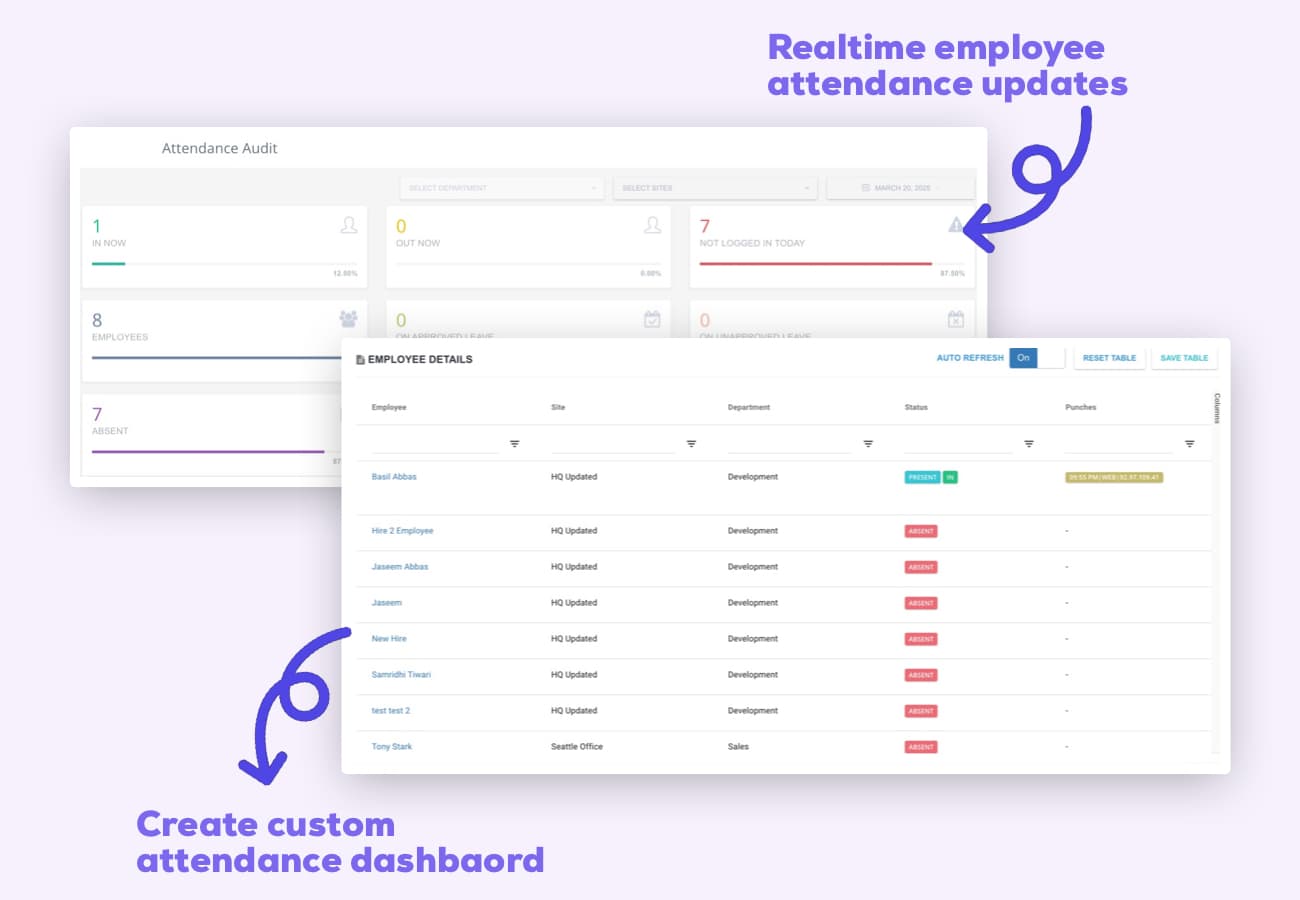
Add Notes, Todos, Locations and Geofences to your shifts.
Attach case notes, task lists, office/courtroom locations, and geofencing for precise attendance.
Shift notes
Include matter IDs, client initials, or preparation reminders.
Shift todos
Checklist tasks like filings, discovery runs, and client callbacks.
Location tagging
Specify office floors, reception desks, or courthouse rooms.
Geofencing
Restrict clock‑ins to firm offices or approved locations.
Keep every office covered and compliant—without the spreadsheet shuffle.
ClockIt helps law firms replace manual rosters with a fast, compliant schedule builder that respects availability, controls overtime, and keeps teams informed in real time.
Leave that respects coverage and key dates
Prevent understaffing during trials and busy periods with real‑time leave visibility.
One‑tap requests
Staff submit vacation or sick leave in seconds.
Manager approvals
Approve on web or mobile with audit logs.
Staffing safeguards
Block approvals when reception or intake coverage dips.
Balance visibility
See PTO balances before requests to reduce back‑and‑forth.
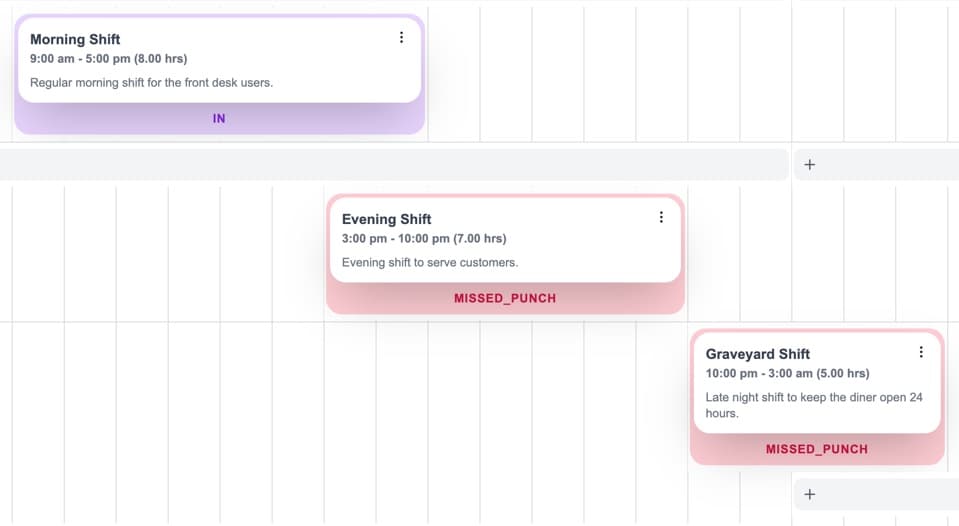
Real‑time alerts that keep legal teams in sync
Send assignments, changes, and reminders via push, email, and Slack with calendar sync.
Publish notices
Notify staff when new rosters go live.
Shift reminders
Automated nudges before hearings and meetings.
Late/no‑show alerts
Flag missed clock‑ins with instant manager alerts.
Calendar sync
Subscribe to schedules in Google or Outlook.
Coverage, costs, and compliance at a glance
Track staffing levels, overtime risk, and budget vs. actual with live time clock data.
Coverage heatmaps
Visualize coverage by office, role, and hour.
Overtime & compliance
Spot overtime risk for non‑exempt roles and ensure adherence.
Forecast vs. actual
Compare planned hours to worked hours and costs.
Payroll exports
Export clean timesheets to payroll in one click.
ClockIt simplified our firm’s scheduling. Reception, intake, and court coverage are always staffed, and overtime is under control.
Flexible coverage—swaps, pickups, and open shifts
Let staff swap front‑desk, intake, or on‑call shifts with manager oversight and instant notifications.
Shift swaps
Employees propose and accept swaps in the app with optional approval.
Open shifts
Publish open shifts for eligible staff to claim.
Eligibility rules
Limit pickups by office, role, or practice group.
Instant notifications
Real‑time alerts for swaps, pickups, and approvals.
Insights for firm operations
Analyze labor costs and scheduling efficiency by office and role.
Labor cost reports
View costs by office, role, and time period to optimize staffing.
Employee performance reports
Evaluate attendance to inform coaching and development.
Scheduling efficiency reports
Analyze coverage, availability, and overtime.
Export CSV & Excel
Download reports for review or sharing.
24/7 Support
Human help when you need it
Onboarding, roster setup, and data migration with fast responses—day or night.
Awards & Recognition
Award‑Winning Software
Recognized by industry leaders for value, ease of use, and performance.

Best Value
Capterra
2026
Most Recommended
Software Advice
2026
Best Customer Support
Software Advice
2026
Best Ease of Use
Capterra
2026
Front Runner
Software Advice
2026
Front Runner
Software Advice
2025
Short List
Capterra
2025
Category Leader
Get App
2025
Best Value 2025
Capterra
2025
Best Ease of Use 2025
Capterra
2025
Best Ease of Use
Capterra
2024
Top Rated
Software World
2023
Best Scheduler
Software World
2023
Most Affordable
Capterra
2019
Category Leader
Get App
2018
“The mobile app time clock has revolutionized how we manage our remote team. It's intuitive, accurate, and has saved us countless hours in payroll processing. The GPS feature ensures accountability without being intrusive. It's a game-changer for businesses with a mobile workforce.”
“As a small business owner, I was skeptical about implementing a new time tracking system. But this mobile app has exceeded all my expectations. It's user-friendly, reliable, and the reporting features have given me invaluable insights into our productivity.”
“The integration capabilities of this mobile time clock app are outstanding. It seamlessly connects with our existing HR and payroll systems, creating a streamlined workflow that has significantly reduced errors and improved our overall efficiency.”
“What we love most is the real-time data and reports, which provide clear insights into employee attendance and payroll expenses. Plus, the ease of use means less administrative burden, allowing our HR team to focus on more strategic initiatives. If you’re looking for a reliable payroll solution that enhances efficiency and accuracy, clockit.io is the perfect choice! Highly recommended!”
“ClockIt.io cut our timesheet corrections by more than half. Exports line up perfectly with payroll and the GPS clock-ins keep our field crews honest without creating friction.”
“Geofencing and kiosk mode at each site solved our late punches. Managers love the late alerts and I love closing payroll on Friday in minutes.”
“ClockIt’s overtime rules and approvals gave us immediate savings. Clear audit trails and clean timesheets mean finance isn’t chasing people anymore.”
“We schedule across multiple locations and roles. ClockIt.io handles PTO, availability, and publishes updates to everyone’s phones instantly—no more group chats.”
“Our trainers swap shifts right in the app and confirm attendance. Attendance and payroll line up perfectly—ClockIt just works.”
“Setup was fast and the support team was outstanding. We rolled out ClockIt to 120 staff in a week and adoption was near 100% on day one.”
“The reports in ClockIt.io make our monthly reviews painless. We finally have visibility into attendance trends and actual hours by department.”
“Time‑off requests, approvals, and balances are all in one place. Doctors see who’s off at a glance and we avoid coverage gaps.”
“For crews on the move, ClockIt’s GPS punch-ins and site-based rules keep things accurate. It’s the reliability we were missing before.”
“We tried three tools before ClockIt.io. This is the first one our team actually likes using—and it saves my admin two hours every payroll run.”
“Implementing ClockIt's biometric kiosks eliminated buddy punching overnight. The facial recognition is instant and works perfectly even in our warehouse environment. It's the most secure time tracking decision we've made.”
Frequently asked questions
Can ClockIt align schedules with court dates and legal calendars?
Yes. Use calendar sync and shift notes to align coverage with hearings, depositions, and client meetings, with reminders for upcoming events.
Can we schedule across multiple offices and practice groups?
Yes. Plan coverage by office, role, and practice group with eligibility rules and multi‑location scheduling.
Do you support on‑call rotations for after‑hours intake?
Yes. Create recurring on‑call shifts, publish open shifts, and manage swaps with optional approvals.
How does scheduling connect to time tracking and payroll?
Published schedules sync with ClockIt time clocks and attendance. Worked hours flow into reports and payroll exports.
Can we control who sees or edits schedules?
Yes. Role‑based permissions let you restrict access by office, role, or team.
Does this work for part‑time, contract attorneys, or interns?
Yes. Support mixed employment types, preferred hours, and availability rules to avoid conflicts.
Can staff swap front‑desk or reception shifts?
Employees can request swaps and claim open shifts. Managers can require approvals and set eligibility rules.
How fast can a law firm get started?
Most firms go live in a day. Import staff via spreadsheet and start from firm templates.
Do mobile apps send shift reminders and updates?
Yes. Employees receive push/email reminders, updates, and late/no‑show alerts via the ClockIt mobile apps.
Employee Scheduling Use Cases
Discover how our time tracking apps can streamline your workflow and improve productivity.
Workforce Scheduling Software that keeps every shift covered
Drag-and-drop schedules, availability, shift swaps, and instant notifications—fully integrated with ClockIt time tracking and payroll.
Employee Schedule Management Software that keeps every shift covered
Drag-and-drop schedules, availability, shift swaps, and instant notifications—fully integrated with ClockIt time tracking and payroll.
Staff Scheduling Program that keeps every shift covered
Drag-and-drop schedules, availability, shift swaps, and instant notifications—fully integrated with ClockIt time tracking and payroll.
Labor Scheduling Software that keeps every shift covered
Drag-and-drop schedules, availability, shift swaps, and instant notifications—fully integrated with ClockIt time tracking and payroll.
Scheduling Software for Lawyers that keeps every office and matter covered
Drag-and-drop schedules for attorneys, paralegals, and support staff—with availability, shift swaps, reminders, and payroll-ready time tracking.