FREE Leave Tracker Template 2026 — UAE
Track annual leave, sick leave, Hajj leave, and maternity leave for your UAE team. Download our free spreadsheet for Google Sheets or Excel.
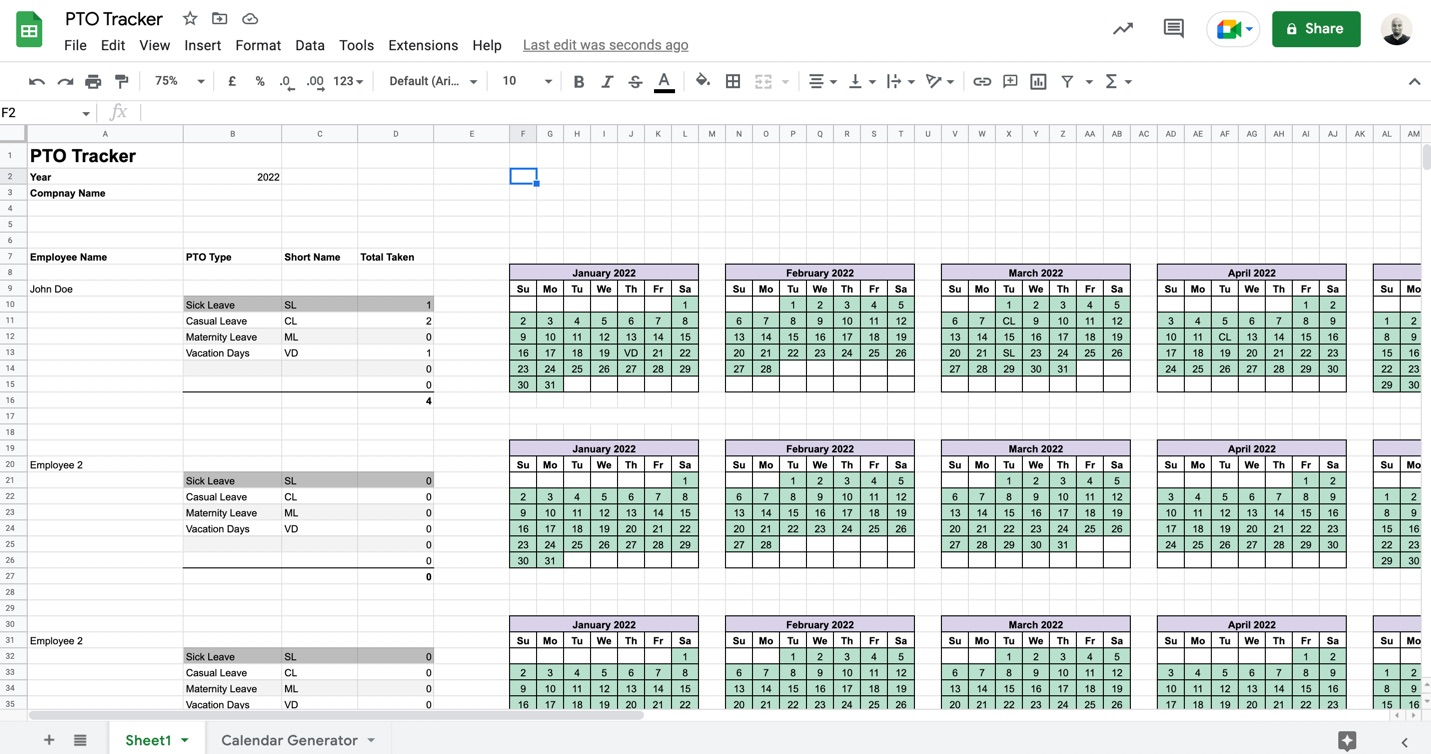
How to use this leave tracker
Add your employees
Enter employee names in the tracker. Use built‑in filters in Google Sheets or Excel to quickly view leave by person or team.
Set your leave types
Create up to six leave categories (e.g., Annual Leave, Sick Leave, Hajj Leave, Maternity Leave). Assign short codes like "AL" or "HL" and log them on the calendar; the sheet totals days automatically.
Add public holidays
Add UAE public holidays — Eid Al Fitr, Eid Al Adha, Islamic New Year, Prophet’s Birthday, and National Day — to keep the calendar accurate.
Track time off and accruals on autopilot.
Employees request time off in seconds, balances stay accurate, and approvals happen in a tap — no spreadsheets, no manual math.
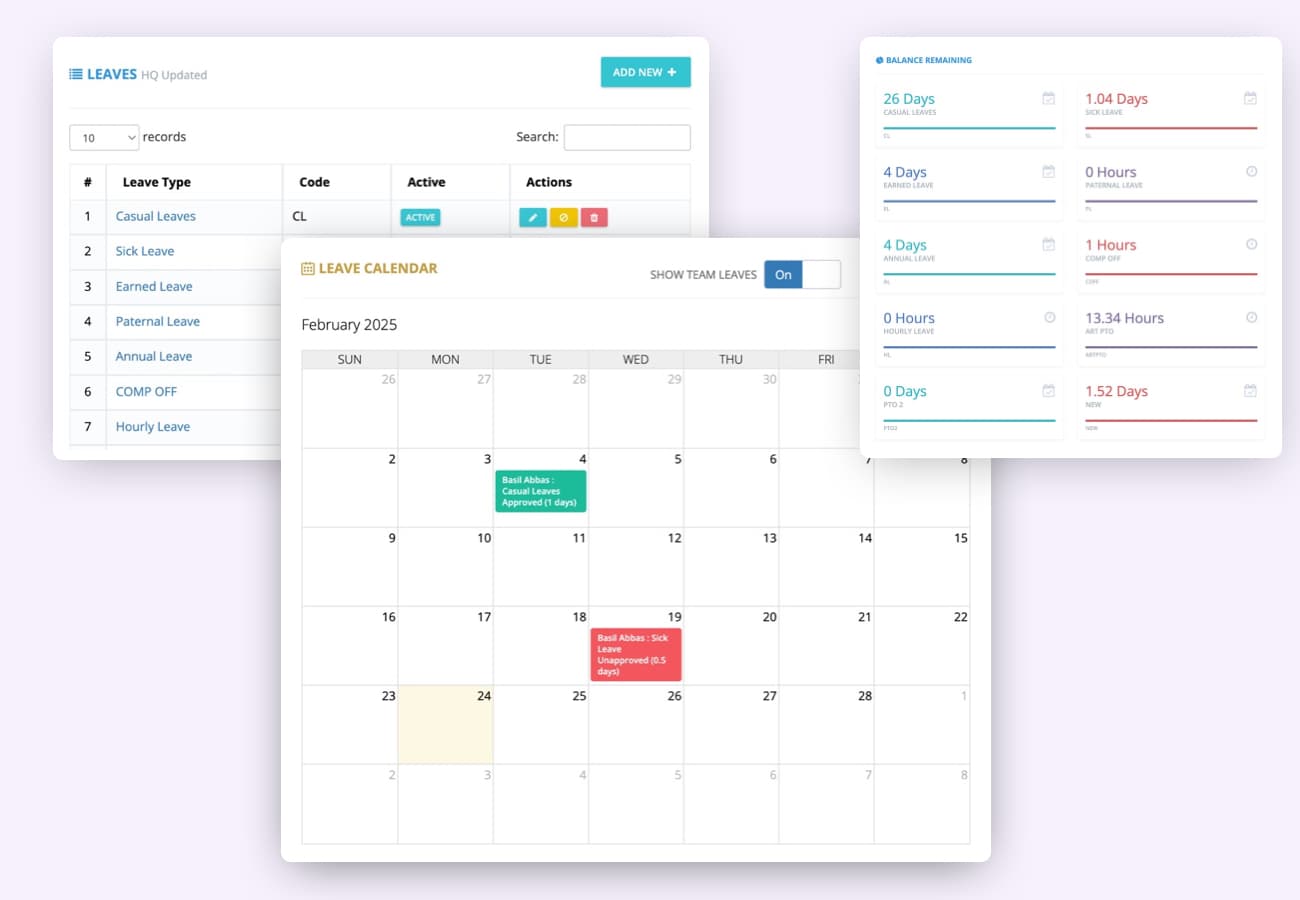
Multiple time-off types
Manage vacation, sick leave, personal days and custom leave types in one place. Employees request time off, view balances, and get real-time updates. Managers set custom rules, automate approvals, and get reports on usage.
- Custom leave types
- Real-time balances
- One-tap approvals
- Automated accruals
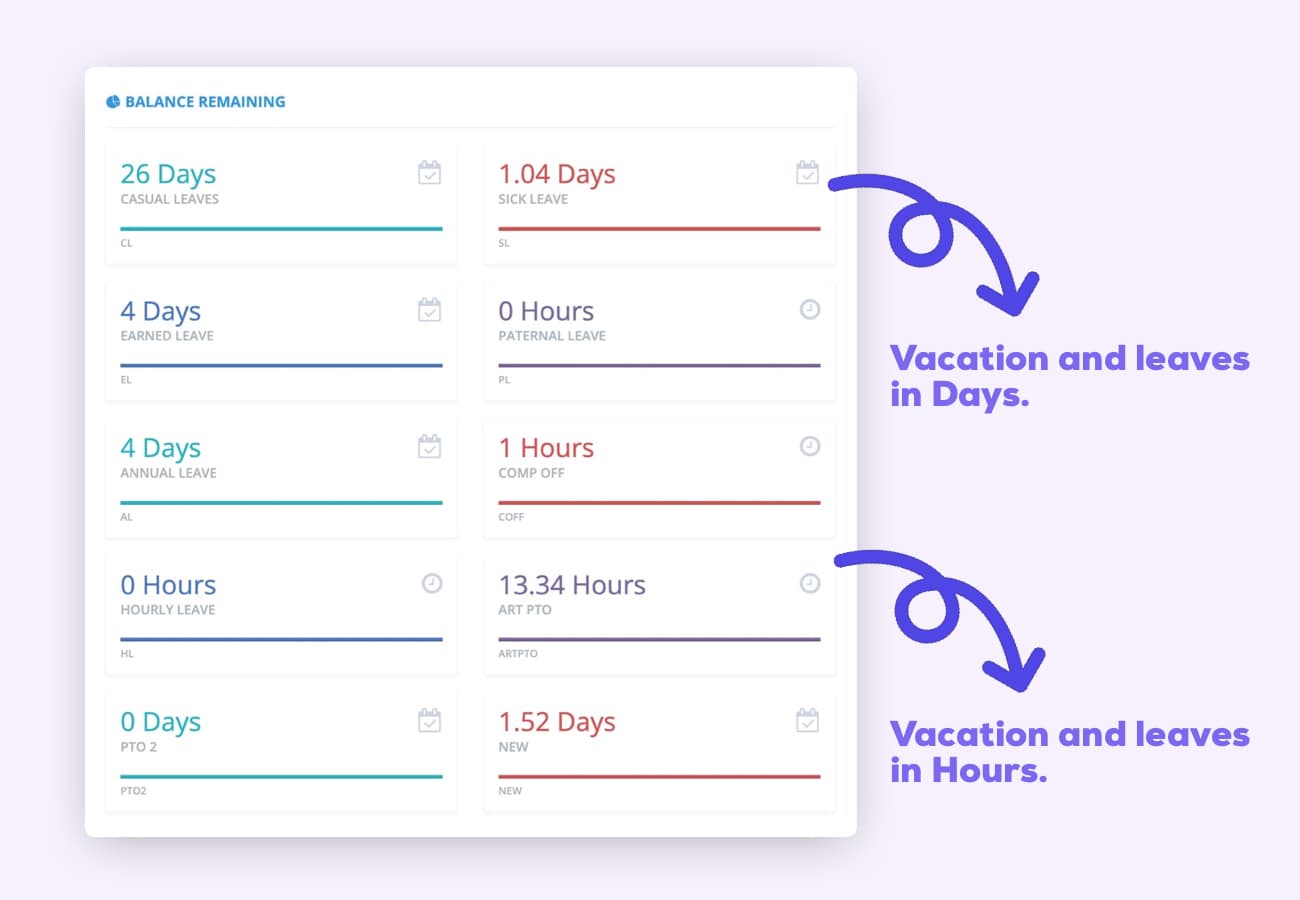
Days or hours
Track time off in days or hours — whichever fits your policies.
Automated accruals
Accrue by tenure, hours worked, anniversary — weekly, 2-weeks, monthly or yearly.
- Tenure rules
- Carry forward
- Probations
- Anniversary
Time off notifications
Employees and managers get instant updates on requests and approvals.
Vacation dashboard
See who's off, who's sick, and who's remote across the whole company.
Frequently asked questions
Have a different question and can't find the answer you're looking for? Reach out to our support team by sending us an email and we'll get back to you as soon as we can.
Yes. ClockIt publishes a free PTO tracking template for Google Sheets and Excel with no account, email address or download gate. It tracks vacation, sick leave and other time-off types with running balances per employee.
Set up one row per employee and one column per leave type, then record the days taken against each. Add an entitlement column and subtract the days taken to produce a remaining balance, using SUM and COUNTIF so the totals update themselves. ClockIt's free PTO tracking template has these formulas already built in, so you can start from it rather than build the sheet from scratch.
Small teams typically start with a spreadsheet, which works until accruals, carryover caps and part-year joiners make the formulas hard to maintain. Larger teams move to software that accrues balances automatically from a policy and lets employees request time off and check their own balance, removing the manual re-entry a spreadsheet needs.
The template is a spreadsheet you maintain by hand: you enter each absence and the formulas total it. ClockIt applies your accrual policy automatically, updates balances as time is approved, handles carryover and caps, and gives employees self-service access to their own balance and requests. Both are free to start.
The template holds an entitlement figure and subtracts days taken, so it shows a remaining balance but does not accrue time automatically or roll balances into the next year for you. For accrual by hours worked or at fixed intervals, plus carryover rules and caps, use ClockIt's PTO features or the free PTO accrual calculator.
More free tools and templates
Online Time Clock for Employees
Punch in and out in the browser — breaks deducted, no sign-up.
Attendance Sheet Template
Daily, weekly, monthly and yearly attendance grids with auto totals.
Employee Vacation Tracker
Log leave as date ranges — entitlement, taken and remaining calculate themselves.
Employee Absence Tracker
Occasions, days lost, absence rate and Bradford Factor per employee.
Timesheet Template
Weekly, biweekly, monthly and project timesheets for payroll.
Work Schedule Templates
Weekly, bi-weekly, monthly and shift schedules for your team.
Clock In / Clock Out Sheet
Printable sign-in log for recording start and finish times.
Time Off Request Form
A simple leave request form your team can fill in and submit.
Annual Leave Calculator
Work out statutory leave entitlement, pro-rata and part-year.
Out of Office Message Templates
25 copy-and-paste auto-replies for vacation, sick leave and handovers.