Replacing your TimeClock Plus
What happens to your punch history, which terminal replaces yours, and what it costs. Written for people who already own the hardware — not a sales comparison.
Most teams replacing a TimeClock Plus are around 20 people and set themselves up in under an hour. Past 100, book a call — the terminal count and site layout are worth working through first.
Your TimeClock Plus will not connect to ClockIt
We would rather lead with that than waste your time. ClockIt reads terminals that speak the ADMS push protocol — that means ZKTeco and eSSL devices. A TimeClock Plus does not, and no amount of configuration changes it.
So this is a hardware replacement, not an integration. The rest of this page is about what that actually involves and what it costs, including the parts people usually discover too late.
What a TimeClock Plus is
TimeClock Plus, from TCP Software, is a long-established workforce-management platform strong in education, healthcare and government — sectors with complicated accrual rules, grant-funded cost coding and strict audit requirements. It is sold with its own terminals and, increasingly, alongside TCP's other acquired products.
This guide covers:
Why teams move off TimeClock Plus
It is built for institutional complexity you may not have
The depth that makes TimeClock Plus right for a school district is overhead for a 40-person company. You pay for and administer capability aimed at a different kind of organisation.
Implementation is a project
Deployments are typically scoped, configured and trained rather than self-serve. That is appropriate at institutional scale and heavy going below it.
Quoted rather than published pricing
Pricing comes through a sales conversation, which makes it hard to compare against a published per-seat rate until you are some way into the process.
What replaces what
| Your TimeClock Plus setup | With ClockIt |
|---|---|
| TCP terminal | ZKTeco terminal, one-time $450–$650, pre-configured |
| Quoted licence | Published $2.99/user/month |
| Scoped implementation project | Self-serve setup in under an hour |
| Institutional feature depth | The subset a 20–200 person business actually uses |
The terminal you need
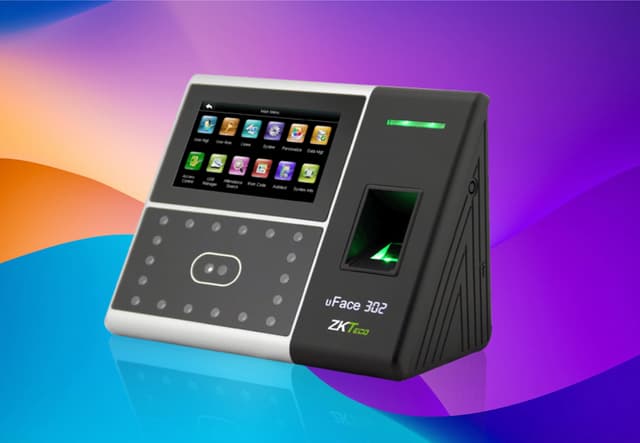
Face Recognition Time Clock – U350
High-performance multi-biometric terminal with face, fingerprint, RFID, and PIN. Recognizes employees in under 1 second—even in low-light conditions.
$650
- Free worldwide shipping
- Arrives pre-configured for your ClockIt account
- Yours outright — no lease, no per-clock licence
How the migration actually goes
- 1
Export your history before you unplug anything
Pull your punch history out of the existing software as CSV while the system is still running. This is the step people skip and regret — once a terminal is decommissioned or a licence lapses, historical punches stored on-device or in a local database can become very hard to reach. Keep the export regardless of whether you import it; payroll audits reach back years.
- 2
Create your ClockIt account
Free to start, no card. Add your employees, set your pay period, and configure overtime rules to match what your old system was doing. Most teams have this done in well under an hour.
- 3
Plug in the new terminal
Your ClockIt device arrives pre-configured for your account. It connects over WiFi or Ethernet and pushes punches to the cloud using built-in ADMS — no local server, no static IP, no port forwarding, no software to install on a PC in the back office.
- 4
Enrol employees and run both in parallel
Enrol fingerprints or faces on the new terminal — a few seconds per person. Run the old clock alongside the new one for one full pay period so you can reconcile the two before you retire the old hardware. Nobody should cut over blind on payday.
- 5
Retire the old terminal
Once a pay period reconciles cleanly, decommission the old clock. Keep the CSV export from step one in your records.
The integration capabilities of this mobile time clock app are outstanding. It seamlessly connects with our existing HR and payroll systems, creating a streamlined workflow that has significantly reduced errors and improved our overall efficiency.
TimeClock Plus migration questions
Will ClockIt work with our existing TCP clocks?
No. TCP terminals are built for their platform and do not support the ADMS push protocol.
We are a school district. Is ClockIt a fit?
Probably not, and it is better said early. Grant-based cost coding, complex union accruals and public-sector audit trails are exactly what TimeClock Plus is built for and are not ClockIt's strengths. ClockIt fits businesses of roughly 20 to 200 people wanting straightforward time, scheduling and payroll export.
How do we export our data?
Export punch history and accrual balances to CSV before your contract ends. Do this early — access usually ends on a contractual date rather than when your migration is finished.
Does ClockIt integrate with my existing terminal?
Almost certainly not, and we would rather say so plainly than waste your time. ClockIt connects to terminals that support the ADMS push protocol — that means ZKTeco and eSSL devices. Hand-geometry readers, proximity-card clocks and most access-control terminals do not speak it. If your device is not a ZKTeco or eSSL, the honest answer is that you need new hardware, which is why we sell it pre-configured rather than pretending a connector exists.
How much does the hardware cost?
Terminals in our shop run $450–$650 with free worldwide shipping, and they arrive already configured for your ClockIt account. That is a one-time purchase, not a lease, and there is no per-clock software licence on top of it.
What does the software cost after that?
ClockIt is $2.99 per user per month. There is a free plan to start on and no setup fee, no per-terminal licence, and no annual contract required.
We have 100+ employees. Can we talk to someone first?
Yes — book a call. Once you are past roughly 100 people the questions get specific to your setup: how many terminals across how many sites, how shifts and overtime rules are structured, and how punches need to reach payroll. That is a conversation, not a signup form.
Replacing something else?
Ready to retire the TimeClock Plus?
Start free and set your account up today — the terminal can follow once you know it fits. Under 100 employees, most teams do this without talking to anyone.