Replacing your Icon Time Systems
What happens to your punch history, which terminal replaces yours, and what it costs. Written for people who already own the hardware — not a sales comparison.
Most teams replacing a Icon Time are around 20 people and set themselves up in under an hour. Past 100, book a call — the terminal count and site layout are worth working through first.
Your Icon Time will not connect to ClockIt
We would rather lead with that than waste your time. ClockIt reads terminals that speak the ADMS push protocol — that means ZKTeco and eSSL devices. A Icon Time does not, and no amount of configuration changes it.
So this is a hardware replacement, not an integration. The rest of this page is about what that actually involves and what it costs, including the parts people usually discover too late.
What a Icon Time is
Icon Time Systems builds self-contained small-business time clocks — most notably the TotalPass line, where the terminal holds the software itself and is administered through a browser pointed at the device on your local network. No server, no PC install, capped at a set number of employees per unit.
This guide covers:
Why teams move off Icon Time
The employee cap is a hard ceiling
TotalPass units are sold for a fixed employee count. Crossing it means another terminal rather than another line on an invoice, which makes growth lumpy and expensive.
Administration is on your network, not the internet
Because the software is on the device, you generally have to be on the same network to administer it. Checking hours from home or from another site is awkward in a way cloud software is not.
One terminal, one location
Self-contained units do not naturally pool across sites. A second location means a second island of data to reconcile by hand.
What replaces what
| Your Icon Time setup | With ClockIt |
|---|---|
| TotalPass terminal with built-in software | ZKTeco terminal that pushes to the cloud |
| Fixed employee cap per unit | Per-seat pricing, add one employee at a time |
| Browser access on the local network | Access from anywhere, any device |
| One island of data per site | All sites pooled in one account, tagged by location |
The terminal you need
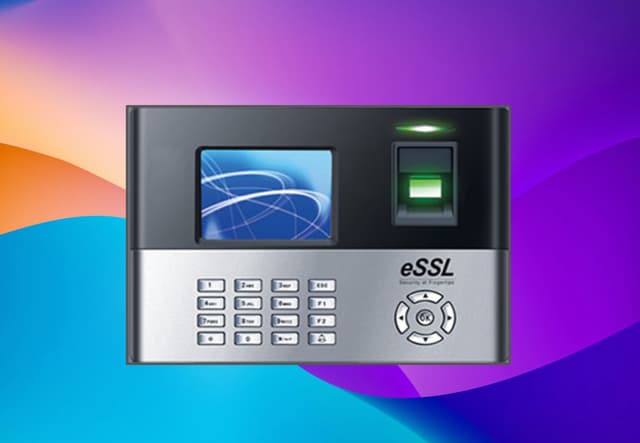
Time Clock X990 FP+RFID WiFi
The X990 is the industry-standard biometric workhorse, now upgraded for the cloud era. Designed for high-traffic environments like factories, warehouses, and large offices, it combines a rugged hardware build with lightning-fast fingerprint verification (<0.5s).
$500
- Free worldwide shipping
- Arrives pre-configured for your ClockIt account
- Yours outright — no lease, no per-clock licence
How the migration actually goes
- 1
Export your history before you unplug anything
Pull your punch history out of the existing software as CSV while the system is still running. This is the step people skip and regret — once a terminal is decommissioned or a licence lapses, historical punches stored on-device or in a local database can become very hard to reach. Keep the export regardless of whether you import it; payroll audits reach back years.
- 2
Create your ClockIt account
Free to start, no card. Add your employees, set your pay period, and configure overtime rules to match what your old system was doing. Most teams have this done in well under an hour.
- 3
Plug in the new terminal
Your ClockIt device arrives pre-configured for your account. It connects over WiFi or Ethernet and pushes punches to the cloud using built-in ADMS — no local server, no static IP, no port forwarding, no software to install on a PC in the back office.
- 4
Enrol employees and run both in parallel
Enrol fingerprints or faces on the new terminal — a few seconds per person. Run the old clock alongside the new one for one full pay period so you can reconcile the two before you retire the old hardware. Nobody should cut over blind on payday.
- 5
Retire the old terminal
Once a pay period reconciles cleanly, decommission the old clock. Keep the CSV export from step one in your records.
The integration capabilities of this mobile time clock app are outstanding. It seamlessly connects with our existing HR and payroll systems, creating a streamlined workflow that has significantly reduced errors and improved our overall efficiency.
Icon Time migration questions
Can ClockIt connect to a TotalPass P400 or B600?
No. TotalPass terminals run their own software and are not built to push punches to a third-party cloud service over ADMS.
How do I get my history off a TotalPass?
Log into the device on your local network and export reports to CSV before you decommission it. The data is on the terminal, so once it is unplugged and wiped there is no other copy.
We hit the employee limit on our unit. Is a second clock the only option?
It is with a self-contained terminal, and it is the most common reason people write to us about TotalPass. With ClockIt the terminal has no employee cap of that kind — you add seats at $2.99 each and only buy a second terminal when you have a second physical door to cover.
Does ClockIt integrate with my existing terminal?
Almost certainly not, and we would rather say so plainly than waste your time. ClockIt connects to terminals that support the ADMS push protocol — that means ZKTeco and eSSL devices. Hand-geometry readers, proximity-card clocks and most access-control terminals do not speak it. If your device is not a ZKTeco or eSSL, the honest answer is that you need new hardware, which is why we sell it pre-configured rather than pretending a connector exists.
How much does the hardware cost?
Terminals in our shop run $450–$650 with free worldwide shipping, and they arrive already configured for your ClockIt account. That is a one-time purchase, not a lease, and there is no per-clock software licence on top of it.
What does the software cost after that?
ClockIt is $2.99 per user per month. There is a free plan to start on and no setup fee, no per-terminal licence, and no annual contract required.
We have 100+ employees. Can we talk to someone first?
Yes — book a call. Once you are past roughly 100 people the questions get specific to your setup: how many terminals across how many sites, how shifts and overtime rules are structured, and how punches need to reach payroll. That is a conversation, not a signup form.
Replacing something else?
Ready to retire the Icon Time?
Start free and set your account up today — the terminal can follow once you know it fits. Under 100 employees, most teams do this without talking to anyone.