New in ClockIt Plus • Payroll in 5 MinutesEmployee Expense & Mileage TrackingFrom Receipt & Odometer to Payroll
Capture mileage trips, FAVR vehicle allowances and expense receipts across mobile, web and kiosk. Enforce spending caps and tiered statutory rates automatically, then opt approved reimbursements straight into Payroll Run.
- Tiered Miles/km & FAVR Plans
- Receipt Rules & Spending Caps
- 1-Click Payroll Run & QuickBooks/ADP Export
- • $2.99/user/month — no separate expense tool
- • No credit card required
- • Free 15-minute policy setup call


Built for Operations & Payroll Teams
Stop reconciling receipts and mileage logs in Monday spreadsheets
Field crews already clock in with ClockIt. Keeping mileage logs, vehicle allowances and expense receipts in the same platform eliminates duplicate apps, enforces caps before approval, and feeds clean earning-code lines directly into Payroll Run.
Tiered & FAVR mileage built in
- Configure per-mile or per-km rates, annual tiered thresholds (IRS, HMRC 45p/25p, CRA, ATO), multiple vehicle types, and recurring Fixed + Variable allowances per employee.
Policy guardrails before approval
- Set category spending caps with hard blocks, receipt photo thresholds, claim age limits, and Self / Team / All permissions so finance reviews clean claims only.
Opt-in sync to Payroll Run
- Pull approved mileage and expense reimbursements straight into Payroll Run under custom earning codes, locked in the pay snapshot and exported to QuickBooks, ADP, Gusto, Rippling or Deel.
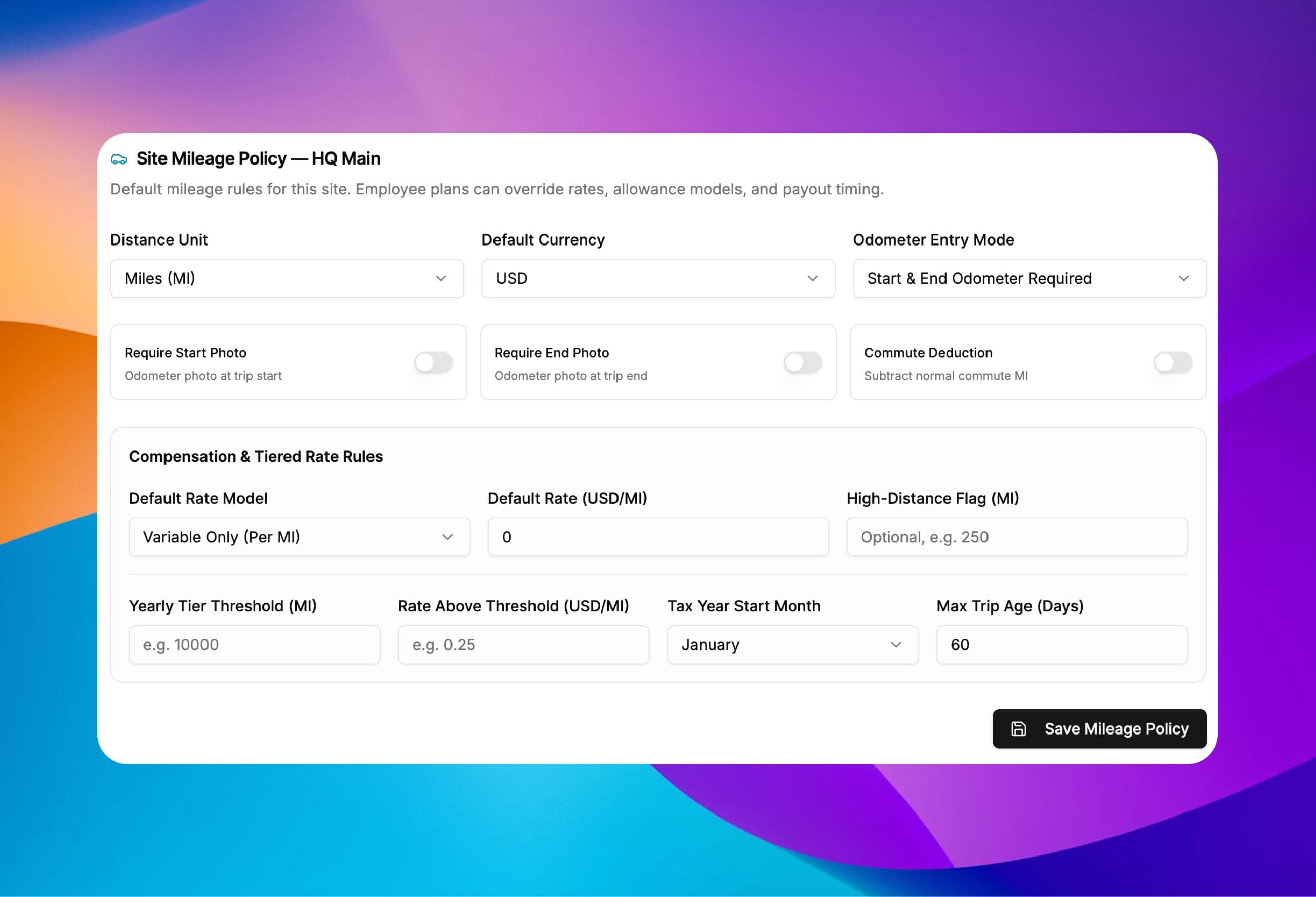
Per-mile or per-km rates with tiered annual thresholds
Set a default mileage policy per site in miles or kilometers with fiscal-year tiered thresholds — such as HMRC's 45p for the first 10,000 miles and 25p thereafter, or CRA's 5,000 km step-down. Override rates for individual employees whenever a role or territory needs its own plan.
Miles or kilometers per site
Run US, UK, Canadian, Australian and European sites under local units and currencies.
Automatic annual tiering
Set your fiscal reset month (Jan–Dec) so ClockIt steps down to Tier 2 automatically.
Employee-level overrides
Assign effective-dated custom mileage rates to specific field reps or managers.
Odometer & claim age rules
Require odometer photos or cap how many days back a trip can be claimed.
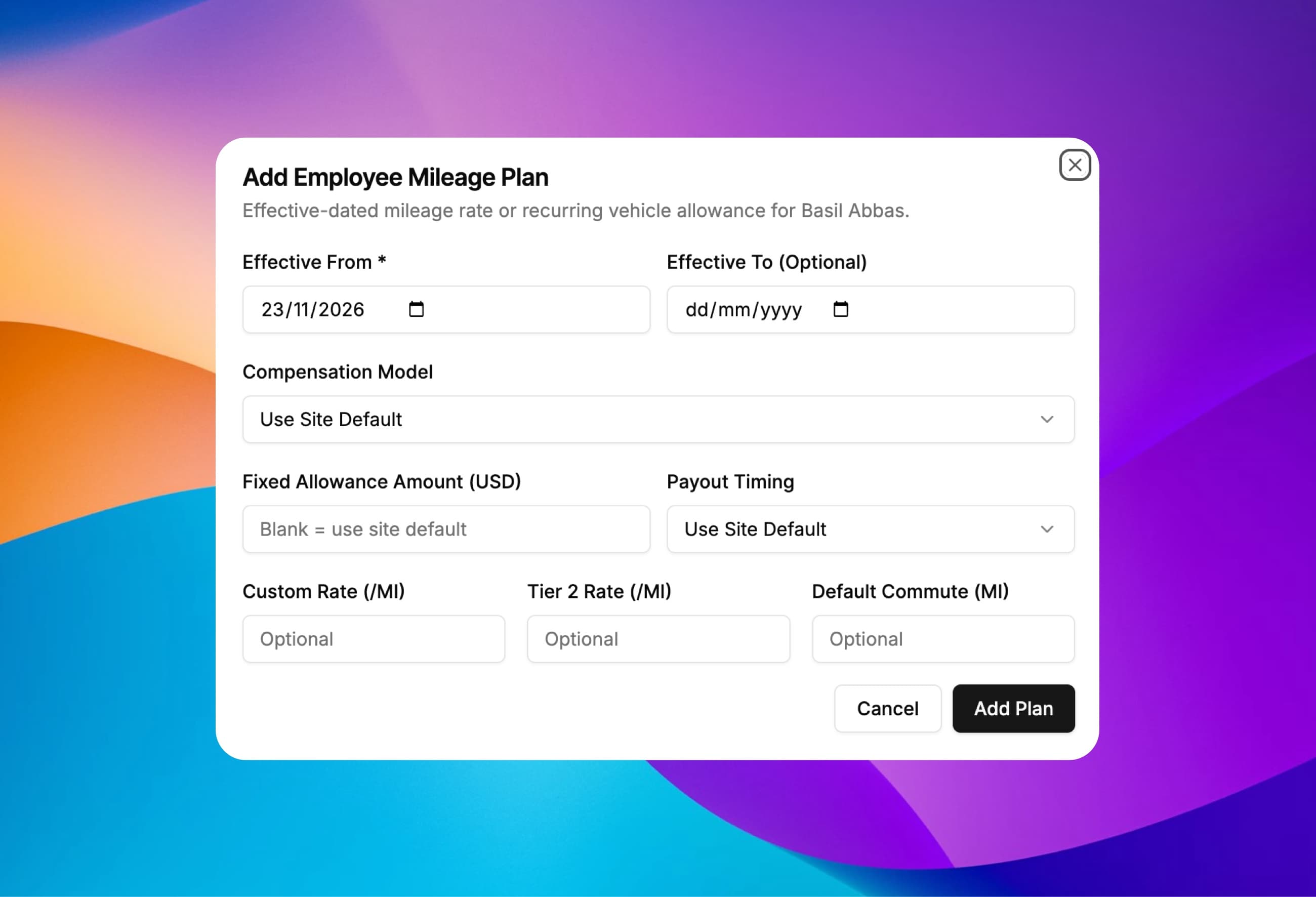
Different reimbursement rates for cars, vans, motorcycles and bikes
Field teams rarely drive the same vehicle. Create unlimited vehicle types per site — Personal Car, Delivery Van, Pickup Truck, Motorcycle or Bicycle — each with its own per-mile or per-km rate so employees just pick their vehicle when logging a trip.
Per-vehicle primary & tier rates
Match statutory vehicle classes (like UK HMRC car vs. motorcycle vs. bicycle rates).
Default vehicle selection
Set a site default so routine trips take seconds to submit.
Clean audit trail
Every logged trip records the exact vehicle type and effective rate on the date driven.
Zero spreadsheet lookups
Payroll never has to guess which rate applies to a driver's vehicle.
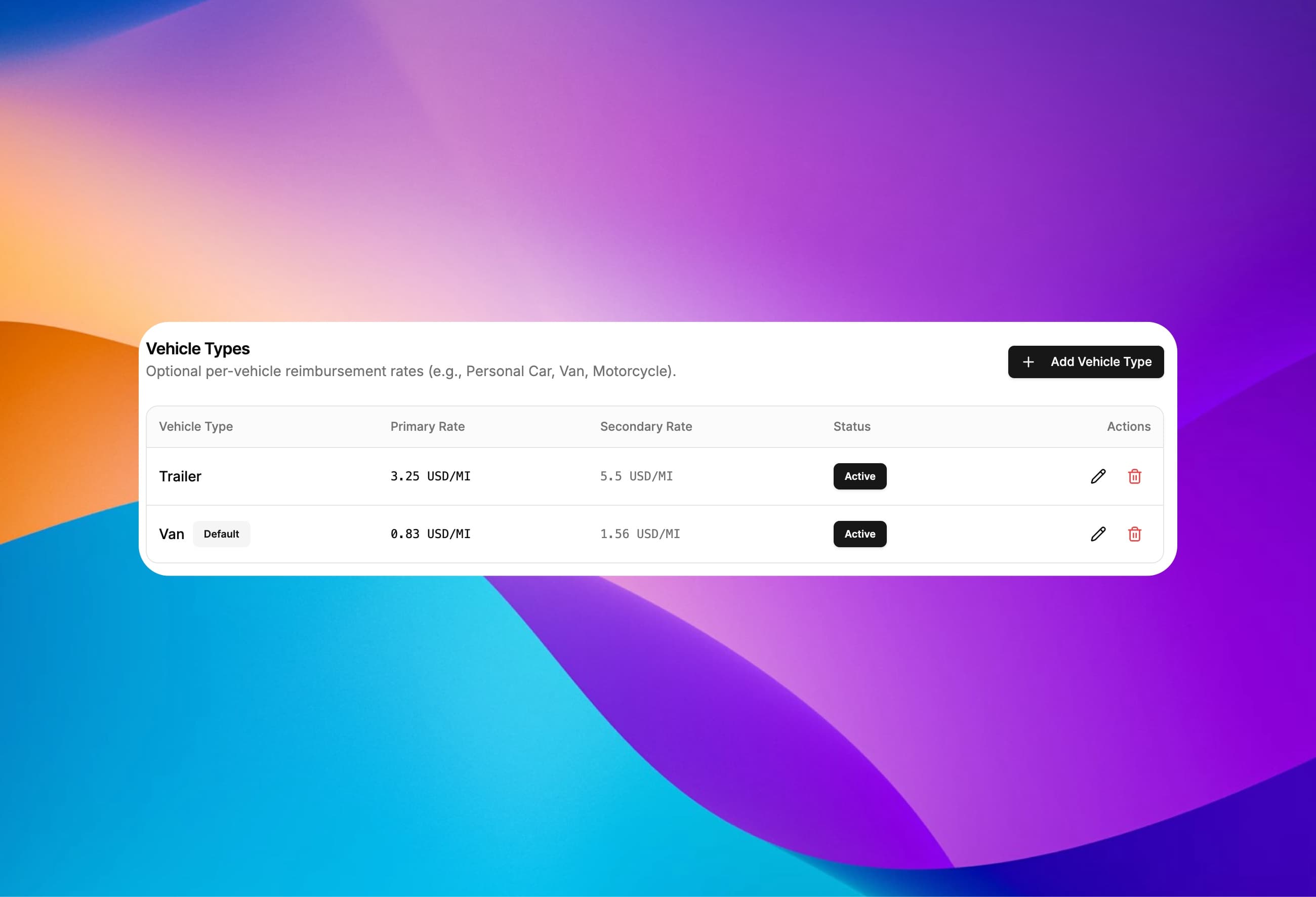
Recurring vehicle allowances plus per-mile variable pay
Support high-mileage field sales and service teams with Fixed + Variable (FAVR) reimbursement plans. Combine a recurring monthly fixed allowance (such as $400/mo) with a variable per-mile or per-km rate, all effective-dated on the employee's profile.
Fixed + Variable (FAVR) model
Pair a recurring vehicle stipend with live variable mileage payouts in one plan.
Effective-dated history
Update an employee's vehicle allowance mid-year without altering historical pay runs.
Site default or custom plan
Keep standard staff on site defaults while field reps run custom FAVR plans.
Automated payroll payout
Recurring fixed amounts and approved variable miles flow cleanly into Payroll Run.
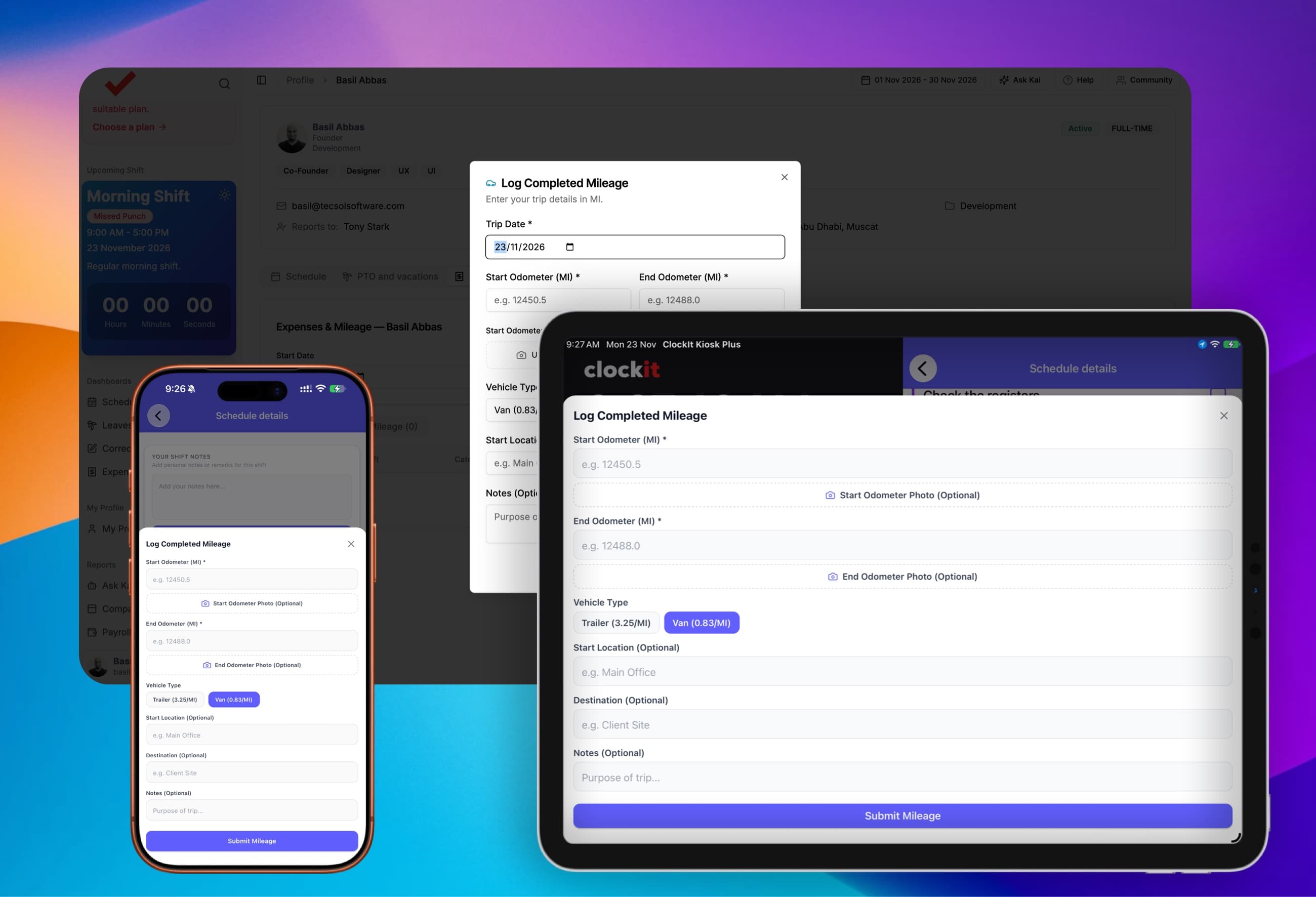
Log business trips from mobile, web or shared kiosk
Employees submit mileage logs wherever they work — from the ClockIt iOS and Android apps in the field, the web portal at a desk, or a shared tablet kiosk at the depot. Odometer readings, distance and reimbursement totals calculate instantly.
iOS & Android field logging
Capture trips right after a site visit alongside GPS clock-ins and shift punches.
Web & Kiosk access
Drivers without company phones can log trips from the depot kiosk or browser.
Instant payout preview
Employees see the exact reimbursement amount before submitting for approval.
Odometer photo proof
Attach start/end odometer photos when required by your site mileage policy.
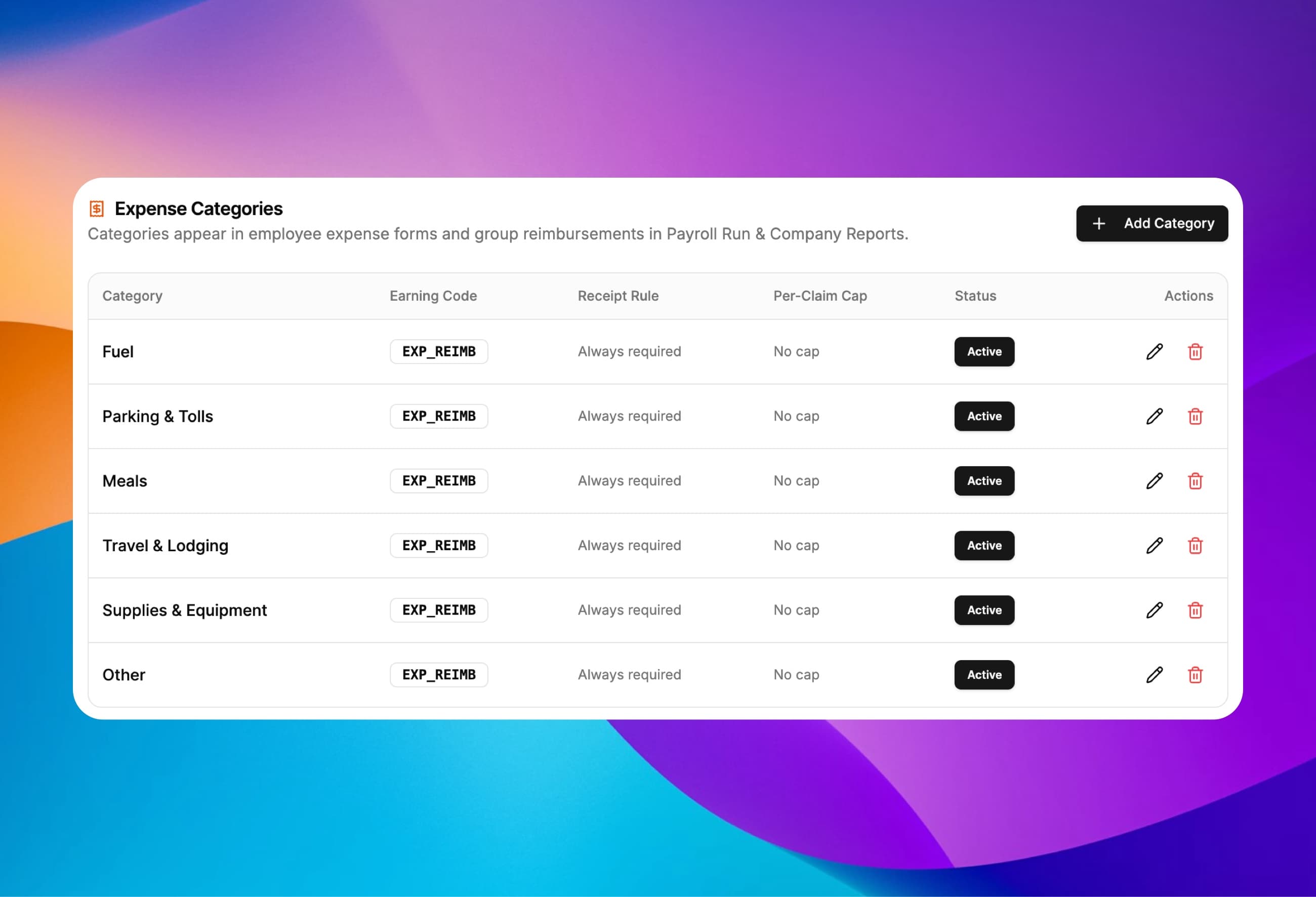
Map every expense category straight to its payroll earning code
Create per-site expense categories — Meals, Parking & Tolls, Lodging, Tools, Client Travel or Uniforms — and assign each category its own payroll earning code (such as EXP_REIMB or MEAL_REIMB) so exported payroll files drop directly into your ledger.
Custom payroll earning codes
Tag each category with the exact code ADP, QuickBooks, Gusto, Rippling or Deel expects.
Per-site currency
Match each site's local currency across US, UK, EU, UAE, Australia and APAC teams.
Structured reporting
Track spend cleanly by category, site, department and pay period.
Fast category setup
Add, edit or archive categories anytime without breaking historical payroll snapshots.
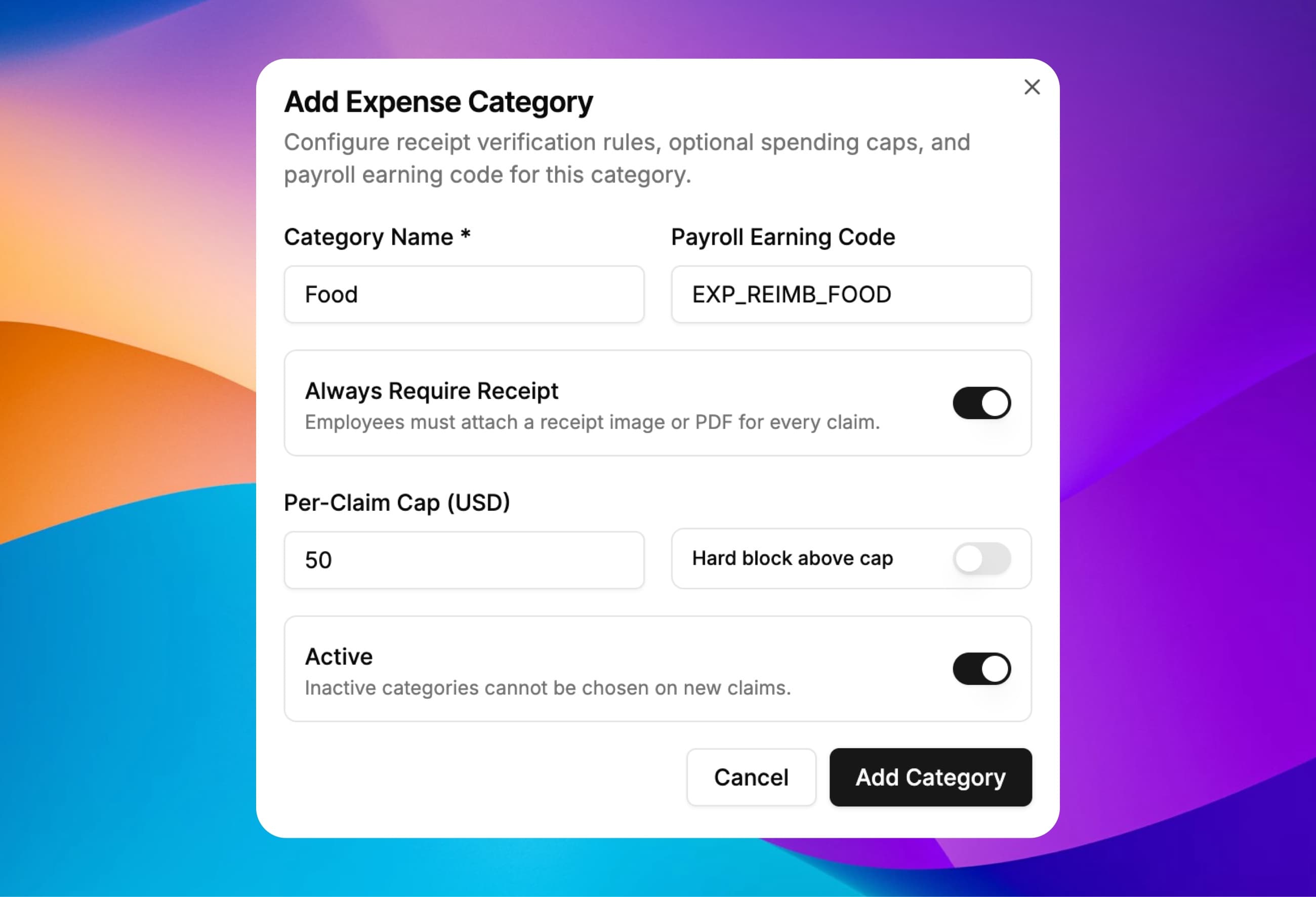
Enforce receipt thresholds, spending caps and submission deadlines
Stop chasing missing paper receipts at month-end. Require receipt images or PDFs on every claim — or only above a dollar threshold like $25 — set category spending caps with optional hard blocks, and enforce a maximum claim age in days.
Smart receipt rules
Require receipts on all claims or only above a configurable threshold (e.g., $25.00).
Soft warnings or hard blocks
Flag over-cap claims for manager review or hard-block submissions above the limit.
Max submission age
Prevent 6-month-old surprise receipts by enforcing a 30, 60 or 90-day claim window.
Image & PDF receipts
Employees snap a photo on mobile or upload a PDF invoice right on the claim.
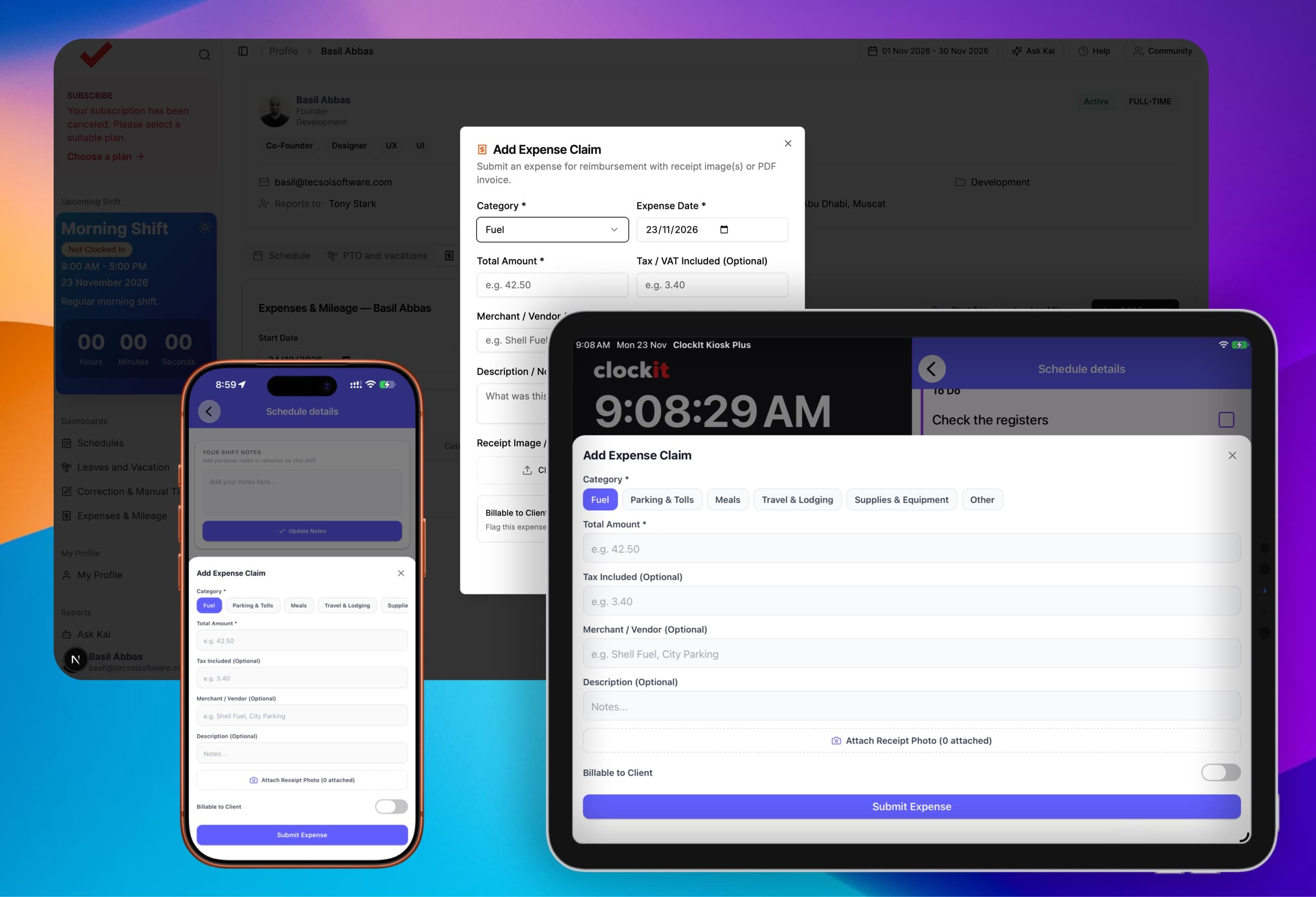
Snap a receipt and submit an expense claim in 15 seconds
Field crews, hotel managers and traveling reps submit expense claims right from the same ClockIt app they already clock in with — on mobile, web or kiosk — with category validation applied before the claim ever reaches finance.
One app for time & expenses
No separate expense tool login or extra per-seat subscription for hourly staff.
Instant policy feedback
Employees know immediately if a receipt is required or a category cap is exceeded.
Real-time claim status
Track Pending, Approved, Rejected and Paid status without emailing payroll.
Receipt archive
Every receipt stays attached to the claim and linked to the finalized pay run.
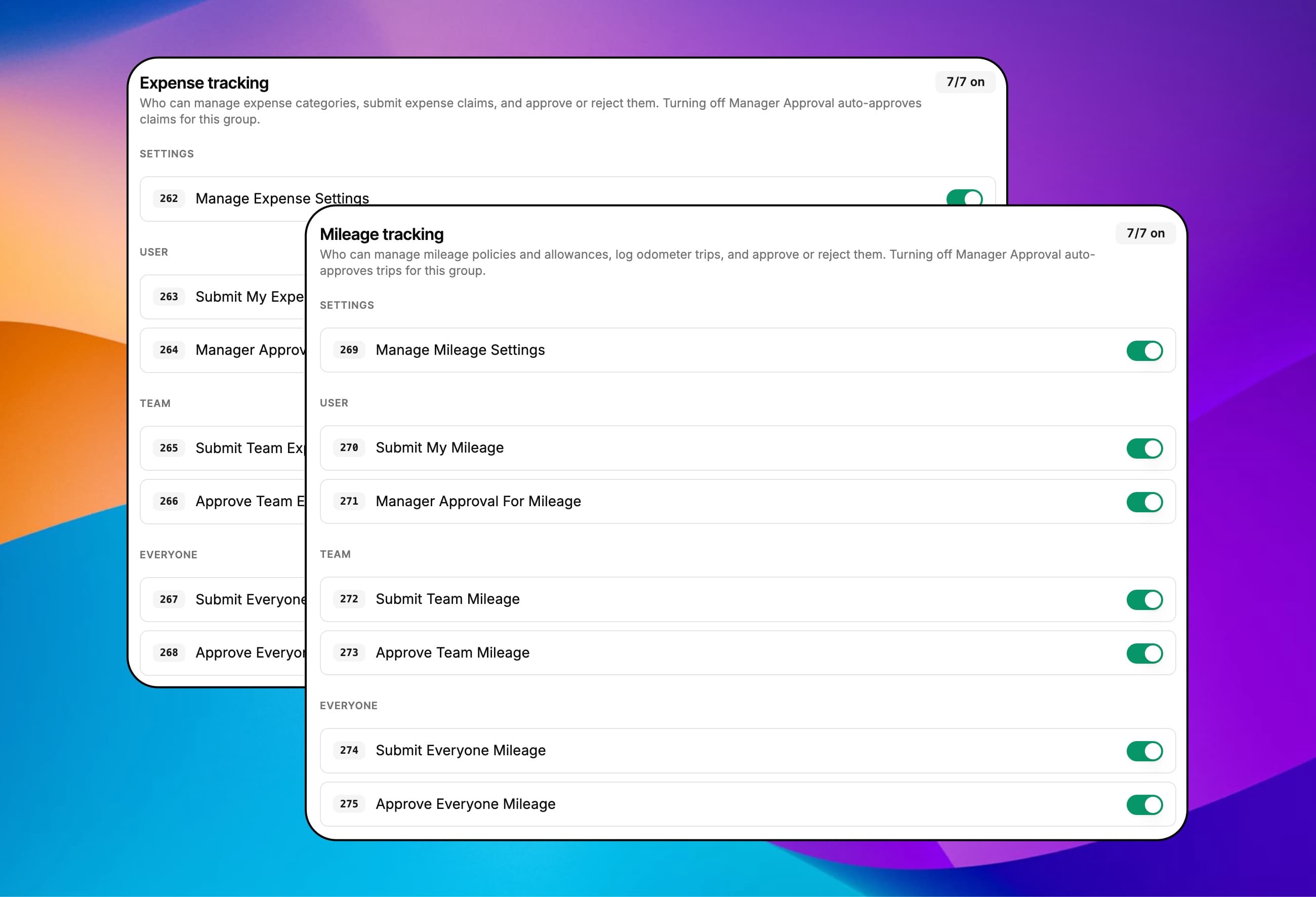
Self, Team or All-company visibility and approval controls
Keep payroll data tight with role-based permissions. Let employees view and submit their own claims (Self), let branch or site managers review and approve their direct reports (Team), and give payroll admins full company-wide control (All).
Self scope for employees
Staff only see their own mileage logs, expense claims and payout history.
Team scope for managers
Supervisors approve claims only for their assigned sites or direct reports.
All scope for payroll & finance
Admins audit every site, override policies and finalize payouts into Payroll Run.
Clear approval audit log
Records who approved or rejected every claim, when, and with what note.
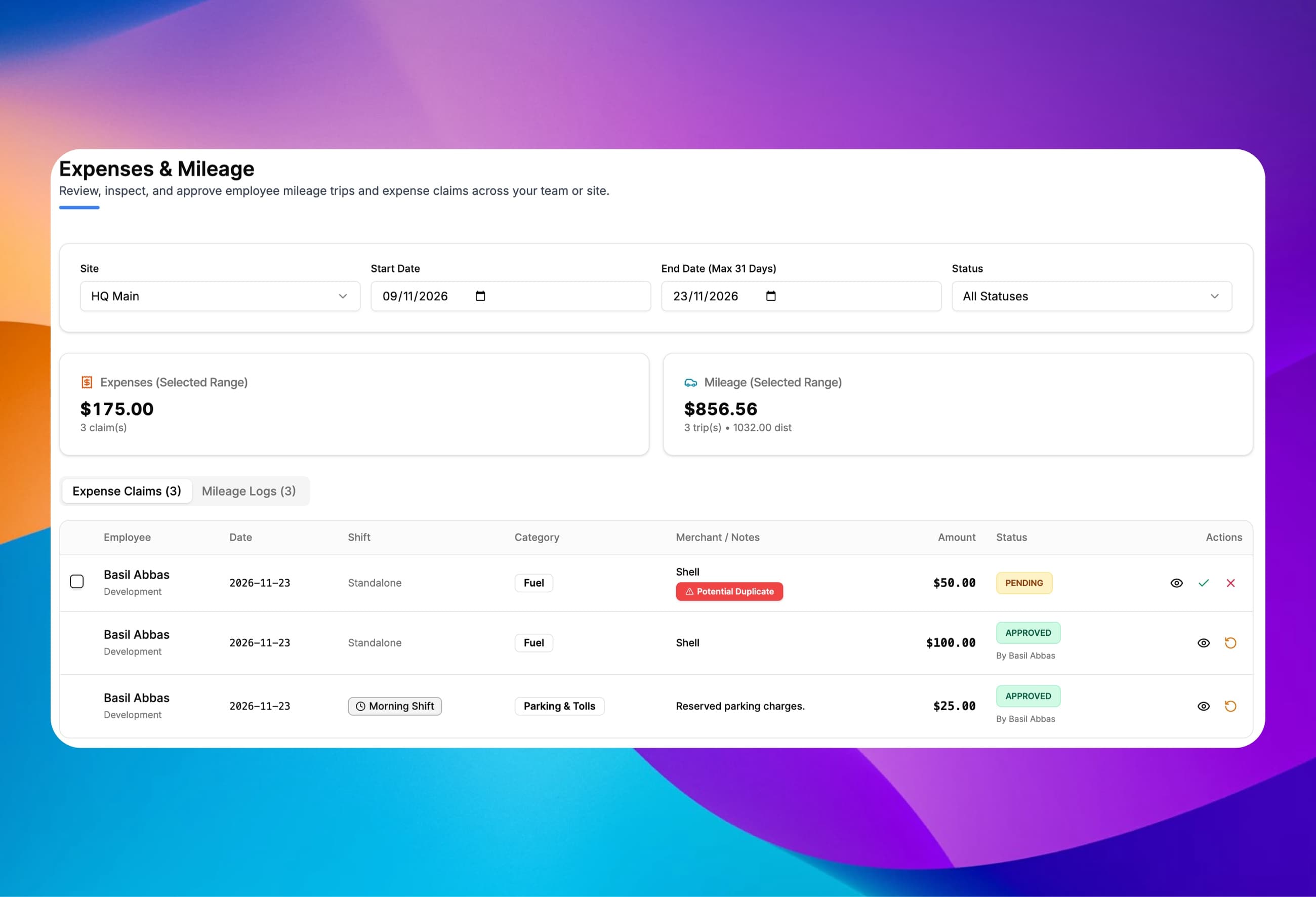
Review expense queues with automatic policy warnings
Managers and payroll teams don't have to inspect every line item blindly. The Expenses dashboard surfaces warning badges for missing receipts, over-cap amounts and pending approvals so you can approve clean claims in bulk and focus only on exceptions.
Exception-first review
Policy warnings highlight missing receipts, cap breaches and late submissions instantly.
One-click receipt preview
Inspect attached receipt images and PDFs side by side before clicking Approve.
Filter by site, status & period
Clear the entire pay period's queue before running Monday payroll.
Rejection notes
Send claims back with a clear reason so employees can attach a missing receipt.
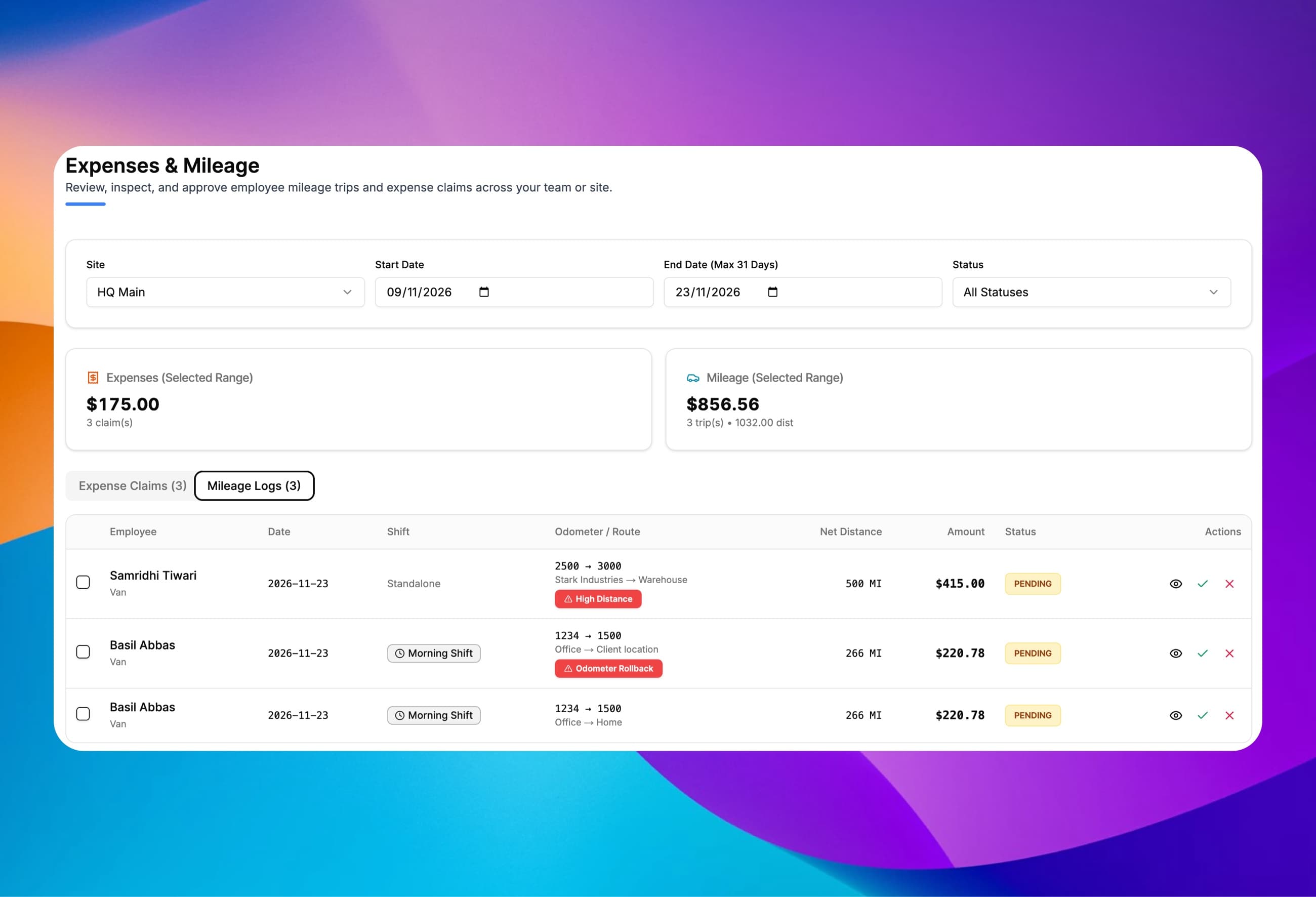
Audit mileage logs and flag anomalies before payout
Review every employee's submitted trips, vehicle types, distances and calculated reimbursements in one queue. Built-in warnings alert approvers to missing odometer proof, unusual distances or pending logs before the pay period closes.
Distance & rate verification
Confirm exact miles/km, vehicle rate and tier threshold applied on every trip.
Odometer & policy alerts
Spot missing odometer photos or out-of-window claims at a glance.
Fast manager sign-off
Approve or reject trips individually or in batches ahead of payroll cutoff.
Zero duplicate claims
Approved logs lock to their payroll run so a trip is never paid twice.
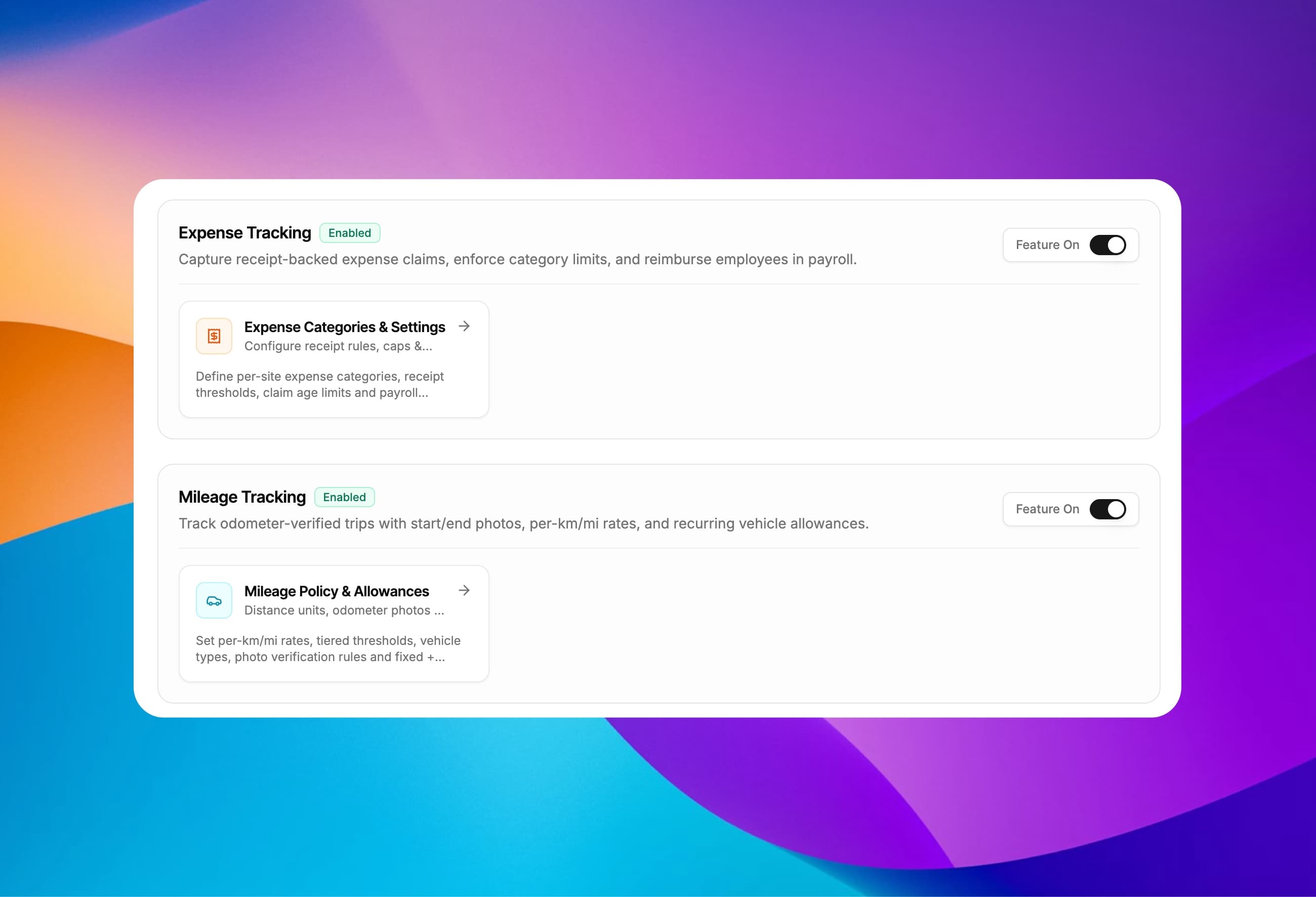
Choose whether to include expenses & mileage in each pay run
Some companies reimburse mileage on every biweekly paycheck; others settle expenses once a month in a separate run. Toggle Expenses and Mileage on or off per Payroll Run — ClockIt stays flexible to your accounting workflow.
Per-run opt-in toggles
Include approved expenses, approved mileage, both, or neither on any draft run.
Pre-flight pending checks
Payroll Run warns you if unapproved claims exist in the pay period before you lock.
Pay once, never twice
Once a run is finalized, included claims are marked paid and excluded from future runs.
Separate reimbursement tracking
Keep non-wage reimbursements distinct from taxable gross wages on the ledger.
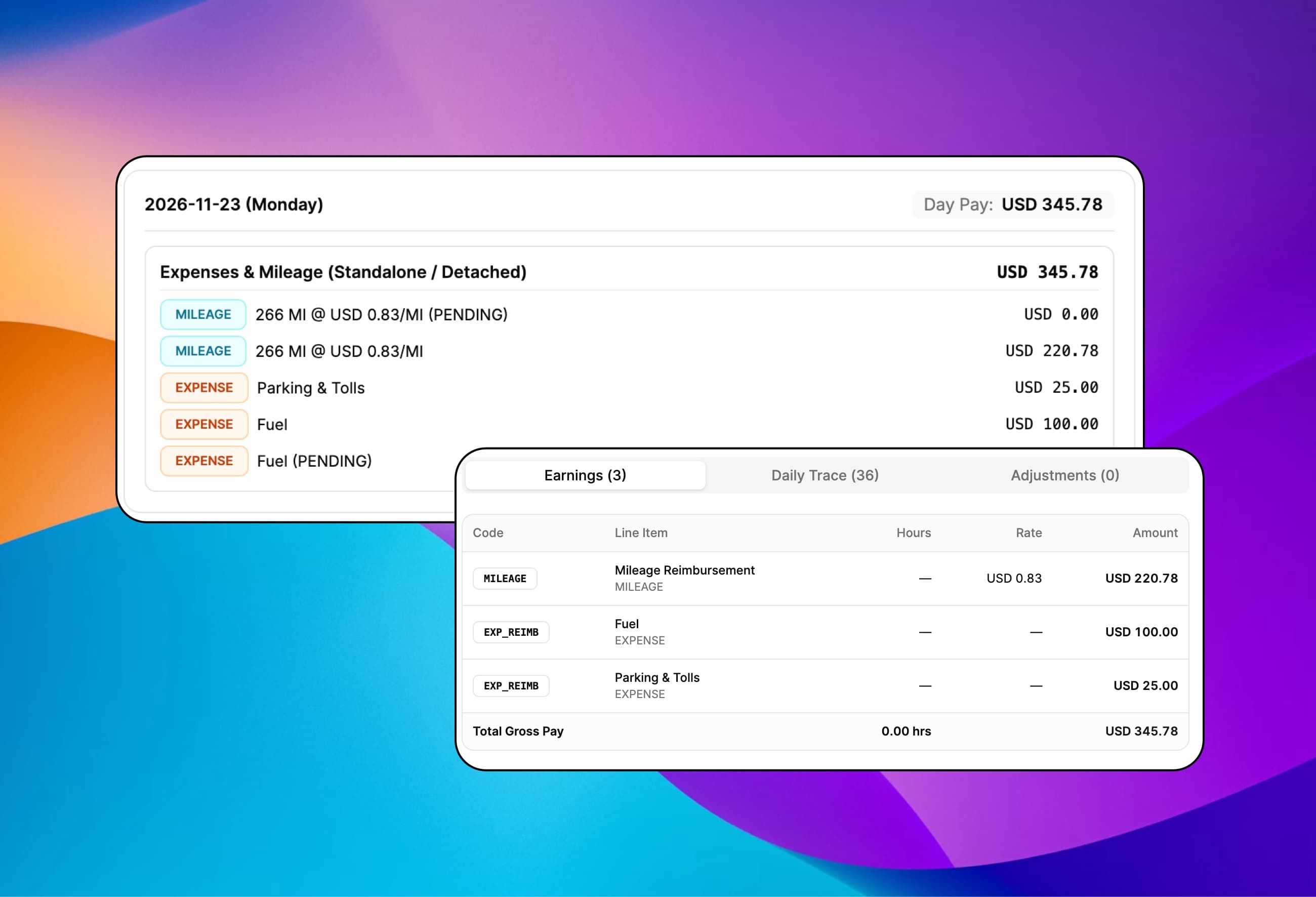
Complete time, shifts, expenses and mileage payroll in 5 minutes
Approved mileage and expenses land directly inside ClockIt Payroll Run alongside regular hours, overtime tiers, shift differentials, PTO and holiday pay. Finalize the immutable snapshot and export pre-mapped CSVs for QuickBooks, ADP, Gusto, Rippling or Deel.
Unified gross pay + reimbursements
Time punches, shift differentials, mileage and expenses reconciled in one pay run.
Provider-ready CSV exports
Export clean earning-code lines for QuickBooks, ADP, Gusto, Rippling, Deel or any ERP.
Immutable audit snapshot
Lock rates, receipts, mileage logs and approvals permanently when the run closes.
Included at $2.99/user/mo
No separate $8/user expense software needed alongside your time clock.
How It Works
From field trip to finalized payroll in three steps
Configure your reimbursement policies once and let every pay cycle run on autopilot.
- 1. Set mileage rates & expense rules once
Pick miles or km, configure site/vehicle rates or FAVR plans, and set receipt thresholds, spending caps and payroll earning codes.
- 2. Employees log from mobile, web or kiosk
Field crews snap receipts and log mileage trips in seconds; managers clear exception-flagged queues with Self / Team / All permissions.
- 3. Opt into Payroll Run & export in 5 minutes
Toggle approved expenses and mileage into your pay period, lock the snapshot, and export to QuickBooks, ADP, Gusto, Rippling or Deel.
Global Mileage & Expense Compliance
Ready for IRS, HMRC, ATO, CRA and multi-country teams
Each site in ClockIt carries its own currency, distance unit, mileage tiers and expense categories so global operations stay compliant from one account.
United States (IRS, California § 2802 & Illinois)
- Run standard IRS per-mile rates or FAVR plans, enforce mandatory private-employer expense & mileage reimbursement rules in states like CA and IL, and export to QuickBooks, ADP or Gusto.
United Kingdom (HMRC 45p / 25p Tiered Rates)
- Set automatic 10,000-mile annual tier thresholds (45p first 10k miles, 25p thereafter) with separate rates for cars, motorcycles (24p) and bicycles (20p) aligned to the April UK tax year.
Australia (ATO Cents-per-km) & Canada (CRA Tiered km)
- Switch sites to kilometers, apply ATO cents-per-km or CRA 5,000 km tiered step-down rates automatically, and collect GST/receipt documentation cleanly.
Multi-Site Field, Hospitality & Staffing Teams
- Combine mobile GPS clock-ins, tablet kiosks, shift differentials, holiday pay and expense/mileage reimbursements in one $2.99/user/month platform.
Related: Payroll Run & pay policies · free mileage reimbursement calculator · mileage rates by country & US state · shift differential calculator · holiday pay calculator · GPS location & geofencing
What we love most is the real-time data and reports, which provide clear insights into employee attendance and payroll expenses. Plus, the ease of use means less administrative burden, allowing our HR team to focus on more strategic initiatives. If you’re looking for a reliable payroll solution that enhances efficiency and accuracy, clockit.io is the perfect choice! Highly recommended!
How does ClockIt calculate tiered mileage rates like HMRC or CRA?
In your site Mileage Policy, set your primary rate, annual distance threshold (such as 10,000 miles for UK HMRC or 5,000 km for Canada CRA), secondary Tier 2 rate, and fiscal reset month. ClockIt tracks each employee's cumulative distance for the fiscal year and steps down automatically when they cross the threshold.
Can we reimburse different rates for personal cars, vans and motorcycles?
Yes. You can configure multiple Vehicle Types per site — such as Personal Car, Delivery Van, Pickup Truck, Motorcycle or Bicycle — each with its own reimbursement rate. Employees select their vehicle when logging a trip.
Does ClockIt support Fixed and Variable Rate (FAVR) vehicle allowances?
Yes. Individual employee mileage plans support Fixed + Variable (FAVR) models, letting you combine a recurring monthly fixed allowance with a per-mile or per-km variable rate, all effective-dated on the employee's profile.
Can employees submit expenses and mileage from mobile and kiosk apps?
Yes. Employees can log mileage trips, attach odometer photos, and submit expense claims with receipt images or PDFs across the ClockIt iOS and Android mobile apps, web browser, and shared tablet kiosks.
Do approved expenses and mileage have to go into every payroll run?
No — inclusion is optional per run. When creating or reviewing a Payroll Run, you can toggle approved expenses and approved mileage on or off depending on whether you reimburse every pay cycle or on a separate schedule. Once a run is finalized, included claims are locked so they can never be paid twice.
Which payroll providers can I export expenses and mileage to?
Every expense category and mileage policy maps to a custom Payroll Earning Code (such as EXP_REIMB or MILEAGE). ClockIt exports pre-mapped CSV files for QuickBooks, ADP Workforce Now / RUN, Gusto, Rippling, Deel, plus a universal detailed earnings ledger.