












Webclock for Time Tracking & Payroll
Track hours from any browser, automate payroll, and uncover insights. A web‑based time clock built for modern teams of any size.
Manual processes create errors, delays, and blind spots that cost time and money.
Inaccurate time tracking that creates payroll errors
Time‑consuming manual data entry
Little visibility into project costs or team productivity
Balancing employee trust without intrusive monitoring
Clockit.io turns time management from a chore into a strategic advantage — delivering precision, efficiency, and the insights leaders need.
Key Features & Benefits
Discover how our webclock goes beyond simple time tracking to boost your business.
Intelligent AI time tracking detects activity, suggests entries, and learns work patterns.
Eliminate manual timesheet entry, improve accuracy, and free up employee time for more productive work.
Connects directly with QuickBooks and other major payroll and time tracking software.
Run payroll faster, reduce errors, and save hours on every pay run. Ensure accurate, compliant financial processing.
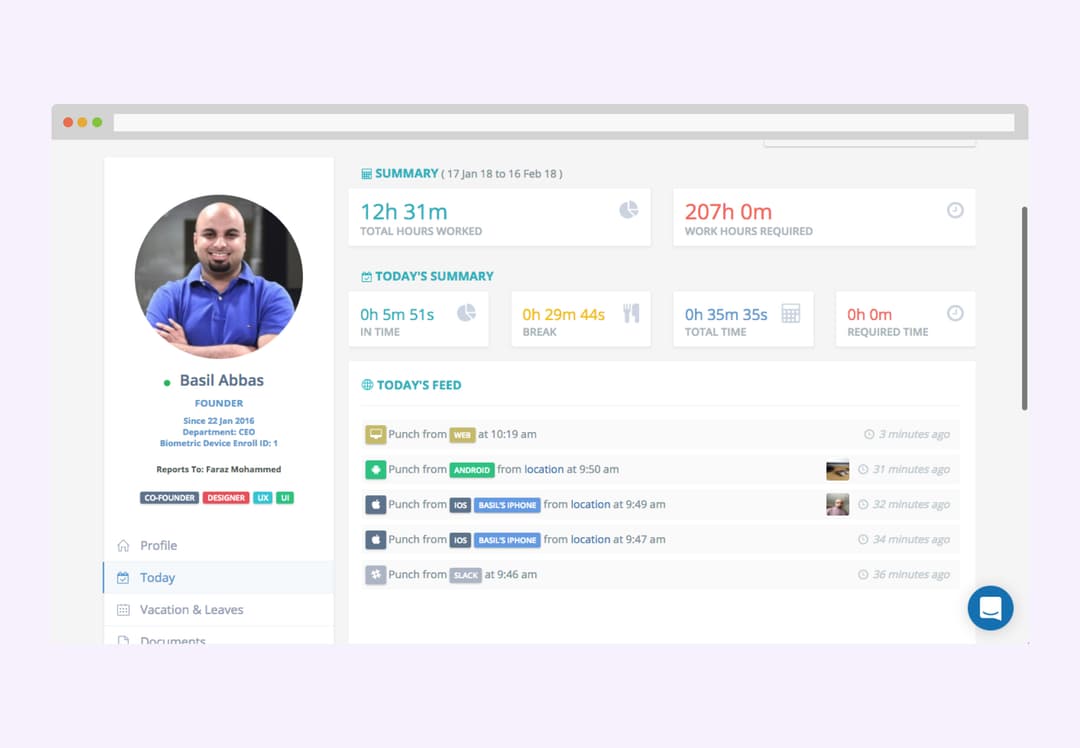
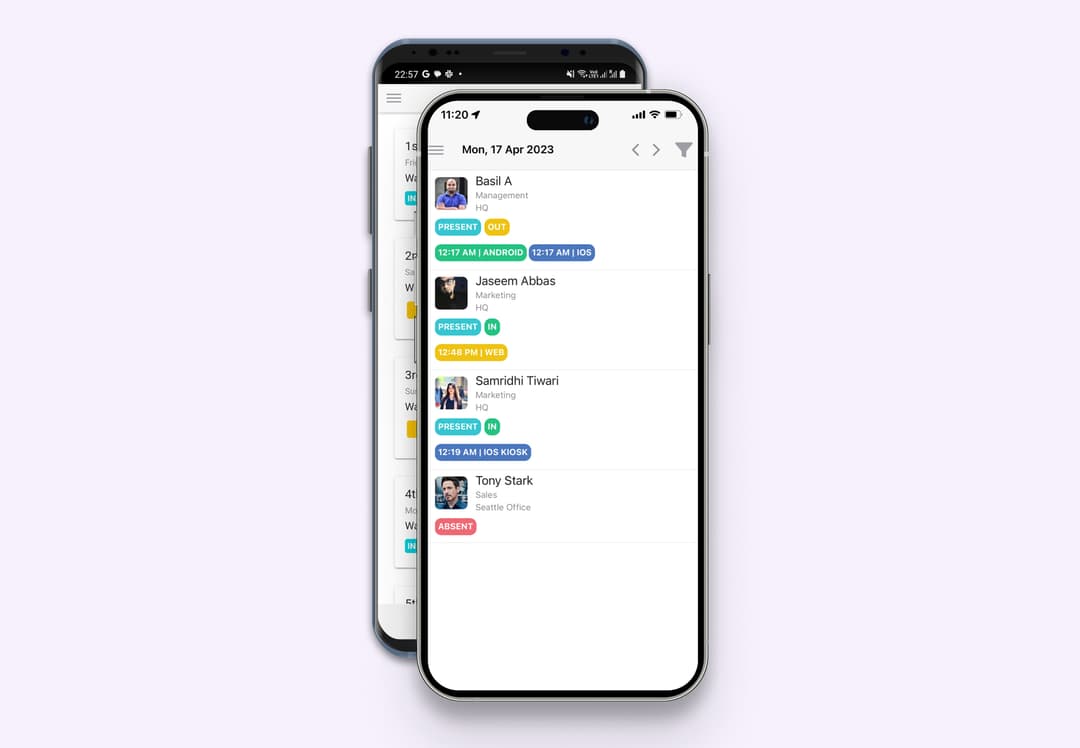
Easy clock-in/out from any web browser, with dedicated employee time clock apps for mobile and desktop.
Flexible time tracking for office, remote, and hybrid teams. Clock in from anywhere, on any device, with real-time sync.
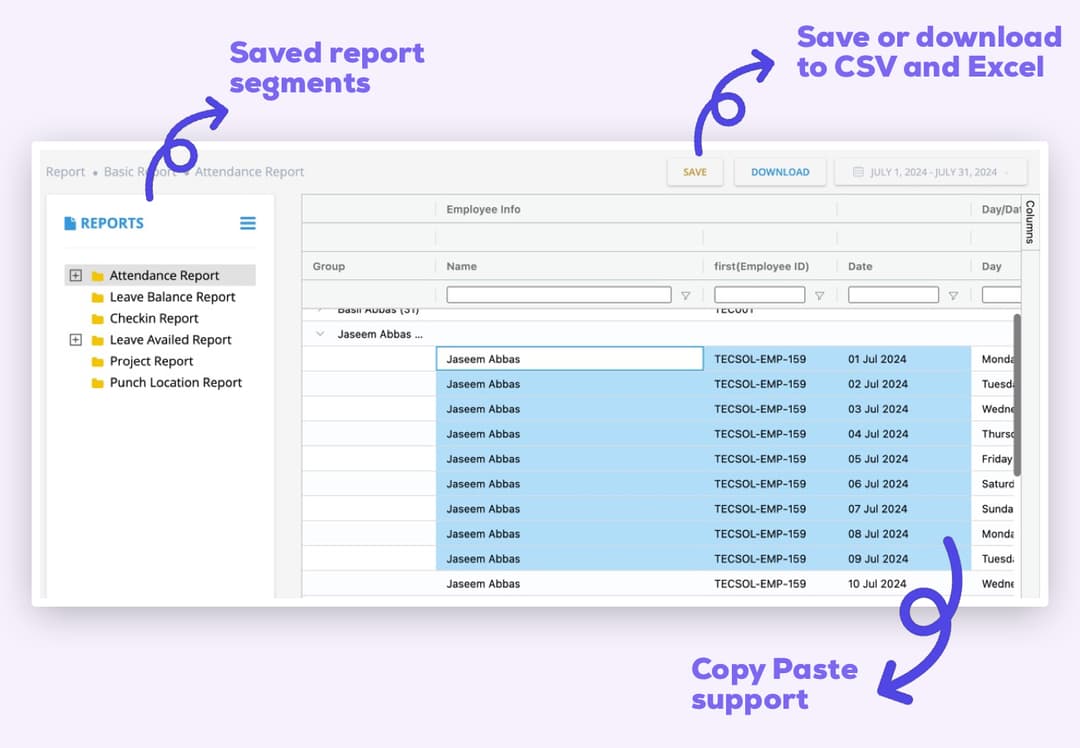
Customizable reports for project time tracking, budget vs. actuals, and team utilization.
Gain deep insights into project costs, optimize resource allocation, and boost profitability with data-driven decisions.
User-friendly interface with no intrusive monitoring—an anti-micromanagement time tracking solution.
Foster trust and encourage 100% adoption with a respectful time tracking experience focused on productivity—not micromanagement.
Granular role-based access control with manager approvals and a complete audit trail.
Maintain control, compliance, and accountability while keeping workflows fast and secure.
Manage shifts, time off, and availability with an intuitive drag-and-drop interface that keeps everyone on the same page.
Centralized scheduling
View and manage all employee schedules in one easy-to-use calendar interface.
Drag-and-drop shifts
Easily create, edit, and assign shifts with a simple drag-and-drop feature.
Real-time updates
Instantly notify employees of schedule changes via email or mobile notifications.
Time-off management
Allow employees to request time off and manage approvals seamlessly within the scheduler.
Permissions based clock in clock out allows employees to easily select their assigned shift and punch in or out with a single click. Managers or amdins can punch on behalf of employees as needed.
Single-click punch in/out
Employees can quickly select their assigned shift and punch in or out with just one click.
Permissions-based access
Employees can only punch in or out for shifts they are authorized to work, ensuring accurate time tracking and compliance.
Admins and Managers
Managers or admins can punch in or out on behalf of employees as needed.
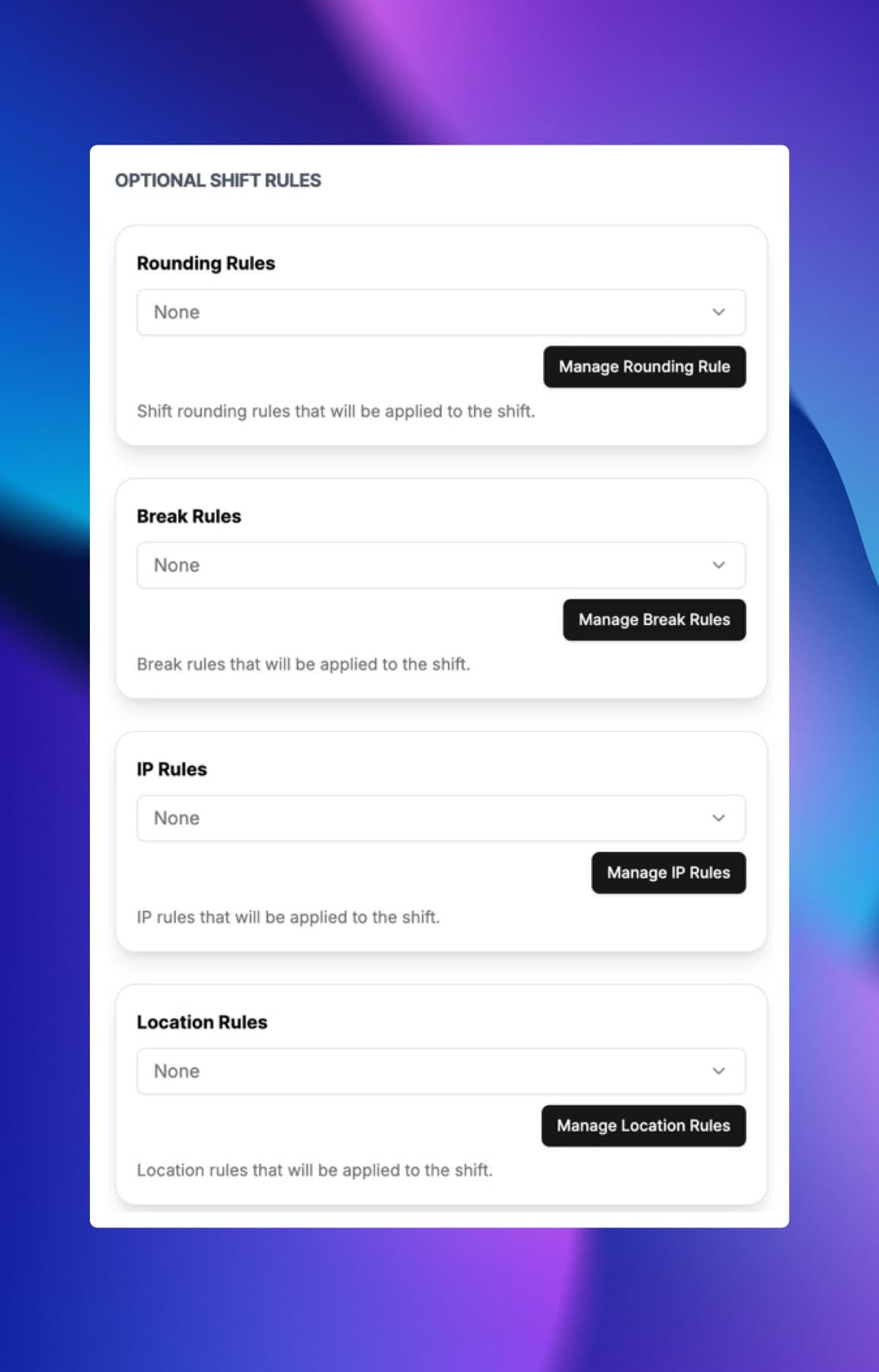
Set specific rules for each shift to automate rounding, breaks, and IP/location restrictions.
Rounding Rules
Automatically round clock-ins and clock-outs to the nearest interval to simplify payroll processing and ensure consistency.
Shift Breaks
Automatically enforce break policies by scheduling mandatory breaks during shifts to ensure compliance with labor laws.
IP Restrictions
Restrict clock-ins to specific IP addresses or locations to prevent time fraud and ensure compliance.
Location & Geofence Controls
Restrict clock-ins to specific locations using geofencing technology to ensure employees are on-site when clocking in or out.

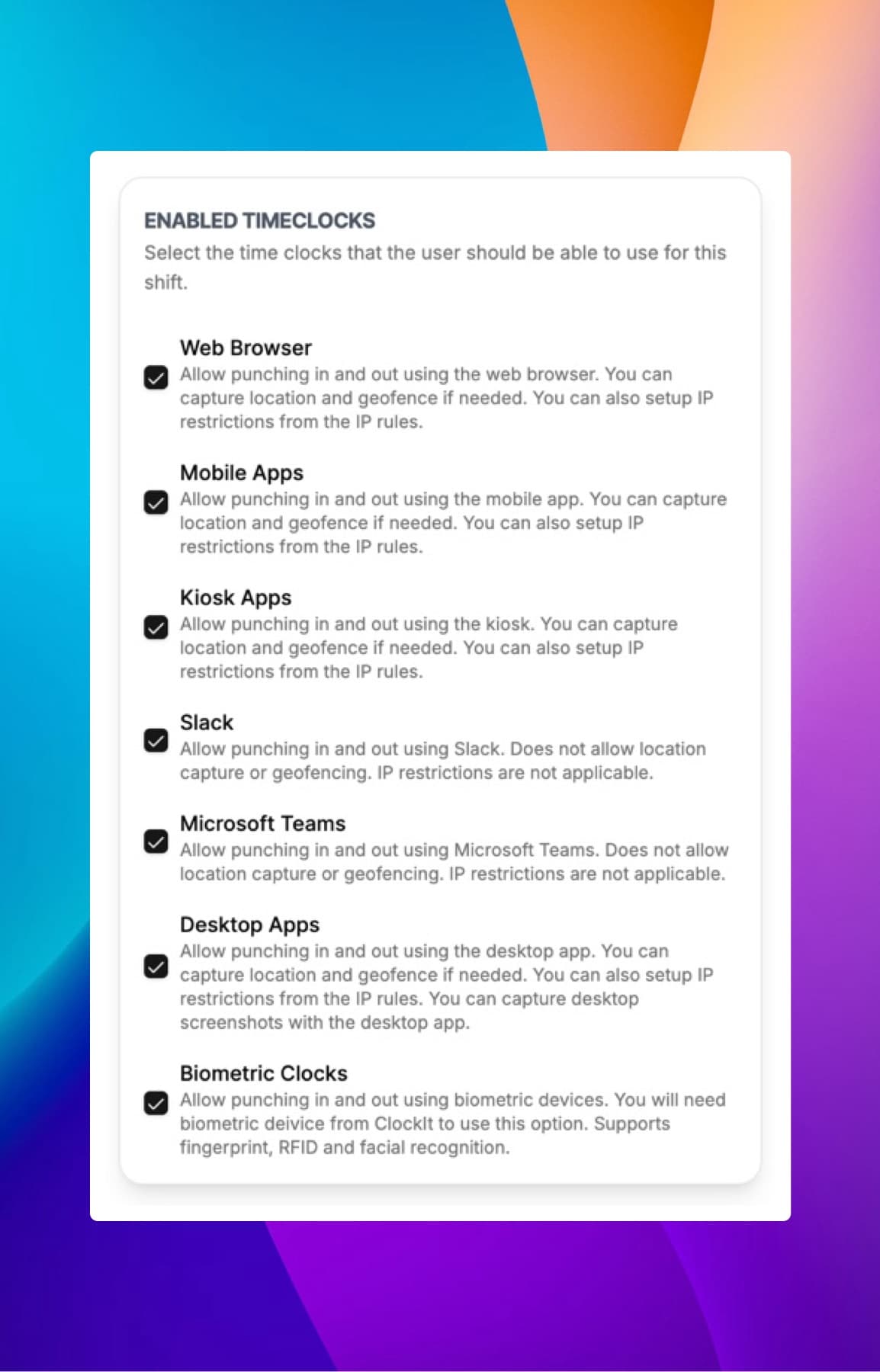
Each shift can be assigned a different time clock method to best suit the work environment and employee needs.
Web Clock
Use any web browser to clock in and out with our intuitive web clock interface.
Mobile App
Use our mobile app to clock in and out on the go, with GPS tracking to verify location.
Kiosk Mode
Use kiosk mode to allow multiple employees to clock in and out from a shared device, with IP restrictions for added security.
Slack & Microsoft Teams
Clock in and out directly from Slack or Microsoft Teams for seamless integration with your communication tools.
Biometric Clocks
Use biometric technology such as fingerprint or facial recognition to ensure secure and accurate clock-ins.
Desktop App
Use our desktop app to clock in and out with additional features and offline capabilities.

Who it's for
Whether you're a small business, a growing agency, or a distributed team, Clockit.io adapts to your needs.
Simplify time tracking and payroll, ensuring compliance and profitability without the complexity.
Empower your distributed workforce with flexible, accurate time tracking from anywhere, fostering productivity and accountability.
Optimize project profitability by accurately tracking time against budgets and gaining insights into team utilization.
Track billable hours effortlessly, manage multiple projects, and generate professional invoices for faster payments.
How it works
Set up in minutes, track time anywhere, and export payroll-ready reports.

Quickly add employees, define projects, and assign tasks in minutes.

Employees use the intuitive webclock or mobile app to effortlessly clock in, out, and track time against tasks.

Access real-time reports, analyze productivity, and seamlessly export accurate timesheets for payroll.
Awards & Recognition
Recognized by industry leaders for value, ease of use, and performance.

Capterra
2026
Software Advice
2026
Software Advice
2026
Capterra
2026
Software Advice
2026
Software Advice
2025
Capterra
2025
Get App
2025
Capterra
2025
Capterra
2025
Capterra
2024
Software World
2023
Software World
2023
Capterra
2019
Get App
2018What we love most is the real-time data and reports, which provide clear insights into employee attendance and payroll expenses. Plus, the ease of use means less administrative burden, allowing our HR team to focus on more strategic initiatives. If you’re looking for a reliable payroll solution that enhances efficiency and accuracy, clockit.io is the perfect choice! Highly recommended!
Have a different question and can't find the answer you're looking for? Reach out to our support team by sending us an email and we'll get back to you as soon as we can.
A webclock is an online time clock system accessible via any web browser. Clockit.io's webclock allows employees to easily clock in and out, track breaks, and submit timesheets from their computer or mobile device, with data synced in real-time.
Yes, Clockit.io is designed to meet the unique needs of small businesses, offering intuitive time tracking, streamlined payroll integration, and affordable plans to help manage your team efficiently and profitably.
Yes, Clockit.io offers seamless integration with QuickBooks (and other major payroll systems) to automate timesheet export, reduce manual data entry, and ensure accurate payroll processing.
Absolutely. Clockit.io provides a dedicated mobile app for iOS and Android, allowing employees to clock in/out, track time, and submit timesheets conveniently from their smartphones, even with GPS tracking enabled.
Clockit.io offers a generous free trial (e.g., 30 days, no credit card required) to explore all features. We also have a free plan available for teams up to [X] users, perfect for getting started.
Clockit.io is built on a privacy-first philosophy. We focus on accurate time data for payroll and project management, not intrusive monitoring. Employees have control over their clock-in/out times, and we do not use screenshots or camera tracking.
Clockit.io's AI-powered features automate time entries, suggest task allocations based on activity, and provide insights into productivity patterns. This reduces manual effort, improves timesheet accuracy, and helps identify time-saving opportunities.
Yes, Clockit.io's reporting tools allow you to compare budgeted hours to actual hours, track project costs, and analyze time spent on tasks. This helps you make data-driven decisions to keep projects on budget and boost profitability.