ZKTeco S922 Cloud Integration
Connect your ZKTeco S922 directly to ClockIt without any desktop software. Real-time attendance data from anywhere.
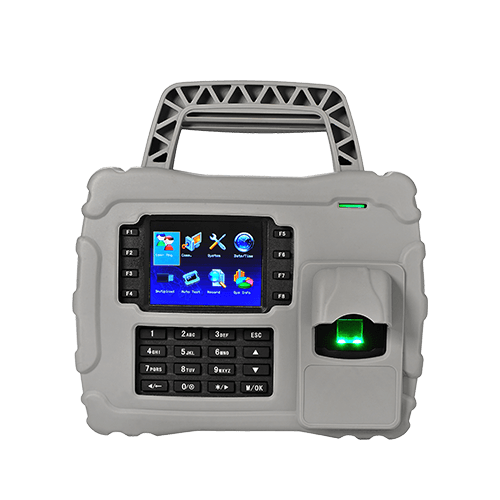
Stop using ZKTeco Desktop Software
Many businesses still struggle with offline desktop software that requires manual data download via USB or LAN cables. This "store and forward" method is outdated, prone to data loss, and doesn't support remote work or multi-location setups.
The Limitation:
Offline software means you don't know who is at work right now. You only find out at the end of the month when you download the logs.
The Solution: Enable ADMS
The ZKTeco S922 comes with a built-in feature called ADMS (Automatic Data Master Server). By enabling this, your device can push attendance logs directly to the ClockIt cloud in real-time over the internet.
- Real-time data: See who clocked in immediately.
- Job codes on the punch: Employees key a job or cost code at the device and hours are costed to that project.
- Centralized management: Manage 100+ locations from one dashboard.
- No static IP required: Works on standard broadband or 4G.
- Automatic backup: Data is safe in the cloud.
Device Summary
- Model
- S922
- Biometric Type
- Fingerprint
- Capacity
- 5,000 Fingerprints
- Ideal For
- Construction sites, mining, remote locations
How to Connect ZKTeco S922 to ClockIt
Network Setup
Connect your ZKTeco S922 to the internet via LAN cable or Wi-Fi. Ensure the device has an active internet connection by pinging a public wrapper.
Server Settings
Go to Menu > Comm > ADMS / Cloud Server.
Set URL/IP: adms.clockit.io (or per your account setup).
Add to ClockIt
Log in to your ClockIt account. Go to Time Clock > Biometric Devices. Click "Add Device" and enter the Serial Number found on the back of your S922.
Technical Specifications
| Feature | Specification |
|---|---|
| fingerprint capacity | 5,000 |
| card capacity | 30,000 |
| transaction capacity | 200,000 |
| display | 3.5-inch TFT Screen |
| communication | TCP/IP, USB Host, GPRS/3G |
| protection | IP65 |
Frequently Asked Questions
Does the ZKTeco S922 work with the mobile app?
Yes! Once connected to ClockIt, all data from the ZKTeco S922 is synced to the cloud. You can view this data on the ClockIt mobile app for iOS and Android in real-time.
Can employees enter a job code on the ZKTeco S922?
Yes. The ZKTeco S922 can ask for a job, project or cost code as part of the punch — on some models the prompt appears after the face or fingerprint match, on others the code is keyed first and the employee then verifies. The code is sent to ClockIt with the punch over ADMS and resolves to the matching Project or Task, so hours are costed to the right job without a paper job sheet.
Do I need a static IP address?
No. Because the ZKTeco S922 uses ADMS "Push Technology", it initiates the connection to our server. This means you do not need a static IP address at your office or factory location.
Can I manage users remotely?
Yes. With ClockIt connected, you can upload user names and fingerprints/faces to multiple devices from the web portal, ensuring employee data is consistent across all locations.
Is the data secure?
Attendance logs are encrypted during transmission. ClockIt stores your data on secure AWS servers with regular backups, which is much safer than keeping data on a local PC prone to crashes.
Ready to upgrade your ZKTeco S922?
Connect your device to ClockIt today and experience the power of cloud-based time tracking. Free for 14 days.