NEW · ClockIt MCP Server
Connect Claude, ChatGPT & any AI assistant to ClockIt
Run conversational reporting on your real timekeeping data. Ask about attendance, overtime, approvals, schedules, and PTO — your assistant answers from live ClockIt records.
- Works with Claude, ChatGPT, Cursor & any MCP client
- Hosted — nothing to install
- Read-only & OAuth-secured
- Free on every plan
- • Setup within 5 minutes
- • No credit card required
- • 14-day full trial


Your timekeeping data, one question away
Connect your AI assistant once, then ask about attendance, schedules, approvals, and PTO the same way you'd ask a colleague.
Conversational reporting
Your assistant pulls real attendance data through the ClockIt MCP server and answers with the numbers: totals, breakdowns by department or site, and the exact records behind them. Ask a follow-up and it refines the same report.
- Attendance summaries
- Overtime breakdowns
- Follow-up questions
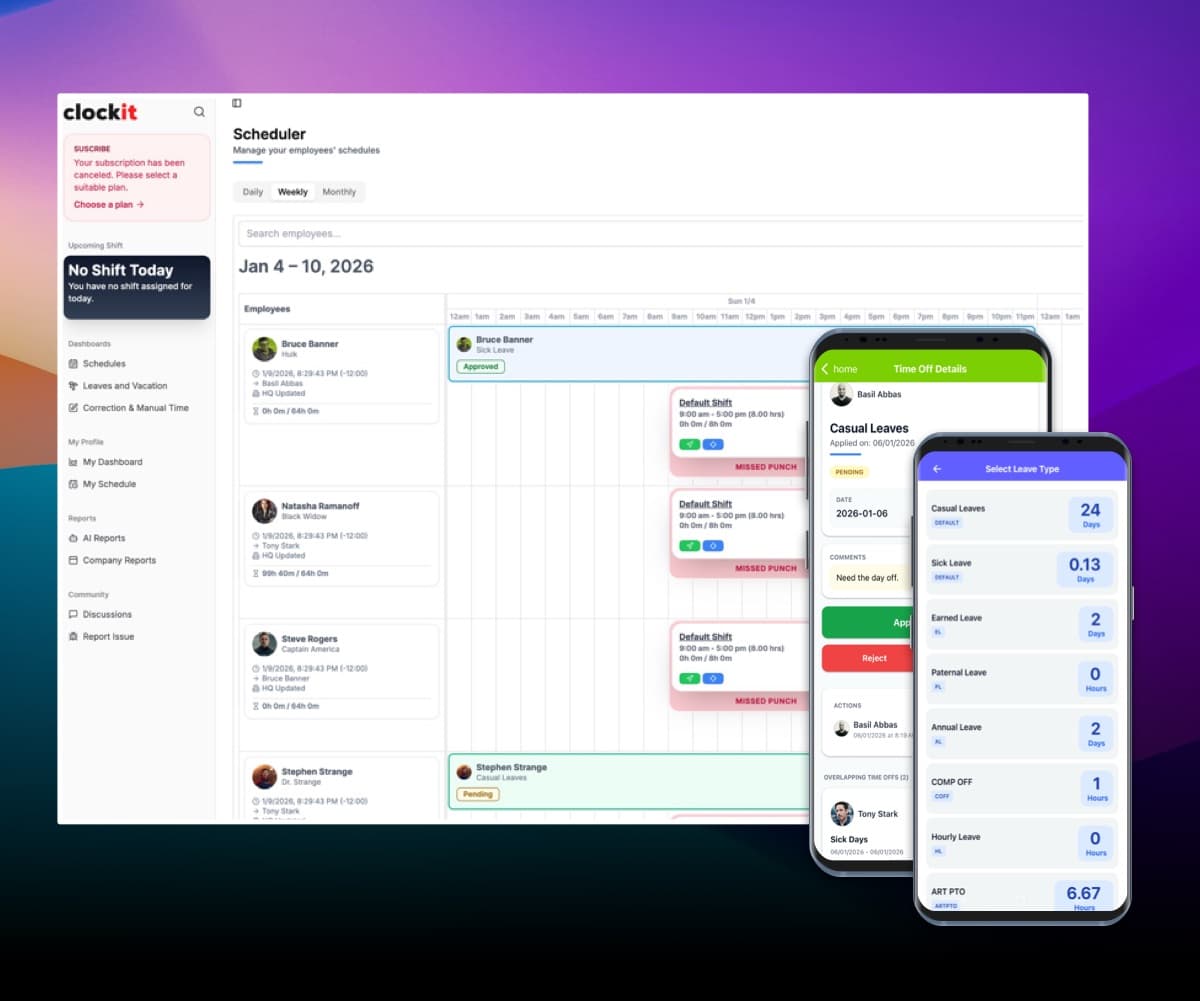
Live clock-in status
“Who's in right now?” — see who's clocked in, late, or missing across every site without opening a dashboard.
- Real-time status
- Late & missing punches
- Per-site view
Approvals at a glance
Check pending timesheet approvals and correction requests from the same chat where you plan your day.
- Timesheet approvals
- Correction requests
Schedules, PTO & holidays
Look up who's scheduled, who's on leave next week, and upcoming holidays before you commit to a deadline.
- Shift lookups
- Leave records
- Holiday calendars
Works with every MCP client
Claude, ChatGPT, Cursor, Claude Code, Windsurf — one hosted server, OAuth sign-in, nothing to install.
- Hosted server
- OAuth sign-in
- Read-only by design
Ask ClockIt anything
Every prompt below maps to live data in your account — no report builder, no exports, no switching tabs.
Connected in under a minute
https://portal.clockit.io/api/v2/mcp/rpcAdd the server
Sign in with ClockIt
Start asking
16 reporting tools, ready on connection
Everything your assistant can look up through the ClockIt MCP server — all read-only.
Attendance & time
Attendance summary
Totals by person, team, or period
Attendance detail
Punch-level records behind any number
Attendance report
Payroll-period reporting on demand
Clock-in status
Who's in, late, or missing right now
Timesheet approvals
Pending approvals in your queue
Correction requests
Open time-entry corrections
Schedules & shifts
Schedules
Published shifts for any date range
Schedule assignments
Who is assigned to which shift
Time templates
Shift patterns and working-hour rules
Leave & holidays
Leave records
PTO, sick leave, and balances
Holidays
Company and regional holiday calendars
People & org
Users
Your team directory
Departments
Org structure for grouped reporting
Sites
Locations for per-site queries
Profile & manager
Your account and reporting line
Built to be safe by default
Read-only by design
The MCP server reports on your data — it can't edit time entries, approve timesheets, or change anything in your account.
OAuth sign-in
You authenticate with your ClockIt account through a standard OAuth flow. No API keys to generate, paste, or leak.
Follows your permissions
The assistant sees exactly what your ClockIt role allows — an employee sees their own records, a manager sees their team.
Disconnect anytime
Remove the connector from your AI tool and access ends immediately. Your data never trains public models.
Reporting without the report builder
The reports you run every week — attendance, overtime, missing punches, PTO balances — become questions you ask while you work.
Ask follow-ups instead of rebuilding filters
Company and team visibility in one place.
Get the exact records behind every number
Company and team visibility in one place.
Pull payroll-period summaries before you run payroll
Company and team visibility in one place.
Check coverage before approving leave
Company and team visibility in one place.
Your timekeeping, wherever you work
ClockIt's hosted MCP server works in Claude Code, Cursor, and Windsurf too — bring attendance data into standups, scripts, and internal agents.
One hosted endpoint, standard MCP protocol
Company and team visibility in one place.
Works in coding agents and desktop AI clients
Company and team visibility in one place.
Build internal workflows on live attendance data
Company and team visibility in one place.
No SDK, no polling, no CSV exports
Company and team visibility in one place.
Awards & Recognition
Award‑Winning Software
Recognized by industry leaders for value, ease of use, and performance.

Best Value
Capterra
2026
Most Recommended
Software Advice
2026
Best Customer Support
Software Advice
2026
Best Ease of Use
Capterra
2026
Front Runner
Software Advice
2026
Front Runner
Software Advice
2025
Short List
Capterra
2025
Category Leader
Get App
2025
Best Value 2025
Capterra
2025
Best Ease of Use 2025
Capterra
2025
Best Ease of Use
Capterra
2024
Top Rated
Software World
2023
Best Scheduler
Software World
2023
Most Affordable
Capterra
2019
Category Leader
Get App
2018
“The mobile app time clock has revolutionized how we manage our remote team. It's intuitive, accurate, and has saved us countless hours in payroll processing. The GPS feature ensures accountability without being intrusive. It's a game-changer for businesses with a mobile workforce.”
“As a small business owner, I was skeptical about implementing a new time tracking system. But this mobile app has exceeded all my expectations. It's user-friendly, reliable, and the reporting features have given me invaluable insights into our productivity.”
“The integration capabilities of this mobile time clock app are outstanding. It seamlessly connects with our existing HR and payroll systems, creating a streamlined workflow that has significantly reduced errors and improved our overall efficiency.”
“What we love most is the real-time data and reports, which provide clear insights into employee attendance and payroll expenses. Plus, the ease of use means less administrative burden, allowing our HR team to focus on more strategic initiatives. If you’re looking for a reliable payroll solution that enhances efficiency and accuracy, clockit.io is the perfect choice! Highly recommended!”
“ClockIt.io cut our timesheet corrections by more than half. Exports line up perfectly with payroll and the GPS clock-ins keep our field crews honest without creating friction.”
“Geofencing and kiosk mode at each site solved our late punches. Managers love the late alerts and I love closing payroll on Friday in minutes.”
“ClockIt’s overtime rules and approvals gave us immediate savings. Clear audit trails and clean timesheets mean finance isn’t chasing people anymore.”
“We schedule across multiple locations and roles. ClockIt.io handles PTO, availability, and publishes updates to everyone’s phones instantly—no more group chats.”
“Our trainers swap shifts right in the app and confirm attendance. Attendance and payroll line up perfectly—ClockIt just works.”
“Setup was fast and the support team was outstanding. We rolled out ClockIt to 120 staff in a week and adoption was near 100% on day one.”
“The reports in ClockIt.io make our monthly reviews painless. We finally have visibility into attendance trends and actual hours by department.”
“Time‑off requests, approvals, and balances are all in one place. Doctors see who’s off at a glance and we avoid coverage gaps.”
“For crews on the move, ClockIt’s GPS punch-ins and site-based rules keep things accurate. It’s the reliability we were missing before.”
“We tried three tools before ClockIt.io. This is the first one our team actually likes using—and it saves my admin two hours every payroll run.”
“Implementing ClockIt's biometric kiosks eliminated buddy punching overnight. The facial recognition is instant and works perfectly even in our warehouse environment. It's the most secure time tracking decision we've made.”
Frequently asked questions
Have a different question and can't find the answer you're looking for? Reach out to our support team by sending us an email and we'll get back to you as soon as we can.
MCP (Model Context Protocol) is an open standard that lets AI assistants securely connect to external services. The ClockIt MCP server is a hosted connection between your AI assistant and your ClockIt account, so you can ask about attendance, overtime, timesheet approvals, schedules, PTO, and holidays in plain English and get answers from your live timekeeping data.
Any MCP-compatible client: Claude, ChatGPT, Cursor, Claude Code, Windsurf, and more. The server is hosted by ClockIt, so there's nothing to install — add the server in your AI tool's connectors settings and sign in with your ClockIt account.
No. The ClockIt MCP server is read-only by design. Your assistant can look up and summarize records — attendance, schedules, approvals, leave — but it cannot edit time entries, approve timesheets, or modify anything in your account.
You authenticate through a standard OAuth sign-in with your existing ClockIt credentials — no API keys to manage. The assistant only sees what your ClockIt role permits, access can be revoked instantly by removing the connector, and your data is never used to train public AI models.
Yes. Like every ClockIt feature, the MCP server is available on all plans, including the Forever Free plan. Features are never gated by tiers.
In your AI tool's connectors or integrations settings, add a new MCP server with the URL https://mcp.clockit.io/mcp, then sign in with your ClockIt account when prompted. The whole setup takes under a minute, and you can start asking questions immediately.
Be the first team whose time tracking talks back
Create your free ClockIt account, connect your AI assistant, and ask your first question in under five minutes.