Time Tracking Where You Work
Don't switch apps. Clock in, out, and manage your timesheets directly from Slack.
- Official Slack App
- Slash Commands
- Status Sync
- Mobile Ready
- • Setup within 5 minutes
- • No credit card required
- • 14-day full trial


Clock In with a Slash Command
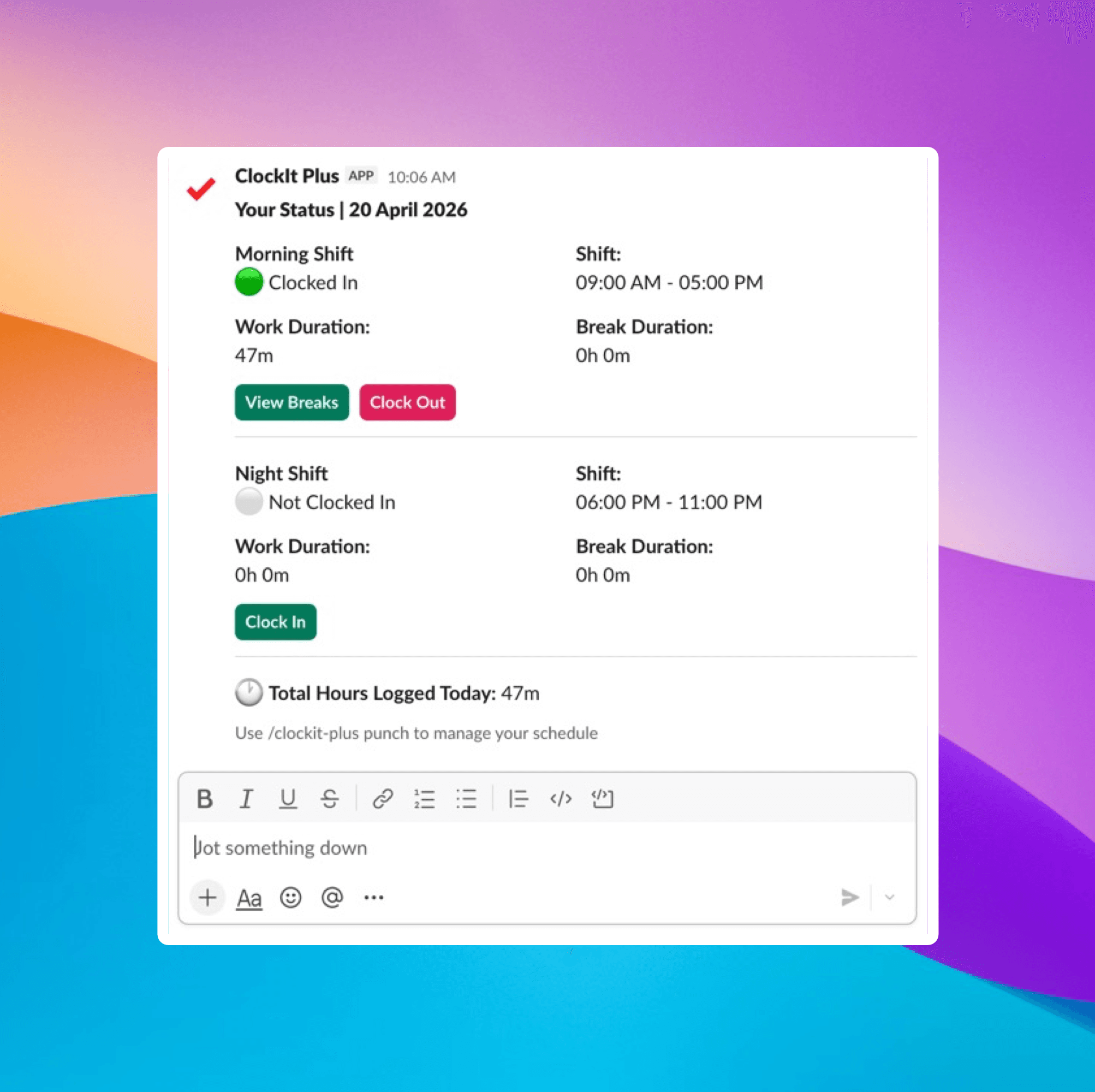
Start your day with simple commands like /clockit in or use the interactive buttons.
Slash Commands
Use /clockit in, /clockit out, /clockit break.
Status Sync
Automatically update your Slack status when you are clocked in or on break (optional).
Notifications
Get reminders to clock out or take a break directly in Slack.
Daily Summary
See your total hours worked for the day right in the chat.
Take Breaks Without Leaving Slack
Know who is online, on break, or out of office without asking.
Breaks Visibility
Easily see who is on break and for how long without leaving Slack.
See Assigned Breaks
Managers can assign breaks and employees get notified in Slack.
Break Reminders
Get notified if you forget to take a break or exceed your break time.
Custom Break Types
Define different break types (lunch, coffee, etc.) and track them separately.
The easiest way to track time.
Your team is already in Slack. Making time tracking part of the conversation increases adoption and accuracy.
See Who's Working
Know who is online, on break, or out of office without asking.
Team Dashboard
Quickly check the working status of your team members.
Leave Requests
Approve or reject time off requests directly from Slack notifications.
Late Alerts
Managers get notified instantly if someone is late.
Project Tracking
Switch projects or tasks using Slack commands.
Part of Your Daily Routine
Reduce friction and ensure 100% timesheet compliance by bringing time tracking to where your team lives.
SSO Support
Log in once with your Slack credentials.
Mobile Friendly
Clock in from the Slack mobile app when on the go.
Audit Trail
All Slack commands are logged with timestamps and IP addresses.
Reminders
Set custom reminders for team members to submit timesheets.
Since adding ClockIt to Slack, our timesheet completion rate went to 100%. The team loves not having to open another app.
24/7 Customer Support
Time Tracking Where You Work
Don't switch apps. Clock in, out, and manage your timesheets directly from Slack.
Awards & Recognition
Award‑Winning Software
Recognized by industry leaders for value, ease of use, and performance.

Best Value
Capterra
2026
Most Recommended
Software Advice
2026
Best Customer Support
Software Advice
2026
Best Ease of Use
Capterra
2026
Front Runner
Software Advice
2026
Front Runner
Software Advice
2025
Short List
Capterra
2025
Category Leader
Get App
2025
Best Value 2025
Capterra
2025
Best Ease of Use 2025
Capterra
2025
Best Ease of Use
Capterra
2024
Top Rated
Software World
2023
Best Scheduler
Software World
2023
Most Affordable
Capterra
2019
Category Leader
Get App
2018
“The mobile app time clock has revolutionized how we manage our remote team. It's intuitive, accurate, and has saved us countless hours in payroll processing. The GPS feature ensures accountability without being intrusive. It's a game-changer for businesses with a mobile workforce.”
“As a small business owner, I was skeptical about implementing a new time tracking system. But this mobile app has exceeded all my expectations. It's user-friendly, reliable, and the reporting features have given me invaluable insights into our productivity.”
“The integration capabilities of this mobile time clock app are outstanding. It seamlessly connects with our existing HR and payroll systems, creating a streamlined workflow that has significantly reduced errors and improved our overall efficiency.”
“What we love most is the real-time data and reports, which provide clear insights into employee attendance and payroll expenses. Plus, the ease of use means less administrative burden, allowing our HR team to focus on more strategic initiatives. If you’re looking for a reliable payroll solution that enhances efficiency and accuracy, clockit.io is the perfect choice! Highly recommended!”
“ClockIt.io cut our timesheet corrections by more than half. Exports line up perfectly with payroll and the GPS clock-ins keep our field crews honest without creating friction.”
“Geofencing and kiosk mode at each site solved our late punches. Managers love the late alerts and I love closing payroll on Friday in minutes.”
“ClockIt’s overtime rules and approvals gave us immediate savings. Clear audit trails and clean timesheets mean finance isn’t chasing people anymore.”
“We schedule across multiple locations and roles. ClockIt.io handles PTO, availability, and publishes updates to everyone’s phones instantly—no more group chats.”
“Our trainers swap shifts right in the app and confirm attendance. Attendance and payroll line up perfectly—ClockIt just works.”
“Setup was fast and the support team was outstanding. We rolled out ClockIt to 120 staff in a week and adoption was near 100% on day one.”
“The reports in ClockIt.io make our monthly reviews painless. We finally have visibility into attendance trends and actual hours by department.”
“Time‑off requests, approvals, and balances are all in one place. Doctors see who’s off at a glance and we avoid coverage gaps.”
“For crews on the move, ClockIt’s GPS punch-ins and site-based rules keep things accurate. It’s the reliability we were missing before.”
“We tried three tools before ClockIt.io. This is the first one our team actually likes using—and it saves my admin two hours every payroll run.”
“Implementing ClockIt's biometric kiosks eliminated buddy punching overnight. The facial recognition is instant and works perfectly even in our warehouse environment. It's the most secure time tracking decision we've made.”
Frequently asked questions
How do I install the Slack app?
Visit the Slack App Directory or click the 'Add to Slack' button on our website.
Can I edit my time in Slack?
You can view your time, but edits usually require logging into the full web dashboard for security/approval reasons.
Does it support projects?
Yes, you can tag time to specific projects commands.
Is it free?
The Slack integration is included with all ClockIt plans, including the free tier.
Clock in clock out app use cases.
Discover how our time tracking apps can streamline your workflow and improve productivity.
Connect ZKTeco Devices to the Cloud
Automate your time and attendance. Sync users, fingerprints, and punch logs from ZKTeco devices to ClockIt in real-time.
Seamless eSSL Biometric Integration
Connect your eSSL devices to the web — including every terminal in the AI Face range. Real-time data transfer, remote management, and automated reporting.
Time Tracking Where You Work
Don't switch apps. Clock in, out, and manage your timesheets directly from Slack.
Time Tracking for Microsoft Teams
Empower your workforce to track time, view schedules, and manage leave without leaving Teams.
Time Tracking for Google Workspace
Clock in and out with simple messages in Google Chat. Keep your team in the flow.