eSSL AiFace Uranus Cloud Integration
Connect your eSSL AiFace Uranus directly to ClockIt without any desktop software. Real-time attendance data from anywhere.
Also sold as AiFace-Uranus, eSSL AI Face Uranus.
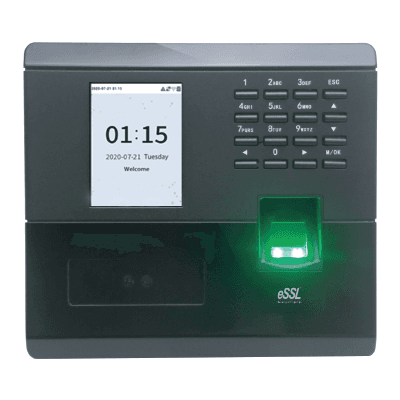
ClockIt supports the whole eSSL AI Face range
The AiFace Uranus is one of nine terminals in eSSL's AI Face series, and ClockIt supports all of them — Viktor, Arion, Jupiter, Mars, Eris, Magnum, Neptune, Mercury and Uranus. The range is eSSL's badge on the same ZKTeco SpeedFace platform, which means the AiFace Uranus speaks the identical ADMS push protocol ClockIt has supported for years. Nothing custom is needed, and you can mix AI Face terminals with older eSSL fingerprint clocks in the same ClockIt account.
Stop using eSSL desktop software
Many businesses still run eTimeTrackLite or a similar offline desktop tool that requires manual data download via USB or LAN cables. This "store and forward" method is outdated, prone to data loss, and doesn't support remote work or multi-location setups.
The Limitation:
Offline software means you don't know who is at work right now. You only find out at the end of the month when you download the logs.
The Solution: Enable ADMS
The eSSL AiFace Uranus comes with a built-in feature called ADMS (Automatic Data Master Server). By enabling this, your device can push attendance logs directly to the ClockIt cloud in real-time over the internet.
- Real-time data: See who clocked in immediately.
- Job codes on the punch: Employees key a job or cost code at the device and hours are costed to that project.
- Centralized management: Manage 100+ locations from one dashboard.
- No static IP required: Works on standard broadband or 4G.
- Automatic backup: Data is safe in the cloud.
Device Summary
- Model
- AiFace Uranus
- Biometric Type
- Facial Recognition
- Capacity
- 500 Faces, 2,000 Fingerprints
- Ideal For
- Small offices replacing an ageing fingerprint-only clock
How to Connect eSSL AiFace Uranus to ClockIt
Network Setup
Connect your eSSL AiFace Uranus to the internet via LAN cable or Wi-Fi. Ensure the device has an active internet connection by pinging a public wrapper.
Server Settings
Go to Menu > Comm > ADMS / Cloud Server.
Set URL/IP: adms.clockit.io.
Add to ClockIt
Log in to your ClockIt account. Go to Time Clock > Biometric Devices. Click "Add Device" and enter the Serial Number found on the back of your AiFace Uranus.
Technical Specifications
| Feature | Specification |
|---|---|
| face capacity | 500 (1:N) |
| fingerprint capacity | 2,000 (1:N) |
| user capacity | 500 |
| transaction capacity | 50,000 |
| display | 2.8-inch Colour LCD |
| communication | TCP/IP (10M/100M), USB 2.0 Host |
| relay | 1 Relay |
| battery | Optional UPS, standby up to 3 hours |
| dimensions | 167.9 x 151.5 x 30 mm |
| operating temperature | 0°C to 45°C |
| power supply | 5V DC, 0.8A |
Frequently Asked Questions
Does ClockIt support the eSSL AiFace Uranus?
Yes. ClockIt supports every terminal in eSSL's AI Face range — Viktor, Arion, Jupiter, Mars, Eris, Magnum, Neptune, Mercury and Uranus. The AI Face series is eSSL's badge on the same ZKTeco SpeedFace platform, so the AiFace Uranus uses the identical ADMS push protocol ClockIt has supported for years. Point the device at ClockIt's cloud server address and punches start arriving in seconds.
Does the eSSL AiFace Uranus work with the mobile app?
Yes! Once connected to ClockIt, all data from the eSSL AiFace Uranus is synced to the cloud. You can view this data on the ClockIt mobile app for iOS and Android in real-time.
Can employees enter a job code on the eSSL AiFace Uranus?
Yes. The eSSL AiFace Uranus can ask for a job, project or cost code as part of the punch — on some models the prompt appears after the face or fingerprint match, on others the code is keyed first and the employee then verifies. The code is sent to ClockIt with the punch over ADMS and resolves to the matching Project or Task, so hours are costed to the right job without a paper job sheet.
Do I need a static IP address?
No. Because the eSSL AiFace Uranus uses ADMS "Push Technology", it initiates the connection to our server. This means you do not need a static IP address at your office or factory location.
Do I have to re-enrol everyone's faces or fingerprints?
No. Biometric templates stay on the AiFace Uranus. You map the device's user IDs to your ClockIt employees once, and every existing enrolment keeps working.
Can I manage users remotely?
Yes. With ClockIt connected, you can upload user names and fingerprints/faces to multiple devices from the web portal, ensuring employee data is consistent across all locations.
Is the data secure?
Attendance logs are encrypted during transmission. ClockIt stores your data on secure AWS servers with regular backups, which is much safer than keeping data on a local PC prone to crashes.
Other eSSL AI Face terminals
Ready to upgrade your eSSL AiFace Uranus?
Connect your device to ClockIt today and experience the power of cloud-based time tracking. Free for 14 days.