



Unlock Seamless Business Processes: Integrating Time Tracking, Payroll & Invoicing
Explore how integrating time tracking, payroll, and invoicing optimizes your business processes.
Employees log time to a project and job code inside the scheduled shift they are clocked into. Project hours, labor cost and payroll all come from one record — on the web, on mobile or at the biometric time clock.
One record for attendance, payroll and job costing
Standalone project timers run separately from the time clock and the rota, so the hours on a project rarely agree with the hours on the payslip. ClockIt combines employee scheduling, time tracking and project management basics, and records project time inside the clock-in itself.
Comparing tools? See ClockIt vs Clockify and ClockIt vs Toggl Track.
Create projects with a budget in the currency the client pays in, add the job codes your team will log against, and assign the people who work on it. Labor cost and billable value build up automatically as time is tracked.
Project budgets
Set a budget per project, in any currency.
Unlimited job codes
Break each project into the job codes your team logs against.
Cost & billable rates
Each member carries their own cost rate and billable rate.
Budget alerts
Get alerted as a project nears its budget.

Once an employee clocks in, the shift opens a project time panel. They describe the task, pick the project and job code, and start the timer — attendance and project time stay one record rather than two.
Project & job code picker
Search and pick the project and job code in one step.
Billable toggle
Mark any entry billable for client invoicing.
Runs only while clocked in
The task timer cannot run outside a worked shift.
Shift totals
Payable, work and break time shown above the timer.
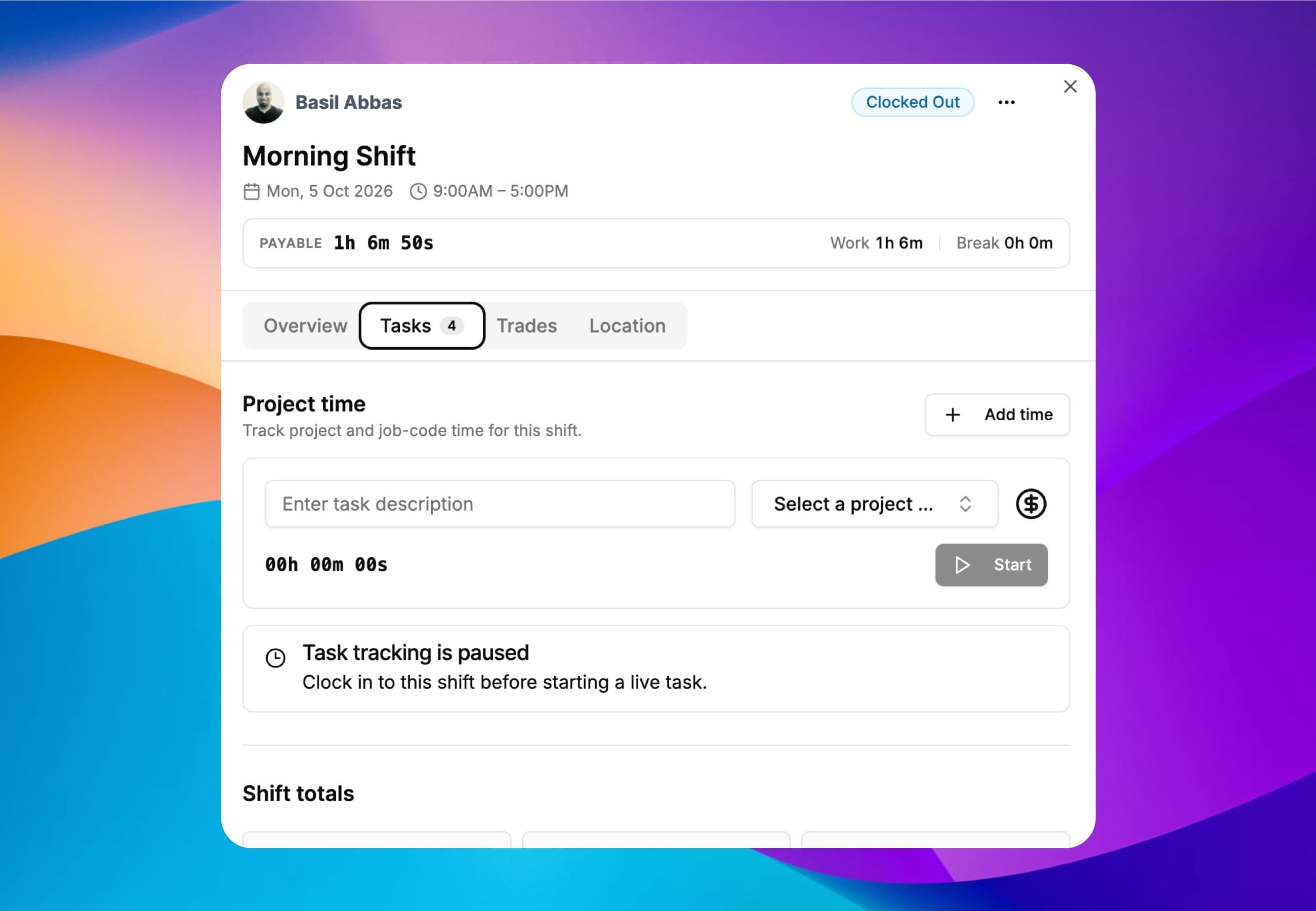
Forgot to start the timer? Employees add completed project time to the shift afterwards. The entry has to fall within an interval they were actually clocked in for, which keeps project reports honest.
Web, iOS & Android
Add project time from any device.
Inside a clocked-in interval
Entries can't be invented outside worked hours.
Billable flag carries through
Billable entries flow into invoicing summaries.
Task descriptions
Note what was done for each block of time.

Project time on every shift card
In the ClockIt mobile app each scheduled shift shows the project time logged against it. Field and site teams pick the project and job code from their phone, and managers see who has clocked in, who missed a punch and what they are working on.


Attach a job code to every biometric punch
Your crews already clock in at the terminal. Now they can tell you what they are clocking in for — the job, the project or the cost code goes in at the device, and the hours arrive in ClockIt already costed.
The employee keys the job, project or cost code on the terminal keypad as part of clocking in or out. Depending on the model the device asks for the code right after the face or fingerprint match, or takes the code first and then verifies — either way the code travels with the punch.
A code entered on the device maps to the same Projects and Tasks your team already picks in the web and mobile apps. One list, one set of reports, whether the hours came from a terminal, a phone or a browser.
Hours land against the right job automatically, so project reports, billable versus non-billable hours and client invoices come straight out of attendance. No paper job sheets to re-key at the end of the week.
Job code capture runs over the same ADMS push connection as your punches, on ZKTeco, eSSL and NGTeco terminals. No firmware swap, no new hardware, no local PC.
See where every hour went
Daily project breakdowns for the team lead, and flexible reports for whoever runs job costing, billing or payroll.
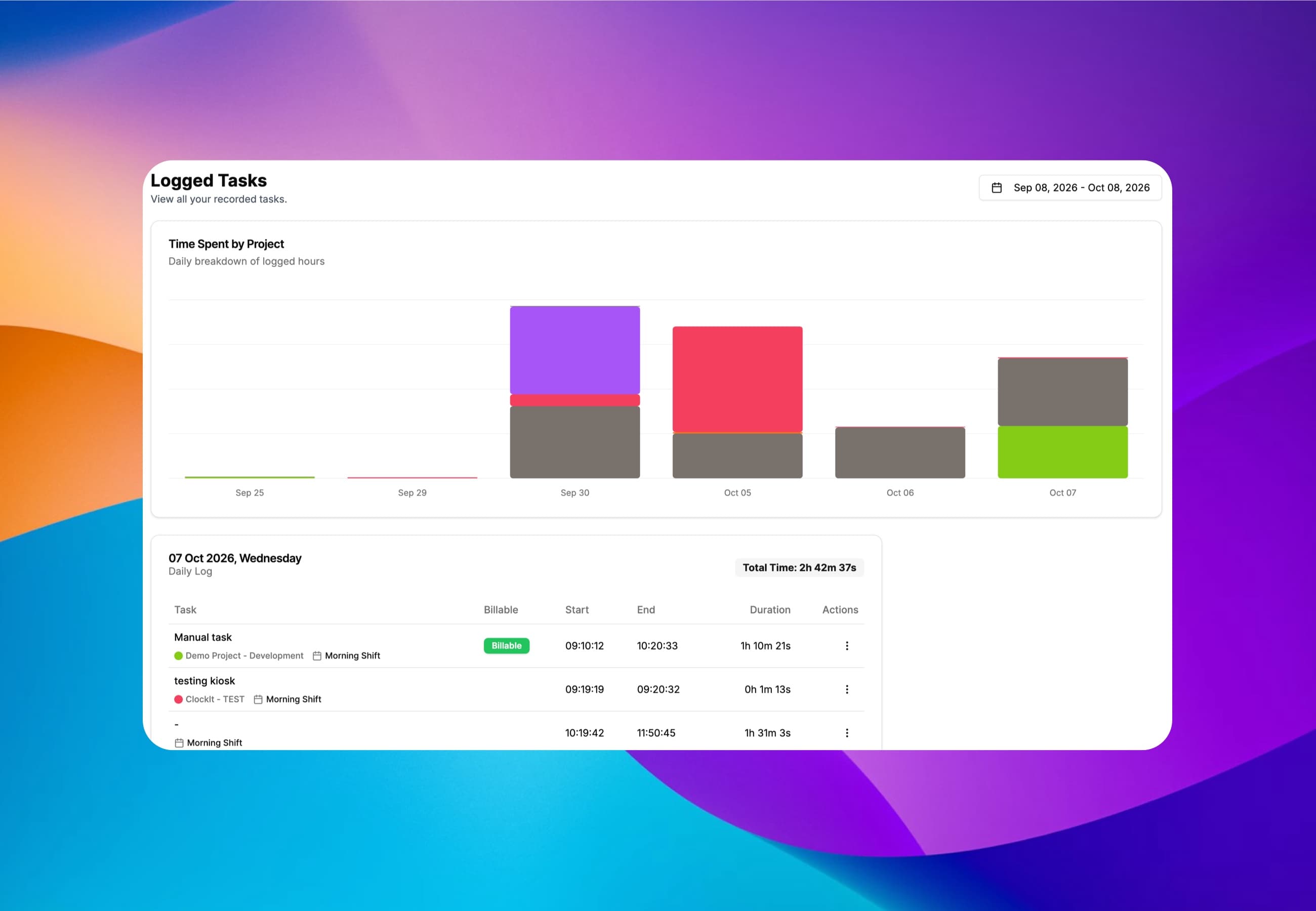
A daily breakdown of logged hours stacked by project, with a day-by-day log of every task, its project, job code, shift and whether it was billable.

Group, filter and choose the columns you need, then save the view as a segment so the same project report is one click away next week.
From tracked hours to invoices and payroll
As a small business owner, I was skeptical about implementing a new time tracking system. But this mobile app has exceeded all my expectations. It's user-friendly, reliable, and the reporting features have given me invaluable insights into our productivity.
Explore how integrating time tracking, payroll, and invoicing optimizes your business processes.

Discover the benefits and process of integrating payroll, time tracking, and invoicing systems for improved business efficiency.
Discover the benefits of integrating invoicing with payroll and time tracking to streamline your business operations.
Have a different question and can't find the answer you're looking for? Reach out to our support team by sending us an email and we'll get back to you as soon as we can.
Project time tracking records the hours employees spend on each project, job or task rather than only their total hours for the day. It shows where labor actually goes, which projects run over budget, and how much of the team's time is billable to clients.
In ClockIt, project time is recorded inside the scheduled shift an employee is clocked into. The project timer only runs while the employee is clocked in, and time added afterwards must fall within a clocked-in interval of that shift. Project hours, attendance and payroll therefore come from the same record and cannot drift apart.
Clockify and Toggl Track are project timers first: employees start a timer against a project, separately from any shift. Clockify's paid plans add a Schedule for planning project assignments and shifts; Toggl Track does not include shift scheduling. ClockIt starts from the shift — employees are scheduled, clock in, and log project and job-code time inside that shift — and job codes can also be entered on ZKTeco, eSSL and NGTeco biometric time clocks. ClockIt suits hourly and field teams that need job costing tied to payroll; a standalone timer suits freelancers and agencies that only bill client hours.
A job code labels a piece of work inside a project — for example installation, travel or snagging on a construction job. In ClockIt each project has its own list of job codes, and employees pick the project and job code when they log time, so hours can be costed and reported at that level.
Yes. On ZKTeco, eSSL and NGTeco terminals connected to ClockIt, employees key the job code on the device as part of clocking in or out. The code arrives with the punch and maps to the same projects and job codes used in the web and mobile apps.
Each project member has a cost rate and a billable rate. ClockIt multiplies the hours tracked against the project by those rates, so you see what the work cost and what it can be billed for, alongside the budget set for the project. Budget alerts warn you as a project approaches its budget.
ClockIt covers the time side of project management — projects, job codes, budgets, member rates, project reports and client invoicing — combined with employee scheduling and attendance. It does not include task boards or Gantt charts, so teams that plan work in Asana, ClickUp or Monday typically keep that tool for planning and use ClockIt for time tracking, job costing and payroll.
Yes. Each project time entry can be marked billable, and billable hours can be turned into client invoices using each member's billable rate. The same hours feed project reports and payroll.